

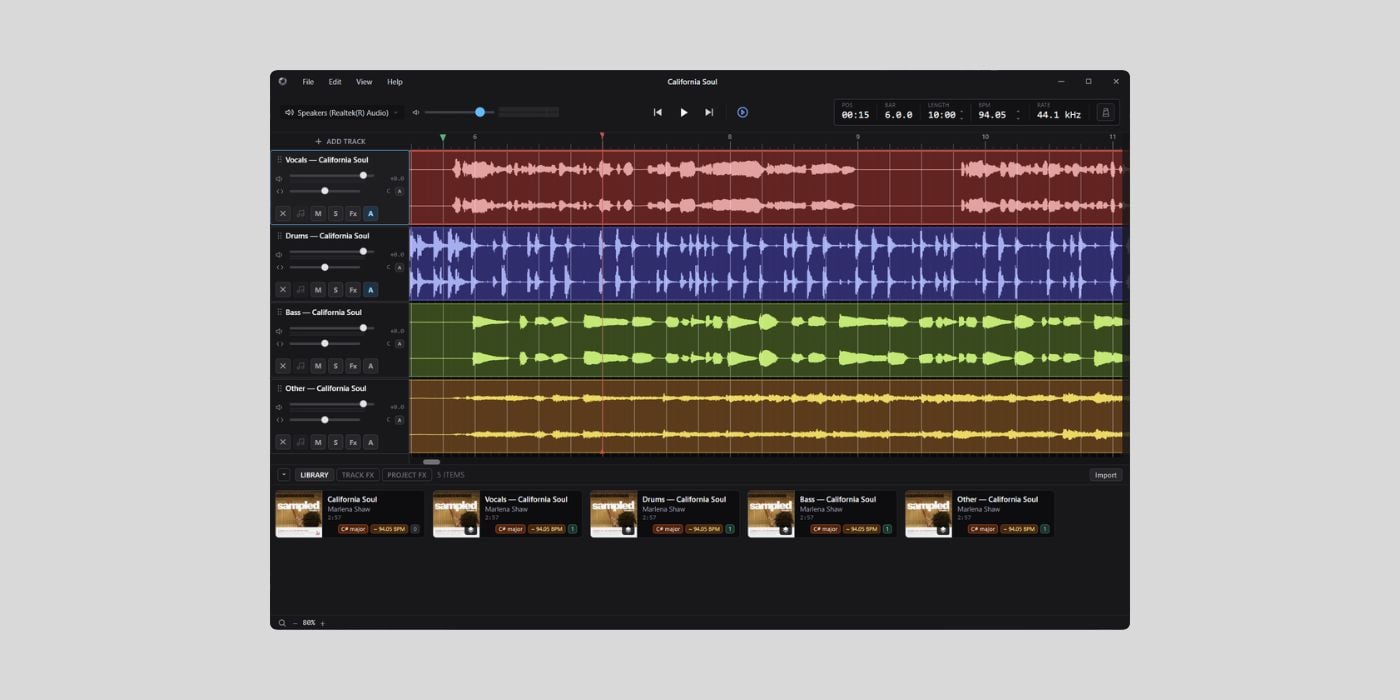

Silverdaw is a free and open-source Windows DAW built for remixing, mashups, and sample-based music production.
The developer sent this to me via email, and I wasn’t expecting a lot (new free DAWs are popping up like mushrooms nowadays), but I ended up impressed.
The key thing here is that Silverdaw is not trying to be another full studio DAW that competes directly with Ableton Live, FL Studio, Cubase, or similar tools. It is aimed more at bedroom producers, DJs, and remixers who want to start with existing audio and quickly reshape it into something new.
The workflow is pretty interesting. You import songs, loops, vocals, or samples into a project library, drag them onto the timeline, and then trim, arrange, split, pitch-shift, tempo-match, and export the result.
Silverdaw analyses imported files in the background to detect tempo, key, and beat positions. The first clip you place on the timeline can automatically set the project tempo, and later clips can be matched to the project so they line up musically.
The workflow is non-destructive, so edits like trimming, tempo changes, pitch shifting, slicing, and effects are stored as clip or track settings. The original files are not changed, which is definitely what you want when experimenting with chops and a bunch of arrangements until you land on something you like.
There are two main sample-based tools that stand out. The first is loop slicing, where you can chop a clip to the beat grid or use manual markers, then rearrange the resulting slices on the timeline. The second is on-device stem separation, which splits a track into vocals, drums, bass, and other parts.
The stem separation runs locally, with Fast, Balanced, and Best modes, so there is no cloud processing involved. Silverdaw also runs without accounts and does not send your data anywhere, according to the developer.
For mixing, Silverdaw includes per-track tone controls, a DJ-style filter, compression, reverb and delay sends, project FX, a master output meter, and saveable automation. You can draw breakpoint curves for parameters like filter, pan, gain, and sends, which should make it useful for build-ups, transitions, and movement inside a remix.
There is also support for selected MIDI DJ controllers. These can control the timeline and track effects, and Silverdaw can record and edit vinyl-style scratch patterns. If you do not have a supported controller, the software also includes an on-screen deck.
Silverdaw is still early, currently at version 1.2.0, and VST support is on the roadmap rather than available now. I hope it lands on macOS someday.
The DAW is available for Windows from the Microsoft Store, with a portable download on GitHub. It is licensed under AGPL-3.0 and can export mixdowns to WAV, FLAC, AIFF, or MP3.
Download: Silverdaw (FREE)
Deal of the day 🔥: Get SSL Native X-Comp for only $10!
More:
Last Updated on July 20, 2026 by Tomislav Zlatic.

