

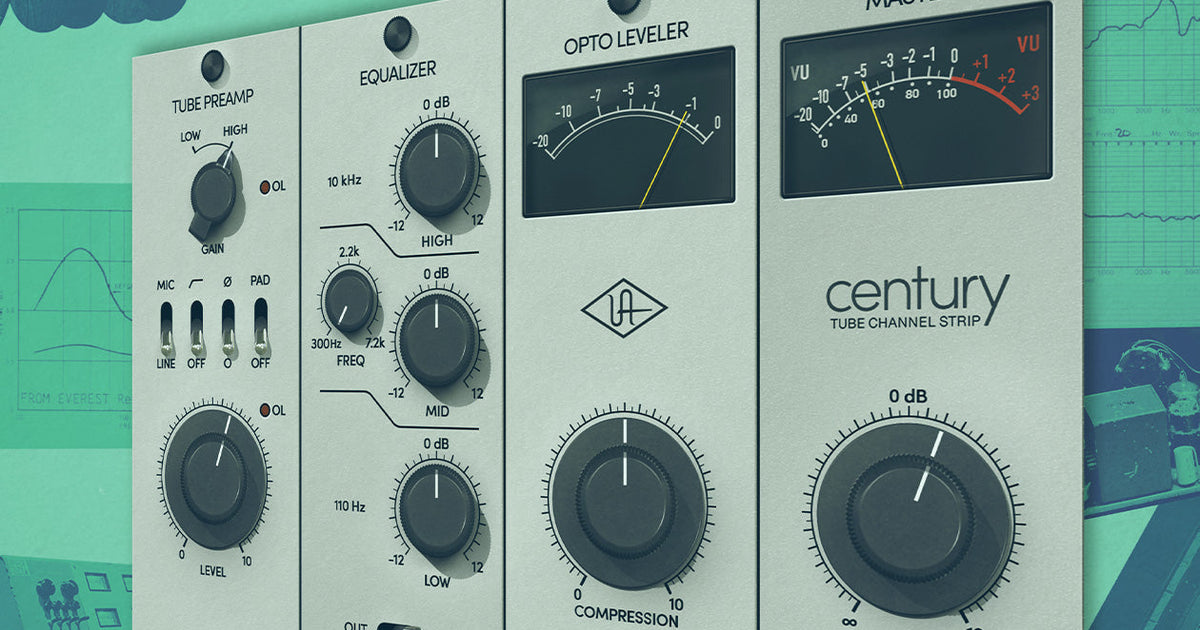

The Century Tube Channel Strip is a UAD plug-in included at no cost in the UAD Explore Free bundle. It combines a tube preamp, three-band EQ, and optical leveler into a single, intentionally minimal signal chain that we describe internally as the “do no harm” channel strip.
Most Explore Free users start with the 1176 Limiting Amplifier and Teletronix LA-2A Leveler. The Century tends to show up later — and then stay permanently in sessions. While it’s built a reputation as a go-to bass processor, it’s equally effective on vocals, acoustic guitar, synths, drum room mics, and spoken word.
Here’s a complete breakdown of what Century does and why it earns a place in nearly every session.
What Is the Century Tube Channel Strip?
The Century Tube Channel Strip is an original plug-in — not a hardware emulation — that combines a tube preamp, three-band EQ, and optical leveler into a streamlined channel strip. It’s included in the UAD Explore Free bundle and works in all major DAWs on Mac and PC.
The Century Tube Channel Strip combines three essential processing stages into one streamlined signal chain:
- Tube preamp
- Three-band EQ
- Optical leveler
- Master output stage
Unlike feature-heavy channel strips packed with dozens of controls, Century is intentionally minimal.
The result is a plug-in that’s difficult to make sound bad, making it equally useful for beginners and experienced engineers.
“The Century Tube Channel Strip is a simple to use starting point for just about anyone.”
John Paterno (Robbie Williams, Badly Drawn Boy, Bonnie Raitt)
Tube Preamp: How Century Adds Analog Character
Century’s tube preamp stage adds harmonic saturation and warmth through a straightforward two-control design: a Gain switch (Low or High) and a Level knob.
The Century Tube Channel Strip’s mic preamp gives vocals and instrument the warmth and detail that only a tube mic pre can provide.
Gain Switch
Low Gain provides a cleaner signal path; High Gain introduces additional harmonic content, making it especially effective on dynamic and ribbon microphones. The added harmonic content creates a richer, more dimensional sound before any additional processing takes place.
Level Control
The Level knob determines how hard the virtual tube stage is driven.
Turning it up increases harmonic saturation and warmth, while backing it off produces a cleaner, more transparent tone.
Built-In High Pass Filter
Century also includes an 80 Hz high-pass filter, making it easy to remove unwanted low-frequency rumble before shaping the rest of the signal.
This is particularly useful on:
- Vocals
- Acoustic guitar
- Spoken word
- Room microphones
Optical Leveler: Smooth Compression Made Simple
Century uses an optical leveler rather than a VCA or FET compressor. A single knob with automatic makeup gain handles gain reduction — the plug-in compensates for output level automatically, so the focus stays on tone rather than gain staging.
As gain reduction increases, Century automatically compensates for output level, allowing engineers to focus on tone rather than constantly adjusting gain staging.
The result is smooth, natural compression that’s especially effective for vocals and acoustic instruments.

Century Tube Channel Strip takes the guesswork out of compression settings with a single control dynamics processor.
Three-band EQ: Streamlined Musical Tone Shaping
Century’s EQ is designed for broad tonal adjustments, not surgical correction. It includes a 110 Hz low shelf, a sweepable mid band (300 Hz–7.2 kHz), and a 10 kHz high shelf — a layout optimized for quickly adding warmth, presence, or air without introducing harsh EQ artifacts.
This layout makes it easy to:
- Add warmth
- Increase presence
- Brighten a track
- Reduce muddiness
Without introducing harsh or unnatural-sounding EQ moves.

Century Tube Channel Strip’s EQ lets you bring out the details of a breathy vocal, add punch to an overdriven electric guitar, or give acoustic rhythm tracks sizzle and shine.
Why Is Century So Popular on Bass?
DI bass recordings are often clean to the point of sounding clinical. Century’s High Gain preamp mode introduces harmonic saturation that helps DI tracks feel more like they were played through real analog hardware — adding depth and texture rather than simply increasing level.
Instead of just making bass louder, it adds depth, texture, and movement that helps the instrument sit naturally in a mix.
Using Century on Vocals
Century works exceptionally well as the first processor in a vocal chain. The tube preamp adds density and harmonic richness before compression, giving vocals more excitement in a way that EQ alone often can’t achieve. Meanwhile, the optical leveler smoothly controls dynamics with just a few decibels of gain reduction, helping vocals remain natural without sounding over-compressed.
“On vocals and dialog, Century imparts forwardness, sheen and body — remarkably simple, but versatile and effective.”
Richard Chycki (Rush, Aerosmith, Dream Theater)
Acoustic Guitar Benefits
On acoustic guitar, Century performs several useful tasks at once:
- Adds harmonic detail through the tube preamp
- Smooths inconsistent picking with the optical leveler
- Removes unnecessary low-end using the high-pass filter
The result is a polished acoustic tone that retains its natural transients while fitting more easily into a mix.
Adding Life to Synths
Virtual instruments often sound extremely clean, which isn’t always desirable. Century introduces subtle harmonic movement that helps software instruments feel more organic. Many producers also use the optical leveler creatively to add texture and attitude to:
- Synth pads
- Keys
- Soft synths
Other Great Uses for Century
Beyond its well-known applications, Century is equally effective on:
- Drum room microphones
- Percussion
- Background vocals
- Electric guitars
- Spoken word
Any source that feels overly clean or static can benefit from Century’s combination of tube saturation and gentle optical compression.
Apollo Users: How Unison Technology Changes What Century Does
The Century Tube Channel Strip is a Unison-enabled plug-in. When loaded into a Unison preamp slot in Apollo Console, it changes Apollo’s microphone preamp input impedance to 600 ohms — a hardware-level interaction that affects how connected microphones respond before any digital processing begins.

Unison technology lets you track in realtime through the Century Channel Strip plug-in using your Apollo, giving you the exact circuit behaviors of a vintage tube mic preamp.
What’s Included in the UAD Explore Free Bundle
The UAD Explore Free bundle includes eight plug-ins at no cost:
- Century Tube Channel Strip
- 1176 Limiting Amplifier
- Teletronix LA-2A Tube Compressor
- UA 610 Tube Preamp & EQ Collection
- Pure Plate Reverb
- Oxide Tape Recorder
- Verve Analog Machines Essentials
- PolyMAX Synth
No subscription or credit card is required.
Final Thoughts
The Century Tube Channel Strip is a free UAD plug-in that combines tube saturation, optical gain control, and musical EQ into a single, minimal signal chain. It’s not a hardware emulation — it’s an original design, built to be useful across almost any source without requiring you to fully understand it before it starts working. For anyone downloading the UAD Explore Free bundle, it’s worth trying on several different sound sources and finding the Century Tube Channel Strip’s sweet spot.
— Brittany Rogers
Related Articles
Frequently Asked Questions
Is the Century Tube Channel Strip free?
Yes. The Century Tube Channel Strip is included in the UAD Explore Free bundle at no cost, with no subscription or credit card required. It works as a UAD plug-in on any compatible Mac or PC running UA Connect.
What DAWs does Century work with?
Century works in all major DAWs that support AU, VST, VST3, or AAX plug-in formats — including Logic Pro, Ableton Live, Pro Tools, Cubase, Studio One, and GarageBand.
Is Century included in Spark?
The UAD Explore Free bundle and the Spark plug-in subscription are separate offerings. Explore Free plug-ins, including Century, are available at no cost and do not require a Spark subscription. It is also available in Spark.
Does Century require an Apollo interface?
No. Century can be used as a standard plug-in in any supported DAW on Mac or PC. However, Apollo users gain access to Unison functionality — which allows Century to change Apollo’s hardware preamp input impedance to 600 ohms, affecting the microphone’s physical response before any processing.
What is an optical leveler and how is it different from a compressor?
An optical leveler uses a light-dependent resistor circuit (or its emulation) to control gain reduction. It responds more slowly and smoothly than a VCA or FET compressor, producing compression that sounds natural and musical rather than punchy. Century’s optical leveler includes automatic makeup gain, so output level adjusts automatically as gain reduction increases.

