


The KVR Developer Challenge 26 not only provides a platform for existing and aspiring developers to showcase their creativity but also offers us an opportunity to stock up on new tools that enhance our workflow for free.
And show our appreciation, of course.
But, seriously, it’s one of the highlights of the year, and, competition aside, we can give our collection a real boost.
Like all of you, we are working our way through this year’s 56 entries, and just a few days into the contest, we’ve already found some real gems.
As always, feel free to share your favourites and why in the comments.
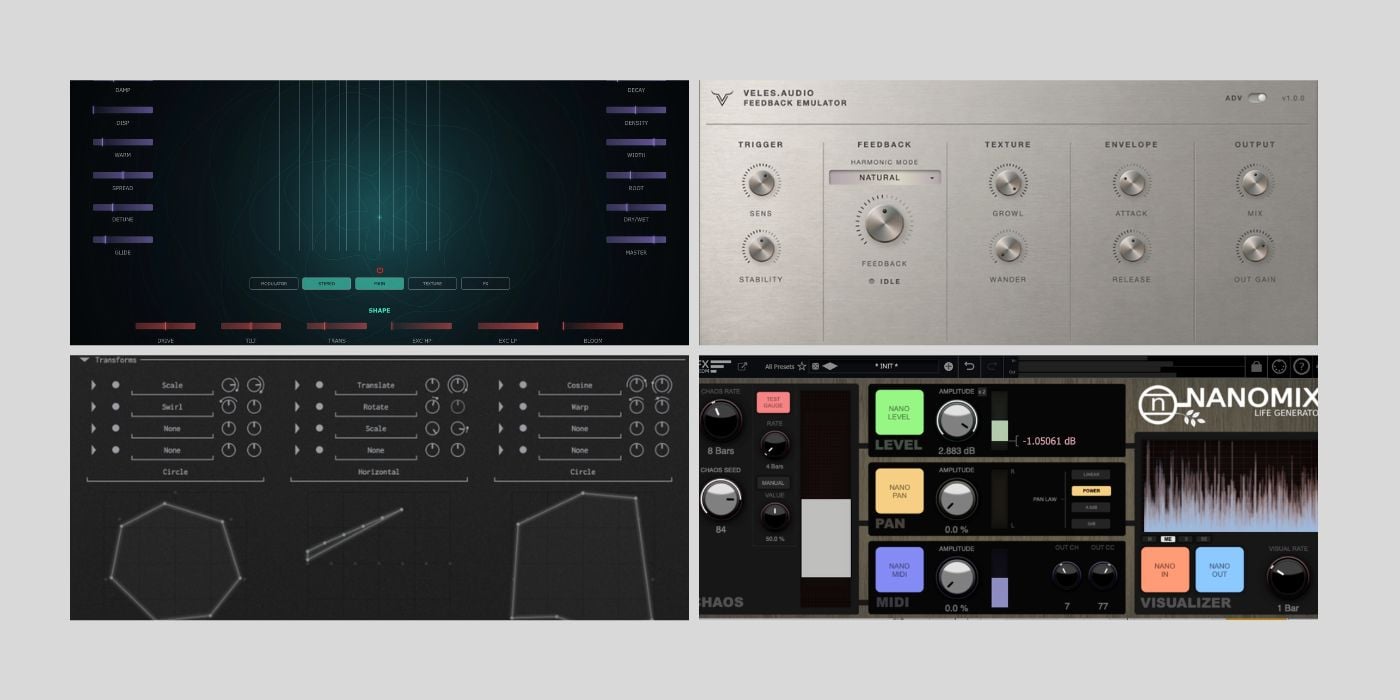
Quiet Music – Reverie
Reverie is a sympathetic string resonator (Karplus-Strong) driven by incoming audio.
The thing that I like about Reverie is that it takes the playing out of your hands, and that’s a good thing now and then.
Reverie has no keyboard and no MIDI notes to program; the instrument is whatever you send it to excite the sympathetic strings.
Of course, that means there’s a definite element of randomness as you explore different combinations, but the results can be stunning.
Reverie combines a bank of sympathetic strings and an audio-reactive sampler engine (Texture), with three controls that blend them: Excite, Track, and Morph.
Although there is no MIDI input, you can control the harmonic centre by choosing any of 21 tuning scales, including microtonal scales, and a custom scale builder.
You can tweak the sound’s character by changing the string material (seven types available).
You can further shape the output using high- and low-pass filters, as well as the Tilt, Transient Emphasis, Drive, and Bloom controls.
Additionally, you have a drawable modulator with seventeen destinations over both engines.
Reverie goes deep enough to take control of shaping the output with some detail, but what I like best is that it encourages those happy accidents we often wish for.
Reverie is available in AU and VST3 formats for macOS and Windows.
Vales Audio – Feedback Emulator
I’ve said it before, and I’ll say it again: it will take more than a nice plugin to make me sound anything like a guitarist, but Feedback Emulator certainly wouldn’t hurt.
If you already sound great, you’ll sound even better; you get the idea.
Unfortunately for me, Feedback Emulator is Windows-only (VST3), but it sounds great, so I wanted to highlight it.
Feedback Emulator is a guitar feedback synthesiser that emulates amp feedback at bedroom volume.
It’s hard to tell without physically picking up a guitar and testing the plugin, but it sounds like the feedback synthesis responds in a very natural way.
It rings out beautifully, but it doesn’t get in the way or become muddy if you’re still picking away.
I really like the Wander parameter; it allows a little drift, so longer sustains don’t sound too manufactured.
The natural response extends to hand-muting the strings to kill the feedback.
There are four Harmonic Modes: Natural, Fundamental, Octave, and Upper Harmonic.
You can even add a touch of saturation with the Grown control, so your tone breaks at the right points.
It’s a simple, easy-to-use plugin that might just convince you that you’re Jimi Hendrix at the Monterey Pop Festival if you close your eyes; just don’t set your guitar on fire.
Vain Audio – Fogbank
Vain Audio’s KVR DC26 entry is Fogbank, a free multi-FX plugin.

Fogbank is an expander and multiplier that duplicates the input audio up to sixteen times (adjustable voice count) and runs it through various effects before recombining it.
Fogbank features both monophonic and polyphonic modulators. The monophonic modulators include six LFOs and four macro sliders.
The polyphonic modulators, displayed as three side-by-side vector spaces showing shapes with point visualizers, are where Fogbank really comes to life.
Each point in a shape represents a voice, and you can apply up to four transformers to each point. The transformers are modulated by the monophonic modulators, and you can then add built-in effects with per-voice values.
Built-in FX include an all-pass filter, a classic filter, volume, panning, delay, diffuser, and distortion.
It brings together so many moving parts in a speedy workflow, making it a real treat for sound designers.
Fogbank is available in AU, VST3, and CLAP formats for macOS, Windows, and Linux.
FKFX – NanoMix
NanoMix is something a little different; it’s a humaniser utility plugin.
One of the things I like about this plugin is that it can make a significant difference without making significant changes.
When any element of a track sounds a bit too clean and clinical, we reach for something to add a little texture or attitude.
Similarly, when an element sounds too rigid or locked to the grid, it’s unlikely to groove, swing, or feel like you want it to, which means your song just won’t hit as it should.
NanoMix is a simple plugin that uses a Chaos Engine to create micro-variations in level, pan, and MIDI parameters, making any track feel more organic.
FKFX explains that, despite the name, the Chaos Engine won’t cause chaos; it creates repeatable variations for playback and bouncing.
You can change the seed to create a new variation pattern.
I like the simplicity of NanoMix, and as counterintuitive as it sounds, in those times when it’s ok to use the quantize button, NanoMix could be a good way to break the chains while leaving enough fully locked in, and without any fidgety automation.
It could be great on arpeggiated patterns, ostinatos, etc.
NanoMix is available in AU and VST3 formats for macOS and Windows.
Every vote counts!
Make sure to cast your votes while you’re testing these plugins, and don’t forget you can change them before the deadline.
You know what it’s like with so much choice; this one is my favourite, no this one is my favourite, ok, really, this one is my real favourite!
More:
Last Updated on July 10, 2026 by Tomislav Zlatic.

