

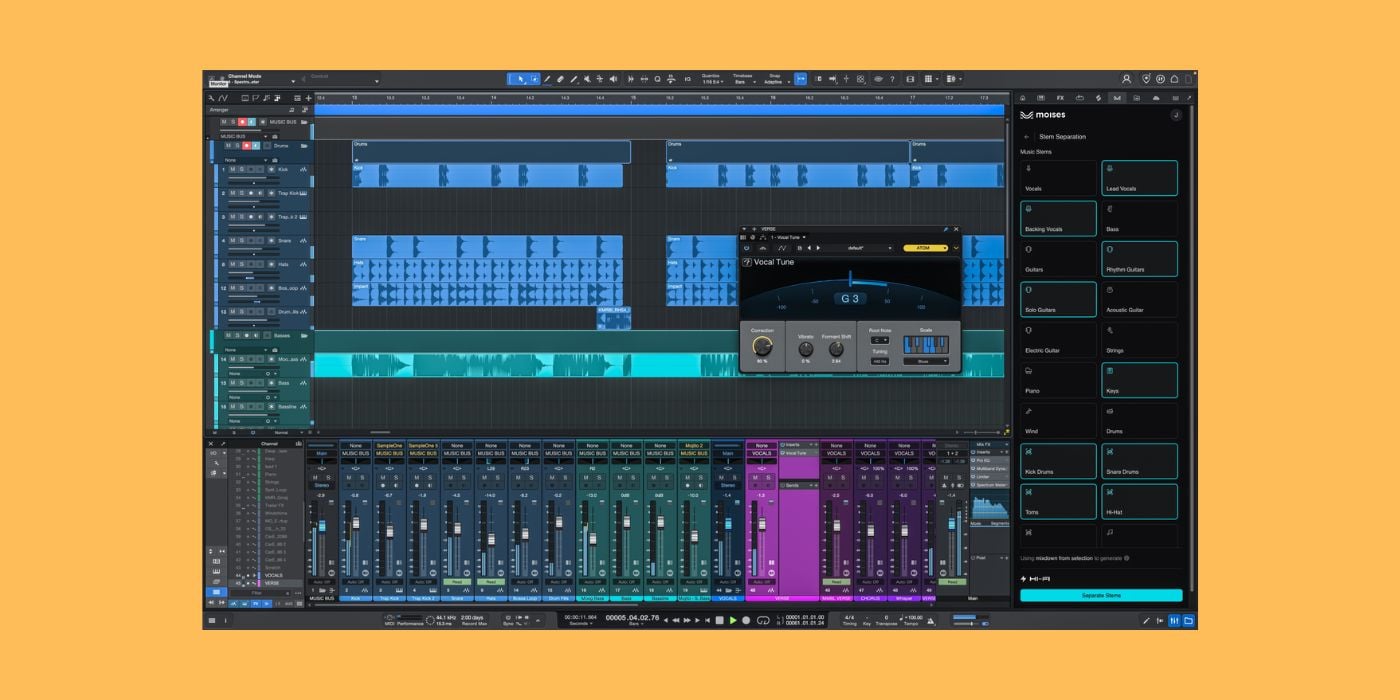

Fender Studio Pro has received the 8.1 update, offering a brand-new AI assistant (public beta) and Moises Studio integration.
As if we haven’t talked about Fender enough recently, here we are again with the legendary manufacturer as the topic of the day.
This time, we’re not talking about guitars or lawsuits, well, not directly, anyway. We’re talking about Fender Studio Pro 8.1, the latest version of Fender’s DAW (formerly PreSonus Studio One).
More specifically, we’ll focus on the new AI assistant (public beta) and Moises Studio integration.
But first, if you’ve never used Fender Studio Pro, like me, here’s a quick overview.
What is Fender Studio Pro?
Fender acquired PreSonus in 2021 and has been gradually integrating and rebranding products ever since.
One very noticeable example of rebranding is the Quantum audio interfaces that now sport the Fender logo rather than PreSonus.
Earlier this year, the popular digital audio workstation PreSonus Studio One became Fender Studio Pro.
Here are some of the core features of Fender Studio Pro:
- Over 40 native plugins
- Nine virtual instruments (a mix of sample-based instruments, analogue modelling, samplers, and more)
- 20GB of loop and sample content
- 2500 Premium Splice samples
- Audio Batch Converter
On the surface, Fender Studio Pro is a DAW with a relatively familiar interface, the usual included features and content, and all the audio/MIDI recording/editing you need to get from an idea to a final mix.
If you were an existing Studio One user, feel free to share your experience of transitioning from PreSonus to MyFender, and your thoughts on any workflow differences since the rebranding.
One obvious addition since the rebrand is the inclusion of official Fender amp models.
The rebranding came with some community backlash, as it often does, and it’s worth noting that Fender has said the PreSonus name will continue for certain product lines.
Fender Studio Pro has several purchase options:
- Perpetual license – £169.99
- Perpetual license and Pro+ annual plan – £159.99 per year
- Pro+ monthly plan – £19.99 per month
Pro+ plans offer access to additional features, including the new AI assistant, which you won’t get with a standard perpetual license.
The AI Assistant (public beta)
Fender has been quite forthright about its intention to use AI to help us create more freely, rather than replacing elements of creative decision-making.
My initial reaction is that a studio assistant is the right way to use AI inside a DAW; I can ask questions as a Fender Studio Pro newbie and save time by letting the AI assistant handle more tedious, less creative tasks.

For example, asking the AI assistant to create a session for a specific instrumentation and function, or in-session technical tasks that a real-life studio assistant might take care of.
My initial reaction was quickly replaced by disappointment, for a few reasons.
First of all, the AI assistant is only available to those who subscribe to Pro+, leaving users on a standard perpetual license to fend for themselves.
At a time when Fender seriously needs goodwill to mend fences with customers, executive-level decision-making seems all wrong. There’s a significant element of the previous Studio One community who are not happy with the rebrand, and that can’t be helped, but rolling out an exciting new feature with the caveat that users who bought the software outright will have to pay extra to use it is a terrible move.
Secondly, the AI assistant doesn’t perform any tasks; it’s effectively a chatbot.
Now, the idea behind the chatbot is that you can ask questions and get answers without leaving your DAW, and that’s not a bad thing; it’s a very good thing. Fender trained the AI assistant on the Studio Pro manual, which means you have an expert at hand all the time.
You can ask how to perform tasks like automating volume, bouncing your project, or more complex questions, and it will provide the relevant information/tutorial in simple terms that beginners can follow.
There’s nothing wrong with what the AI assistant does, but it’s too basic to be a paid add-on.
Since the AI assistant is in public beta, it will improve over time, and I imagine it will eventually perform the tasks I hoped for. At which stage, it will be even more useful, and could become a most welcome addition to your workflow.
Sadly, I can’t help but feel like it should be available to ALL Fender Studio Pro users, even when it is capable of more down the line. I also can’t help but feel like it should already be further along than being a trained chatbot.
Moises Studio Integration
The Moises Studio integration is where Fender begins to lean into the side of AI that I don’t like to see in music, and that’s with Stem Generation.
But first, here’s a summary of what Moises Studio is.
Moises Studio is a platform that offers AI-powered services such as stem separation, stem generation, voice conversion, and more.
Moises Studio offers a free plan (five stem separations per month), and two paid plans: Premium ($3.99 per month) and Pro ($9.99 per month).
The good news is that Fender Studio Pro users (even standard users without Pro+) get additional Moises Studio credits at no extra cost.
I believe standard users will get 10 stem separations, 120 stem generations, and five voice conversions per month, regardless of their Moises Studio membership level.
The other benefit of the new DAW integration is that, like the AI assistant, it keeps you inside the DAW rather than working externally and losing focus.
Stem Separation
Stem separation is by far my favourite part of the Moises Studio integration, and it seems to perform very well. I’m sure results may vary, as they typically do, but what I’ve heard so far is generally better than most alternatives.
We don’t need to dive into stem separation; we’ve covered various applications here, like the latest LALAL.AI plugin and the free Go-Splitter by SoldierSound.
But high-quality stem separation inside the DAW is useful for a variety of reasons.
Stem Generation
Right off the bat, I want to say I have no issue with producers filling gaps with samples or tools like Logic Pro Drummer. Very few musicians can do everything, and I’m not one of them, so I’ll take help where needed.
Typically, I’d use something like Drummer in Logic as a placeholder till I can get a real live drummer, but I’d have no issue using such tools for demos or if I just can’t get a musician for whatever reason, as long as it sounds good enough.
So, I’m not one of those so-called purists who think anything less than playing every note yourself (or hiring musicians) is something to look down on.
However, even without defining a strict cutoff point, I like most of the input to be human, especially the most significant parts, and stem generation could start to blur the lines.
Stem generation, in this case, is when you have an existing track, and you ask Moises Studio to generate a new stem to complement it.
For example, if you have a rhythm guitar track, you might ask Moises Studio to create a drum or bass track. You can provide specific prompts and use various style/genre selectors. Using your existing track as a reference, the AI generates new audio.
Having listened to various examples, the results aren’t mind-blowing; some are good, some aren’t. But Fender claims the results are more musical than just throwing down a sample because it responds to existing content, as a musician would, and that’s true to a decent extent. The Stem generator actively adapts to rhythmic and dynamic changes.
It also follows harmony fairly well.
You can continue to add new stems, having them reference more than one track; for example, you could add keys to your existing rhythm guitar and drums/bass.
Fender makes a distinction between this sort of stem generation and simply asking AI to create music out of thin air because it uses something you already created as a reference, and that’s true.
If using stem generation as placeholders or for demos, there’s no issue; my concern is that adding layer after layer of AI-generated music to a single self-made element becomes less and less human.
That’s not to say people will automatically use the function this way, but it’s possible. It’s easy to say the quality isn’t good enough to release a commercial track that’s 90% AI-generated through Fender Studio Pro, but I don’t like the sentiment at all.
Voice Conversion
We’ve seen this recently with things like IK Multimedia’s ReSing. Moises Studio maps your vocals to royalty-free AI voice models.

It’s great for non-singers, like myself, who want a half-decent vocal for a demo, and it’s potentially a great tool for creating backing vocal stacks by pitch-shifting the lead vocal.
Final thoughts
I’m not reviewing Fender Studio Pro 8.1, but the positives are overshadowed by the fact that it’s not all free to existing users.
Other new additions, namely the native Vocal Tune plugin and the audio-to-MIDI notes function, are promising.
However, it feels underwhelming to me and seems like another missed opportunity for Fender to show appreciation for customers.
What do you think?
Check it out: Fender Studio Pro 8.1
More:
Last Updated on June 10, 2026 by Tomislav Zlatic.

