

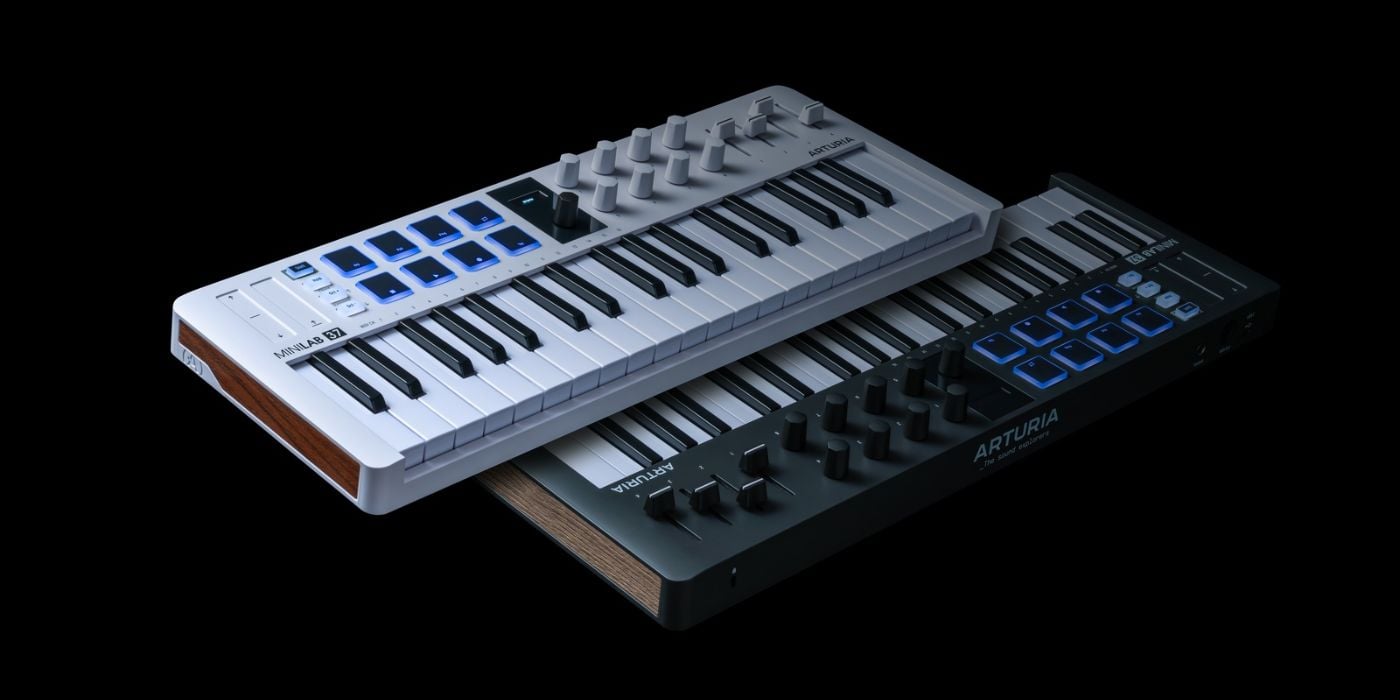

Arturia has launched the MiniLab 37, the latest addition to the MiniLab MIDI keyboard controller series.
The MiniLab series has been around since 2013 and has become one of the most popular budget-friendly controllers on the market.
A new kind of MiniLab
Although MiniLab controllers have been around for well over a decade and improved with every new model, any changes in form have been largely cosmetic.
Since the original MiniLab, Mk2/3 models have essentially offered a more refined version of the same thing, because there’s only so much you can do with a 25-key controller.
Of course, you can expect enhanced functionality from newer models, yet until now, the most significant change in form has been ditching half the encoders in favour of four assignable faders on the MiniLab Mk3.
I love that Arturia added faders to the MiniLab (sixteen encoders were probably overkill anyway, even with smart mapping to Analog Lab instruments, etc.); the faders make the controller ideal for orchestral programming on the go because you can more easily automate expression and volume simultaneously.
I wish more manufacturers would add faders to mini controllers.
The MiniLab 37 is the obvious evolution, offering 37 mini-keys rather than 25.
One more octave makes a huge difference in terms of performance; you now have a wider range for soloing, and more space to play with both hands, whether it’s splitting harmony/melody, complex spread voicings, or more realistic comping.
The MiniLab 37 provides an extended playing experience while maintaining the backpack-friendly portability.
I know there are lots of 37-key controllers available, but with the assignable faders that few others have, Arturia has positioned itself well amongst the competition.
Key Features
- 37 velocity-sensitive mini-keys (slim)
- Eight rotary encoders
- Four assignable faders
- Eight velocity/pressure-sensitive RGB pads (sixteen with two banks)
- Built-in arpeggiator
- Hold Mode
- Chord Mode
- Custom modes
- Pitch and modulation touch strips
- Transport controls
- OLED screen with multi-function push encoder
- Comes with Analog Lab Intro and Ableton Live Lite
There’s nothing too unexpected in the features, so we don’t need a deep dive on anything, but there are a few things I want to highlight.

If it’s not clear, the knobs are endless encoders, which means they can never be in the wrong place when changing instruments/effects.
The Hold button doesn’t function like a sustain button you’d find on many beginner keyboards. When active, it will hold any new notes you play, providing you have at least one key depressed. If you release all keys, the held notes will continue until you trigger a new note, and it will start over.
Chord Mode is handy because you can map complex chords to a single key and have it transposed across the keyboard, but it’s not much more than that.
The OLED screen is good, but very small, which isn’t uncommon for smaller controllers, but you may expect it to be bigger at first glance because it sits within the central black panel.
The multi-mode arpeggiator parameters are nicely mapped out across the encoders for easy use.
You can save up to five custom modes using the Arturia MIDI Control Center, which is handy for live performance.
New Layout
The appearance of the MiniLab 37 isn’t dissimilar to previous MiniLab keyboards; it has the typically sleek design aesthetic that you expect from Arturia.
But there is one massive difference in the layout.
What used to be a row of eight RGB pads is now two stacked rows of four.
If you’re not a big user of pads, it might not seem like a big deal at all. And, if you typically use pads to trigger scenes or longer samples, the single row shouldn’t have been a problem for you.
However, if you’re into finger drumming or more performative sample triggering, two rows of four is a major enhancement.
Through my own experience with Akai MPC units, I’m used to the stacked arrangement of pads, as are most keen finger drummers, I’m sure.
Even though we’re only dealing with eight pads here, and not sixteen like an MPC, the closeness allows you to perform more intuitively and familiarly.
It also makes it much easier to trigger fast sequences with one hand, leaving the other free for the keyboard.
Mini-keys/Keybed
If you aren’t used to mini-keys, they can feel somewhat fidgety, initially, at least, but you soon get used to them.
The important thing to remember is that this sort of MIDI controller, regardless of manufacturer, is never going to offer the most expressive keybed, but that doesn’t mean they are all equal; some are terrible.
But when you get to the higher-quality offerings, Arturia is one of them; the differences between the top performers become negligible.
There are no bells and whistles, no aftertouch (unlike the KeyStep 37), and no premium feel.
Still, if you know what to expect, Arturia does it as well as anyone.
Connectivity
As you’d expect, there’s not a lot of ground to cover here, given the size of the MiniLab 37, but the addition of a Control jack is very interesting.
The dual-mode Control jack functions in sustain or expression mode, and the expression option is something we don’t typically see from smaller units.
You have MIDI over USB-C and a 5-pin MIDI output for controlling external hardware.

You need to look at something like the Akai Professional MPK Mini Plus for CV/Gate connectivity.
Value for money
As I said above, I think Arturia has positioned the MiniLab very well within the 37-key niche.
It will cost around €149, which is relatively close to the competition, and if an included software bundle sways your decision at all, Analog Lab Intro with hundreds of presets taken from the pro version, V Collection, and Pigments, is a better starting point than most, in my opinion.
You might think it’s worth spending a little extra to get a larger KeyLab Essential controller with full-size keys, and it might be if you have space. But if you have limited space and want to travel easily with your controller, the comparison becomes irrelevant.
My choice of smaller controllers has always been the MPK Mini series, primarily because of the higher-quality MPC pads. I also prefer the joystick over touch strips, and the cheaper MPK Mini Plus has additional pitch/mod wheels.
I think the MiniLab 37 is one of the frontrunners for good value, but it depends on what you value most. For example, although I prefer some elements of Akai’s offering, I wish the MPK Mini Plus had assignable faders.
Final Thoughts
Arturia is one of my favourite manufacturers of MIDI keyboards; I’ve used and owned several over the years (I still use an original KeyLab 61 because the aftertouch and keyboard feel are excellent).
Arturia’s build quality in the budget price range is relatively good, and they have made distinct choices that set the MiniLab 37 apart from the competition and should appeal to a wide range of users.
And, like all other Arturia controllers, the MiniLab 37 looks great, which is a nice bonus.
Last Updated on June 13, 2026 by Tomislav Zlatic.

