

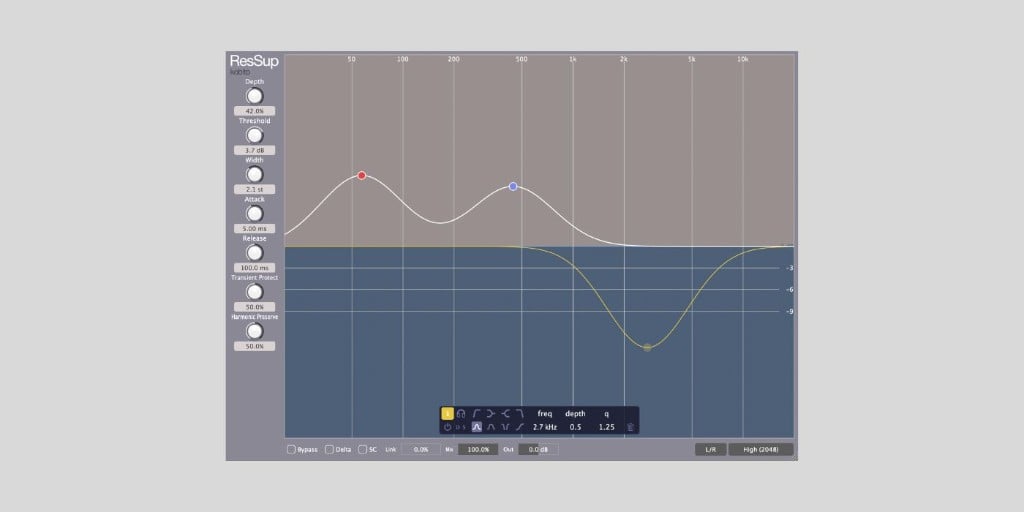

Kobito has released ResSup, a dynamic resonance suppressor plugin for macOS and Windows.
ResSup normally costs $49, but the developer is offering it for free to the first 1000 users before the launch price begins. The $49 discount is applied automatically at checkout, using the code “RESSUPINTRO49”.
I downloaded the plugin to test it, and the whole process is pretty quick. You check out for free and receive a unique license key. When running the plugin for the first time, you simply enter that license key and your email address to activate it.
By the way, we covered Kobito’s GrabTone earlier this year. It’s an experimental synth that turns two audio files into a playable instrument. ResSup is a much more practical mixing tool, though.
The plugin is designed to reduce harshness, ringing, and unwanted resonances in real time. Basically, instead of having to apply static EQ cuts across the whole signal, you let ResSup detect frequencies that stick out too much and suppress them dynamically.
I love using tools that simplify these boring (for me, at least) parts of mixing. And tools like this one can speed up your mixing workflow on vocals, cymbals, piano, guitars, synths, live recordings, and even the mix bus.
Live recordings are an especially good fit because room tone, mic bleed, and resonant buildup can make otherwise good performances feel rough once the tracks are combined.
Small resonances can build up quickly when you’re, for example, recording your band in an untreated room with a couple of microphones. Cleaning those recordings lightly across 10, 15, or 20 tracks can make the whole mix easier to listen to without obvious EQ cuts.
ResSup includes multiple suppression bands with Bell, Band-Pass, Low Cut, High Cut, Low Shelf, and High Shelf modes. You can add bands manually and focus the suppression on specific frequency areas, such as vocal harshness, cymbal sharpness, piano ringing, or low-end buildup.
Delta monitoring is included, too. You can start with the default Threshold and Depth settings, then use Delta to hear what ResSup is removing before adding extra bands.
There are also per-band Delta and Solo options for checking individual problem areas. If the Delta signal starts sounding too full or musical, the suppression is probably too aggressive.
Other useful controls include Spectral Attack and Release for timing the response across frequencies, Transient Protect for preserving punch, and Harmonic Preserve for keeping the source from sounding over-processed. Kobito also designed ResSup to be light on CPU, which is nice if you want to use it across many tracks.
The plugin also supports stereo operation, Stereo Link control, M/S mode, and external sidechain input. The sidechain mode can be used to let one signal influence resonance suppression on another, such as softening competing guitar or synth frequencies when a vocal is present.
ResSup is available in VST3 and AU formats for macOS and Windows.
Download: Kobito ResSup (FREE for first 1000 users)
Deal of the day 🔥: EXCLUSIVE ROLAND SALE (up to 80% OFF)!
More:
Last Updated on May 27, 2026 by Tomislav Zlatic.

