

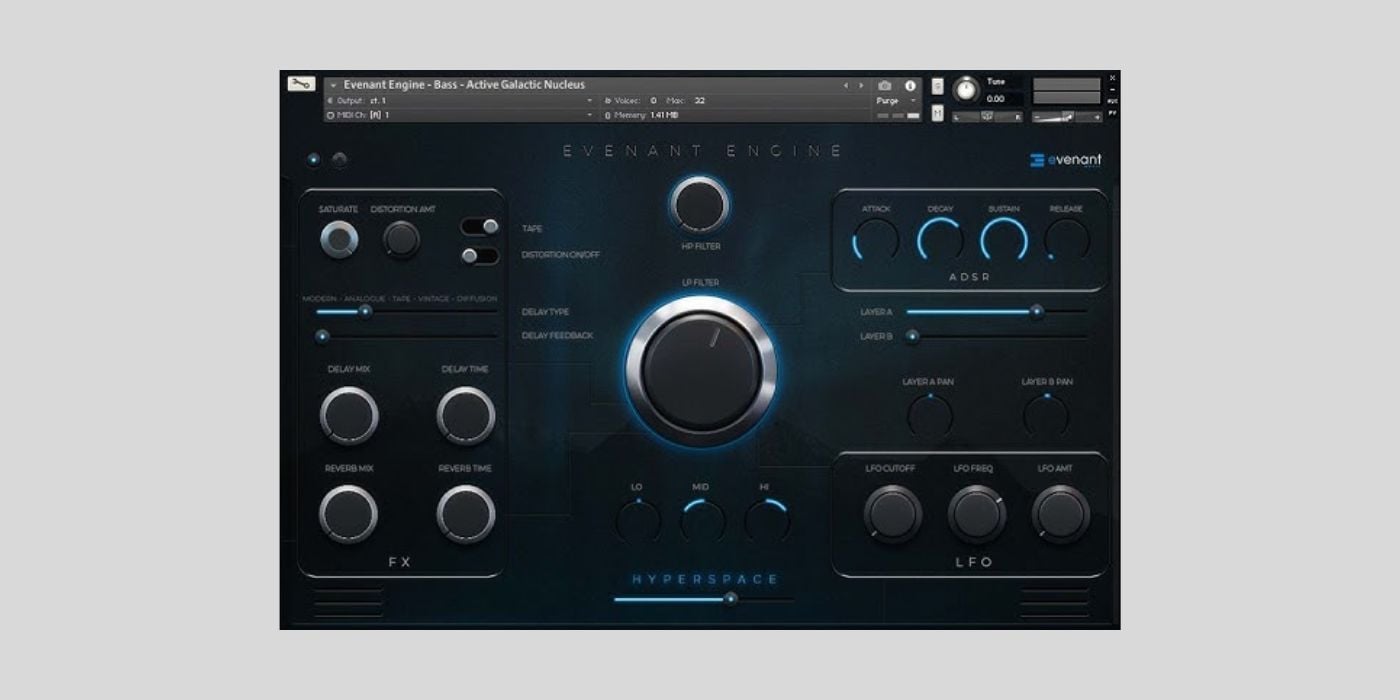

Evenant is currently offering its Evenant Engine, a cinematic library comprising 50 custom patches, for free as a limited-time offer. I didn’t manage to figure out how long this offer lasts, so my tip would be to get it asap.
And please note that running Evenant Engine requires Kontakt by Native Instruments (paid).
According to the developer, Evenant Engine is full of “trailer-worthy signature sounds, vast soundscapes, organic pads, earthshaking braams, and powerful synths.”
It covers a wide range from acoustic instruments like cellos, flutes, and sitars to more analog and cerebral synth patches.
While Evenant Engine seems like a nice toolkit for people working with cinematic scoring and video games, you could easily browse through the patches and use them in more conventional musical endeavors as well.
The plugin’s interface enables you to customize different patches further through built-in effects, saturation, and filtering.
There’s a dedicated saturation knob and a distortion amount control combined with a “tape” switch to change character. This is nice if your pad or synth needs some more bite, grit, or body.
Next, there’s a section for delay and reverb to add width, depth, and atmosphere to your sound. Use the sliders to dial in the feedback and select various delay characteristics like “modern”, “analogue”, “tape”, and more.
Control delay time and mix as well as reverb time and mix with the dedicated knobs beneath for more control.
In the middle of the interface, you’ll find high-pass and low-pass filter controls and a basic three-band EQ for low, mid, and high frequencies. There’s also a “hyperspace” slider at the very bottom. Honestly, I have no idea what this parameter does, but it’s hopefully something cool.
Oh, and if you’re in the mood for a weird and unique sound, you might want to check out Abbey Road’s free Kontakt instrument Big Nessie. The UI gets a lot of hate, but personally, I love it.
Anyway, the sections all the way to the right of Evenant Engine contain ADSR, layering, and an LFO.
Basic ADSR control to help shape the sound is always nice, but the layering section is even more interesting. Each patch has two sound layers that can be individually gain-controlled and panned anywhere in the stereo field.
Finally, the LFO section modulates the filter. Dial in your desired cutoff, frequency, and amount to create slow pulsing or fast strobe-like effects.
You should easily be able to get some mileage out of this one.
Download: Evenant Engine (FREE for a limited time – Kontakt required)
Deal of the day 🔥: Get BABY Audio Parallel Aggressor for only $5! (92% OFF)
More:
Last Updated on March 20, 2026 by Tomislav Zlatic.

