

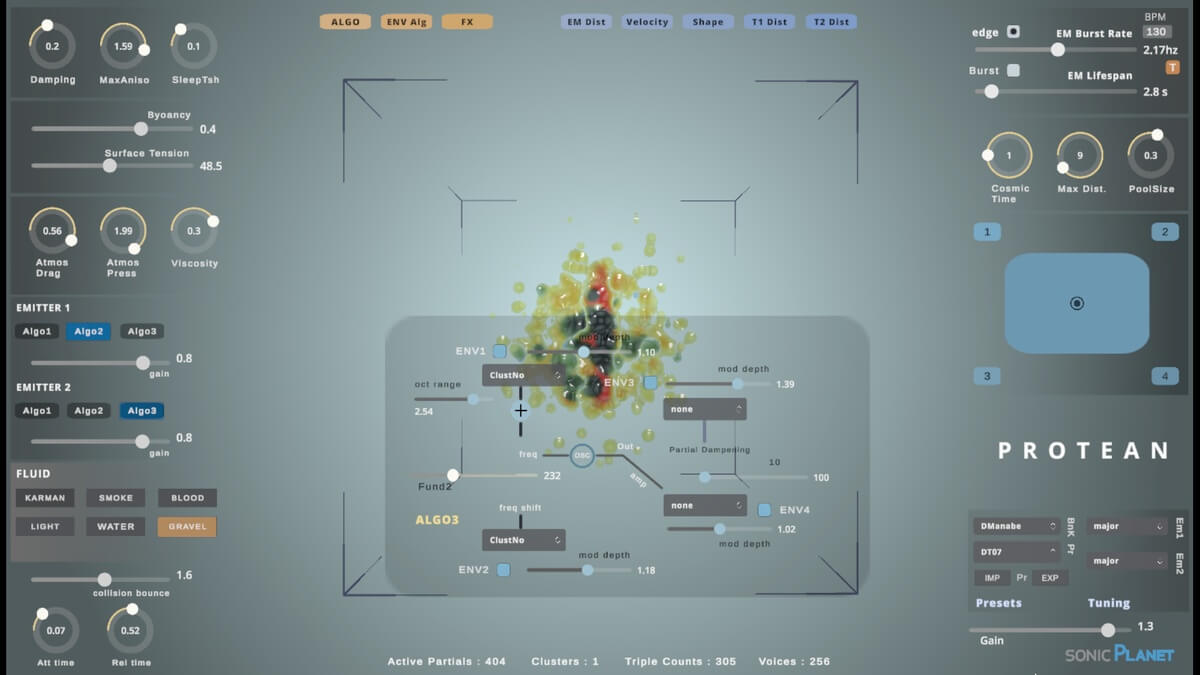

sonicLAB has recently launched a new software synthesizer instrument geared towards sound designers and composers who like to work with experimental music technology. Adam Douglas takes it for a spin in our latest review.
Protean is a wild and experimental generative audio environment that uses fluid dynamics to generate sound. Adam Douglas dives in to see how deep the water is.
While I’ll always love hardware synthesizers, lately I find myself reaching for software because of the sheer variety of novel synthesis options on offer. And, thanks to ever-improving computational power, we now have all kinds of unusual sonic software playgrounds to play on. I’m thinking of instruments like Newfangled Audio’s Generate, which incorporates chaos physics into its oscillators, Sonic Charge’s plant-as-synthesis Synplant 2, and now Protean by sonicLAB, which uses fluid dynamics as a starting point for sound generation.
If Protean, with its wobbling blob of viscous liquid at the center, looks familiar, that’s because it follows BEATSURFING’s RANDOM and Visco from Forever 89 with its goopy glob. However, where the liquid in RANDOM and Visco can be almost decorative, with limited interactivity, Protean is very different. In sonicLAB’s instrument, the liquid is the instrument, and how you set it in motion determines pretty much everything.
If this sounds complicated and unusual, it is. Very much so. However, it’s also very exciting and rewarding – if, that is, you’re ready to embrace its experimental nature and to put in the work to understand it.
Protean: What It Is And It’s Not
Protean is not your typical soft synth. If you know sonicLAB then you’ll probably have an idea of what you’re getting into. It’s more of a sonic environment than an instrument in the traditional sense, or even like a sound installation at a gallery or museum. Using a variety of conditions you set a process in motion, and this process affects how the sound is generated. In the case of Protean, the processes involve particles of fluid and their interaction.
You can control it to a degree, with all of the parameters MIDI mappable, but it’s best to not think about ‘playing’ it in the traditional sense. You don’t press keys on a keyboard controller to generate notes. You coax noise out of it. Accordingly, the sound can be unpredictable and wild. This is, of course, part of the fun of the experiment.
Testing The Waters: How To Use Protean
Protean is complicated in that most of its terms and parameters are related to fluid dynamics. However, it’s also relatively simple because most everything can be found on a single screen. Once you know what you’re doing, it’s easy enough to get around.
First off, Protean is a standalone app. This may be a turnoff for some. I was a little nervous about it at first as I prefer to work in a DAW. You can use it in a DAW like Logic or Live and there’s a remote control plugin to assist with this but it requires some internal audio routing (Mac owners can use an app like BlackHole). It’s not the most elegant workflow, unfortunately, but it is doable.
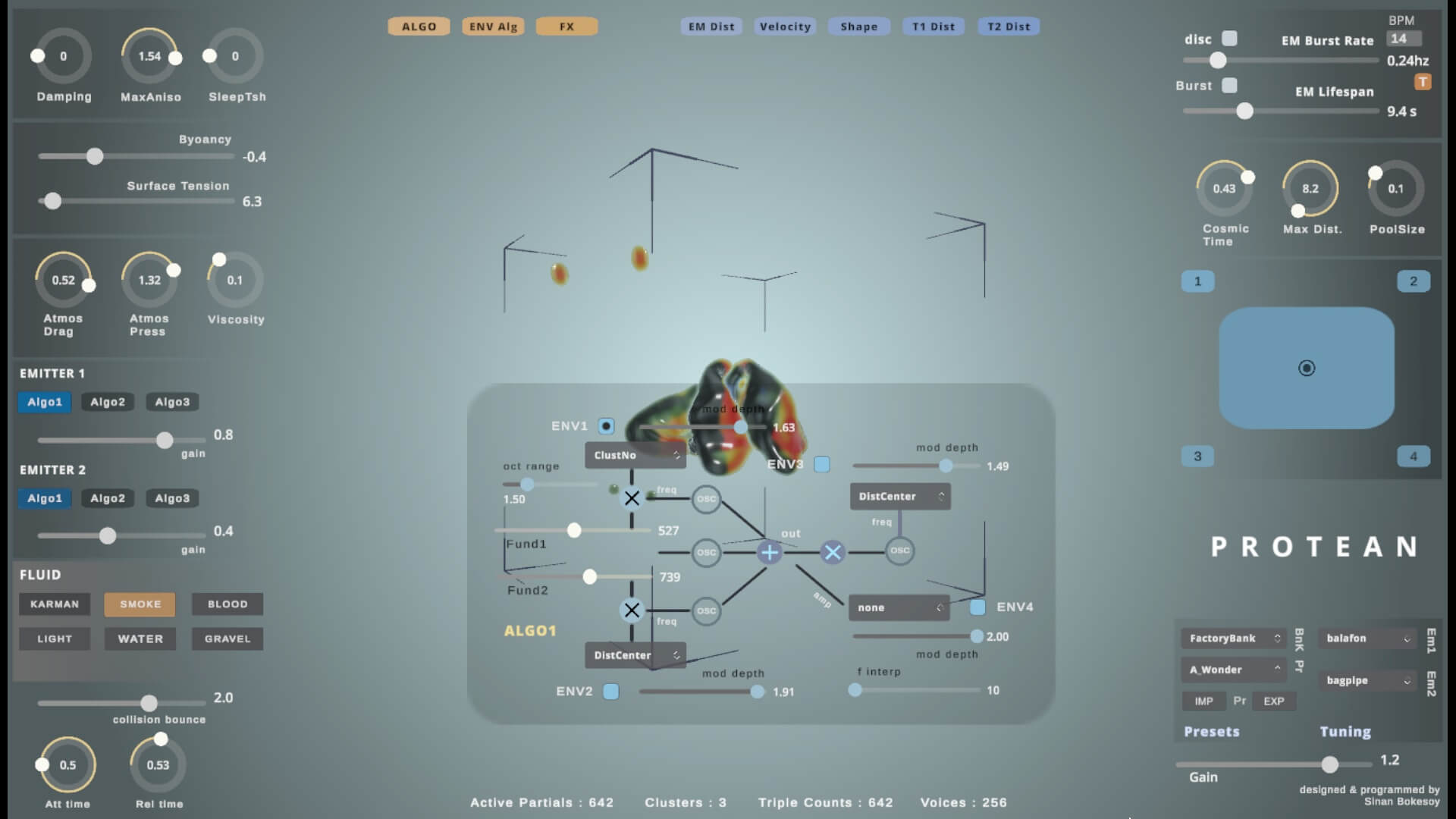
Looking at the app window, you’ve got a series of cryptically named controls arranged around a 3D visualization of a blob of liquid, which is suspended in a cube. Overlaying this ever-evolving graphic is a transparent panel for synthesis, envelope and effects controls.
Without getting too into the details – it’s the kind of thing that you really need to experience yourself to understand – there are fluid particles (up to 1024 of them) moving around inside a gravity-less cube. When a particle enters a defined proximity to two other particles, it generates a sound synthesis voice. Controlling Protean is all about working with these particles.
There are two emitters that shoot out particles in bursts, with control over parameters like rate of emission, the lifespan of particles, the shape of the particle distributor, and more, including what kind of fluid it is (Karman, smoke, blood, light, water or gravel). You can also interact with the fluid dynamics, with sliders for damping, the amount of anisotropic behavior (complexity of movement) of the fluid in the cube, the minimum energy level at which particles become inactive and go to sleep, the buoyancy of the particles, atmospheric drag and pressure, and more.
Digital Synthesis In A Fluid Environment
As you can see, this is all very esoteric and so far has seemingly very little to do with sound creation. But remember that particles emit sound when they clump together, and the type of sound they make is determined by the three emitter algorithms, all of which are based around sine waves.
Algo1 is an additive synthesis motor with three sine waves and ring modulation. Algo2 offers four-operator frequency modulation (FM). Lastly, Algo3 gives you physical modeling, with modal synthesis that employs six sine wave oscillators to create the sound of glass being struck. You can set each of the two emitters to have their own algorithm or the same one. There is also a basic attack/release envelope to affect the envelope over the initiation and termination of a synth voice.
Protean also has modulators but these aren’t LFOs or function generators. Instead you get a number of data-driven parameters that examine the mappings calculated within the fluid simulation system, like the index number identifying the cluster where the synth voice originates, the distance between the particle generating the synth voice and its emitter’s location, and others, plus amplitude modulation factors such as particle velocity, distance, and specific changes to the oscillators. These can all be applied at specific points within the algorithms to create dynamic changes in the sound. There’s a modulation data visualizer as well to help you make synthesis decisions.
There’s also a dedicated envelope section for adjusting the envelopes within the algorithms.
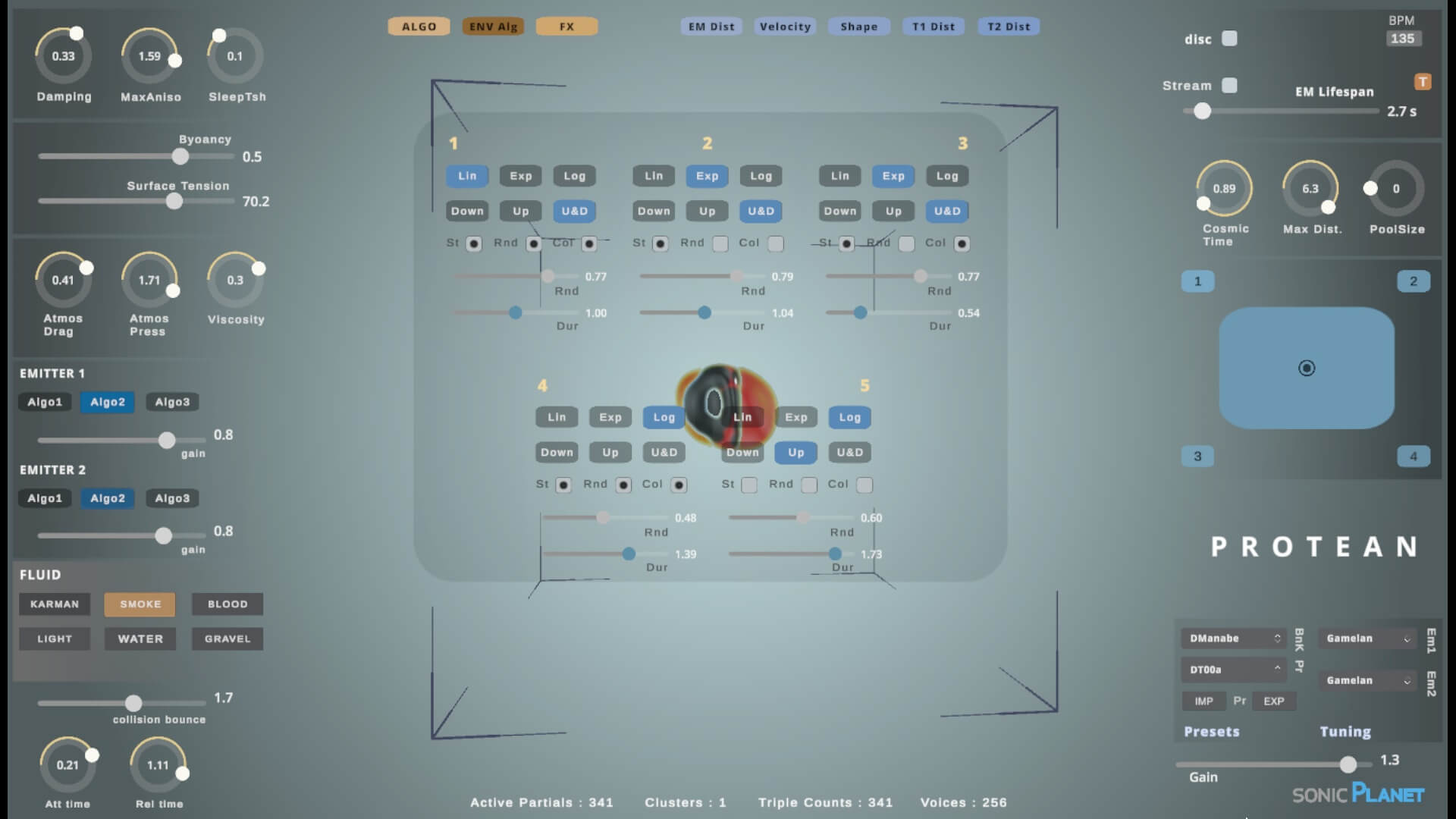
Envelopes feature controls for shape (linear, exponential and logarithmic), direction (down, up plus up and down) and envelope duration as well as trigger modes, such as with the creation of a new synth voice, when a particle collides with a cube wall, and randomly.
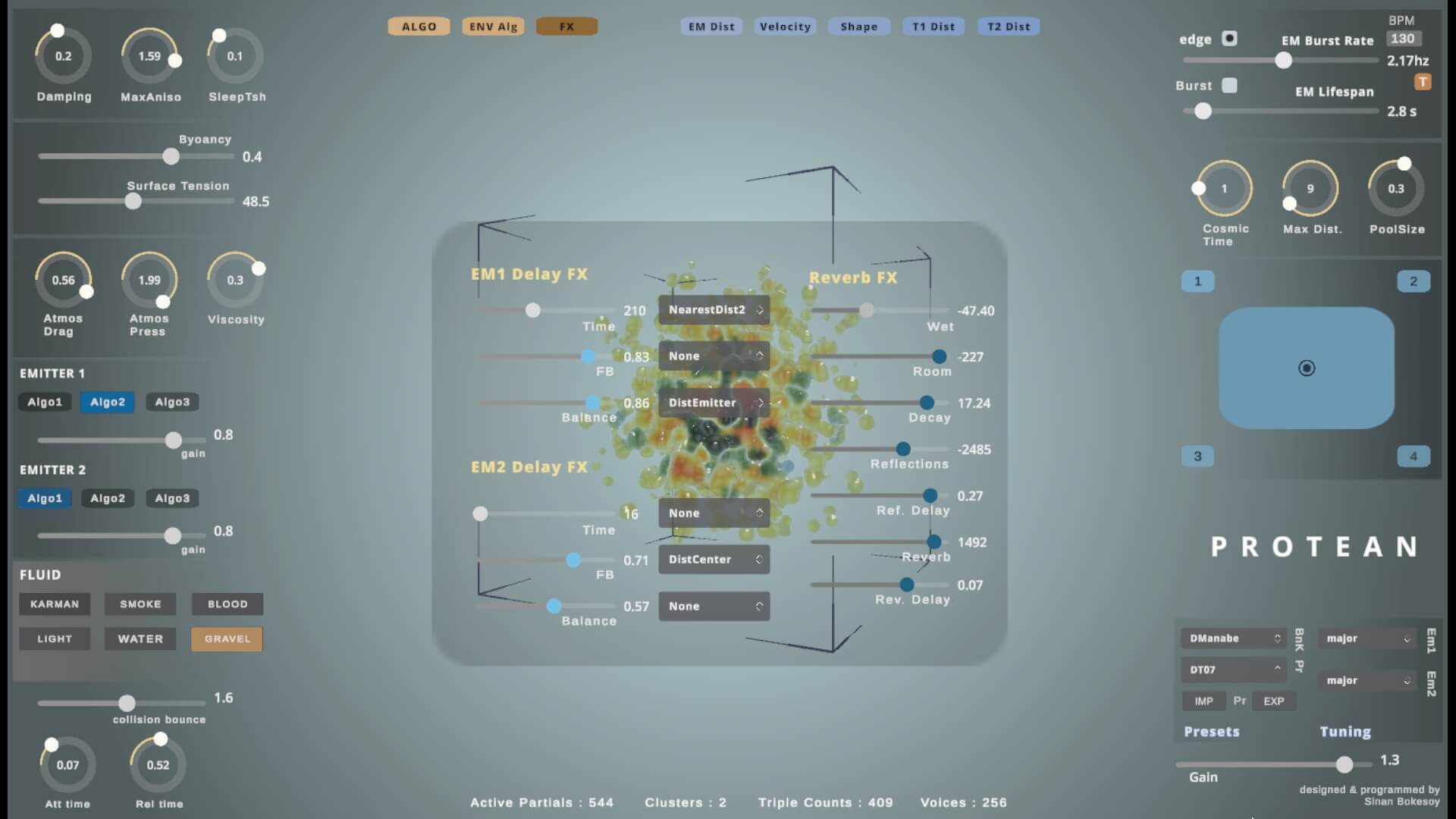
Lastly, there’s an effects section. This behaves as you would expect it to, with a delay circuit for each synth voice plus a global reverb.
Getting To Grips With Protean
As you’ve probably guessed by now Protean is not like other synths. And unless you’re well-versed in the laws of fluid dynamics, most of the parameters won’t make sense until you start playing around with them. And even then, because there’s so much happening, it can be hard to make connections between what you’ve done and the emerging sound. But that’s part of the fun and mystery of Protean. When you throw a rock in a pond you know you’re going to get ripples but exactly how they’ll form remains unknown until you try it.
The best way to approach Protean is to let things unfold naturally. You can map a MIDI controller to the parameters and play with it in that way, or create automations in a DAW using the remote plugin.
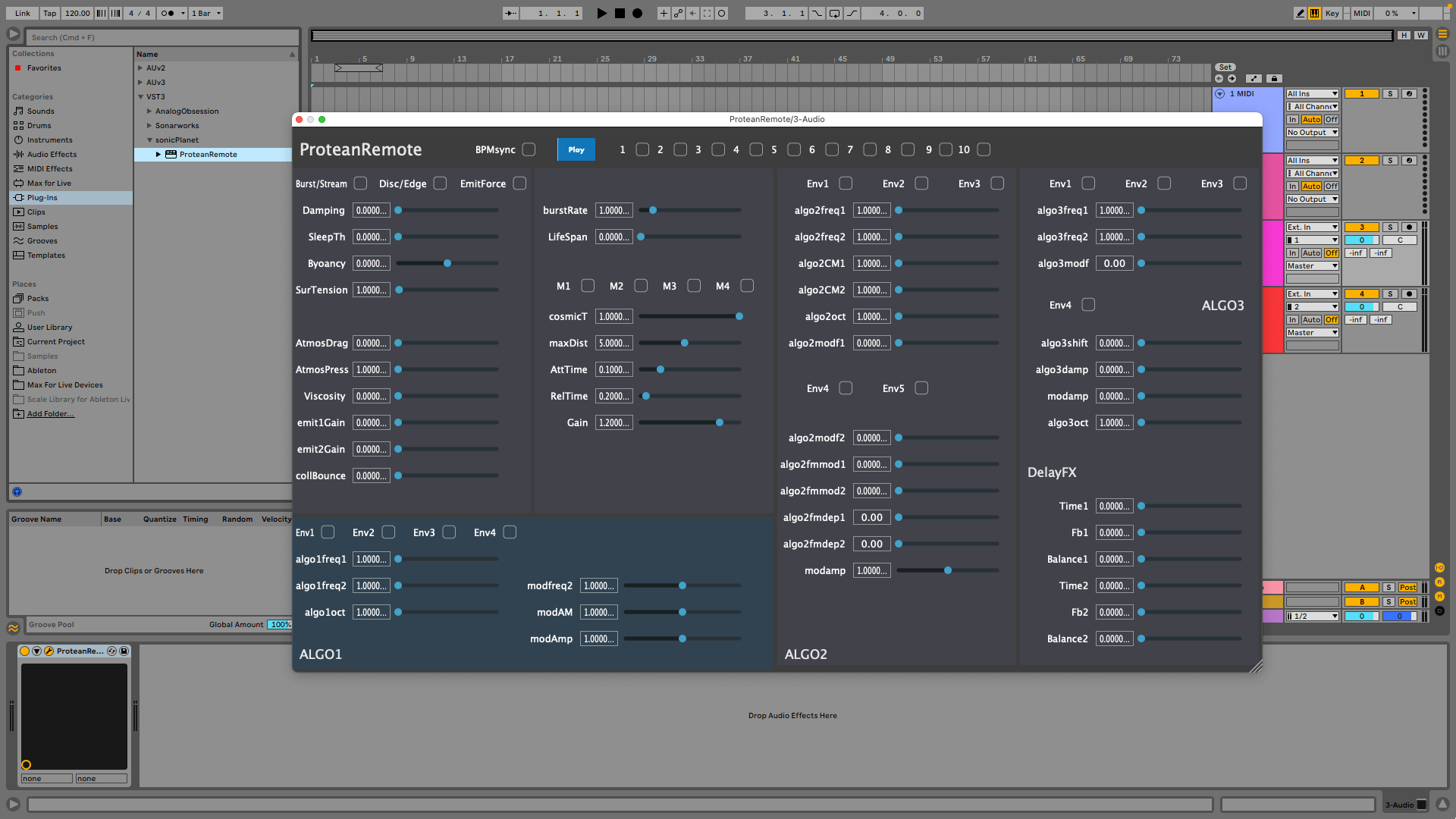
You can bounce audio out directly with the standalone app or capture it in a DAW – either way, having it offline will give you another way to work with your sounds. This makes it an incredible tool for sound design or live performance – ambient and noise music are obvious genres.
Don’t forget to use the morph feature for quick changes between presets and to try the different tunings to make the already esoteric instrument even more occult.
In Conclusion
Protean is not for everyone. It’s very complex. It’s also very digital-sounding, its audio being generated entirely from sine waves. As an ambient musician, I can see myself using it to create sound beds and atmospheres for long-form drone pieces. But Protean is also prone to getting noisy so I’ll have to work extra hard to keep it reined in – like the ocean itself it can be both placid and violent. But maybe violent sound is just what you want. If so, Protean may just become your next favorite instrument.
Thanks Adam for your thoughts on Protean. The software is still available at an introductory price for a few more days, so check it out at the sonicPlanet website.
ABOUT THE AUTHOR

Adam Douglas is a music technology writer based in Japan. When he’s not writing for outlets like Attack Magazine, Gearnews and Music Radar, he can usually be found in his studio making ambient music or else out searching for the perfect bowl of ramen.

