
Close Menu

    Subscribe to Updates

    Get the latest creative news from FooBar about art, design and business.

    What's Hot

    Doja Cat Sings Happy Birthday To SAILORR At “Tour Ma Vie World Tour”

    dezembro 8, 2025

    21 Savage Announces ‘WHAT HAPPENED TO THE STREETS?’ Release Date

    dezembro 8, 2025

    Cardi B, A$AP Rocky & More

    dezembro 8, 2025
    Facebook X (Twitter) Instagram
    Facebook X (Twitter) Instagram Vimeo
    Producer Gang | Home of Producers
    • Home
    • Articles
    • Downloads
      • VST’s
    • Tutoriais
    • Plugins

      NoiseAsh offers Backs EQ as a free download for a limited time

      dezembro 8, 2025

      12 Days of Soundtoys: get six FREE plugins starting with Little PrimalTap

      dezembro 8, 2025

      Synchro Arts 12 Days of Free Plugins: Get four FREE plugins for a limited time

      dezembro 8, 2025

      TonalMark releases Analog Glow, a FREE analog-style saturation plugin for macOS

      dezembro 8, 2025

      Variety of Sound releases FerricTDS mkIII, a FREE tape saturation effect for Windows

      dezembro 4, 2025
    • News
      1. Plugins
      2. VST’s
      3. Hip-Hop
      4. Billboard
      5. View All

      NoiseAsh offers Backs EQ as a free download for a limited time

      dezembro 8, 2025

      12 Days of Soundtoys: get six FREE plugins starting with Little PrimalTap

      dezembro 8, 2025

      Synchro Arts 12 Days of Free Plugins: Get four FREE plugins for a limited time

      dezembro 8, 2025

      TonalMark releases Analog Glow, a FREE analog-style saturation plugin for macOS

      dezembro 8, 2025

      Glitchmachines – Polygon v2.1.0 for Windows

      abril 23, 2025

      Toontrack – EZbass 1.3.0 Update for Windows

      abril 23, 2025

      deltarray – GigLad PC Arranger 4.0.2 for Windows

      abril 23, 2025

      Toontrack – Funk Fusion EBX (SOUNDBANK)

      abril 23, 2025

      Doja Cat Sings Happy Birthday To SAILORR At “Tour Ma Vie World Tour”

      dezembro 8, 2025

      21 Savage Announces ‘WHAT HAPPENED TO THE STREETS?’ Release Date

      dezembro 8, 2025

      Cardi B, A$AP Rocky & More

      dezembro 8, 2025

      Monica Brings Out Mariah The Scientist At “The Boy Is Mine” Atlanta Show

      dezembro 6, 2025

      Beyonce Cowboy Carter Tour July 4th in Washington, D.C.: Best Moments

      julho 5, 2025

      Morgan Wallen Notches 18th Country Airplay No. 1

      julho 5, 2025

      Best Moments in Cardiff, Wales

      julho 4, 2025

      Bad Bunny ‘NUEVAYol’ Pro-Immigrant Video Arrives on Fourth of July

      julho 4, 2025

      When The Cure Came to pointblank –

      dezembro 8, 2025

      How to Mix Huge Rock Guitars – Universal Audio

      dezembro 3, 2025

      The History of Ocean Way Studios – Universal Audio

      dezembro 3, 2025

      Introducing Paradise Guitar Studio – Universal Audio

      dezembro 3, 2025
    • Learn How to Sell Beats
    Producer Gang | Home of Producers
    • Home
    • Plugins
    • Hip-Hop
    • News
    • Learn How to Sell Beats
    Home»Articles»White Noise vs Pink noise: What’s the Difference?
    Articles

    White Noise vs Pink noise: What’s the Difference?

    Producer GangBy Producer Gangjulho 3, 2025Nenhum comentário3 Mins Read
    Facebook Twitter Pinterest LinkedIn Tumblr WhatsApp VKontakte Email
    White Noise vs Pink noise: What's the Difference?
    Share
    Facebook Twitter LinkedIn Pinterest Email


    What is the difference between white noise and pink noise?
    A: White noise has equal energy across all frequencies, creating a bright, hiss-like sound. Pink noise reduces energy in higher frequencies, resulting in a warmer, more balanced tone.

    Pink noise is often used in mixing because it aligns more closely with human hearing, helping producers balance frequency ranges more naturally.


    🎧 What Is Audio Noise?

    Noise isn’t always unwanted. In music production, noise can be a useful tool.
    Whether you’re calibrating your monitors or building risers for a drop, noise types play different roles depending on their frequency spectrum.

    Sound Theory 101: Energy, Frequency and Vibration


    🌟 The 4 Main Noise Colors

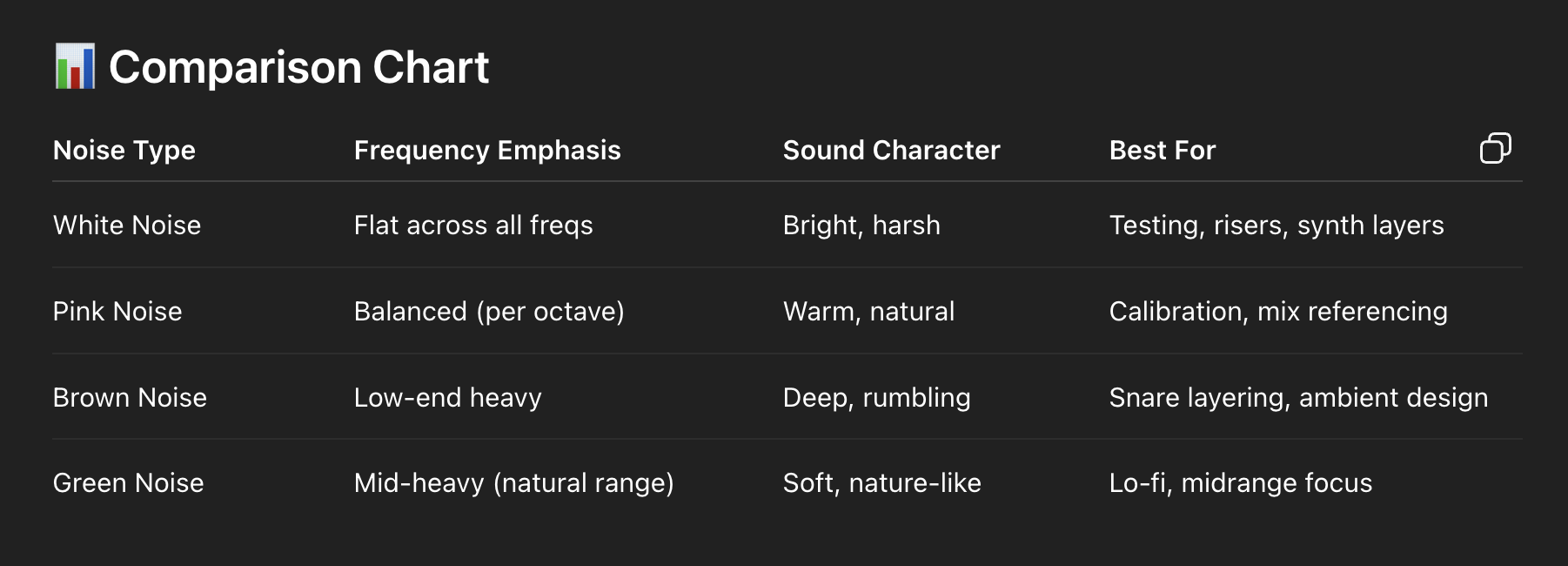
    1. ⚪ White Noise – Equal Energy Per Frequency

    Used for:

    • Testing high-frequency response.

    • Synth risers and transitions.

    • Masking or layering for creative textures.

    What Is Frequency in Music Production?


    2. 🌸 Pink Noise – Equal Energy Per Octave

    • Balanced noise with more energy in low frequencies.

    • Softer and warmer than white noise.

    • Closer to how we perceive sound.

    Used for:

    • Monitor calibration.

    • Balancing mixes.

    • Subtle sound design.

     ⭐️ Start by downloading all of my FREE Music Production Guides ⭐️ It took me years to learn this stuff!


    3. 🟤 Brown Noise – Deeper and Bass-Heavy

    • Power decreases rapidly at higher frequencies.

    • Named after Brownian motion (not the color).

    • Sounds like: Thunder or a waterfall.

    Used for:


    4. 💚 Green Noise – Emphasizes Mid Frequencies

    • Not officially standardized, but used to describe mid-heavy, natural-sounding noise.

    • Often associated with natural environments (e.g. rain, wind).

    Used for:


    🛠️ How to Use Noise in Music Production

    • 🎯 Speaker Testing: Use white or pink noise to test frequency response.

    • 🎚️ Mix Calibration: Mix to pink noise to identify balance issues.

    • 🔊 Sound Design: Add noise to synth patches for texture.

    • 🥁 Drum Design: Use brown or pink noise in snares and percussion.

    • 🎶 Transitions: White noise risers are a staple in electronic genres.


    🔑 Why It Matters

    Noise isn’t just for lab coats and studio engineers. It’s powerful tool for any music producer. Knowing which color of noise to use — and when — gives you a sonic palette that’s both creative and technical. Whether you’re chasing punchy drums, balanced mixes, or rich atmospheres, noise is part of the equation.


    ⭐️ Download my Free Magic Delay settings Guide ⭐️


    ⭐️ Download my Free Magic Reverb settings Guide ⭐️


    #protools #daw #homestudio #recordingschool #recording #musicproduction 

    Also read: 

    How to Start Your Own Online Business Teaching Music

      

    Hey, I’m Futch – Music Production Coach and Ableton Certified Trainer

     

    Learn how to make your first song and beat in Ableton Live with my

    FREE 90-minute Ableton Live course


    I’ve been teaching audio engineering and music production for 35 years.⭐️ 

    Check out my new online music production program: Music Production Ninja…


    Source link

    Share. Facebook Twitter Pinterest LinkedIn Tumblr WhatsApp Email
    Previous ArticleTomorrowland Music & 1001 Tracklists Launch Record Label
    Next Article FiiO introduces K15 Desktop DAC and Headphone Amplifier

    Related Posts

    What Is a Hook in Songwriting and Music Production?

    dezembro 8, 2025

    Classic Drum Machines: The Oberheim DMX

    dezembro 6, 2025

    Pythagorean Geometry in Music Production: Rhythm, Melody & Harmony

    dezembro 4, 2025

    Should I Use Ableton Live or Pro Tools for Music Production?

    dezembro 1, 2025
    Demo
    Our Picks
    • Facebook
    • Twitter
    • Pinterest
    • Instagram
    • YouTube
    • Vimeo
    Don't Miss
    Hip-Hop

    Doja Cat Sings Happy Birthday To SAILORR At “Tour Ma Vie World Tour”

    By Producer Gangdezembro 8, 20250

    Image Image Credit Taylor Hill / Contributor via Getty Images and Joseph Okpako / Contributor…

    21 Savage Announces ‘WHAT HAPPENED TO THE STREETS?’ Release Date

    dezembro 8, 2025

    Cardi B, A$AP Rocky & More

    dezembro 8, 2025

    When The Cure Came to pointblank –

    dezembro 8, 2025

    Subscribe to Updates

    Get the latest creative news from SmartMag about art & design.

    Producer Gang | Home of Producers
    Facebook X (Twitter) Instagram Pinterest
    • Home
    • Plugins
    • Hip-Hop
    • News
    • Learn How to Sell Beats
    © 2025 Producer Gang. Designed by Audio Escola.

    Type above and press Enter to search. Press Esc to cancel.
