

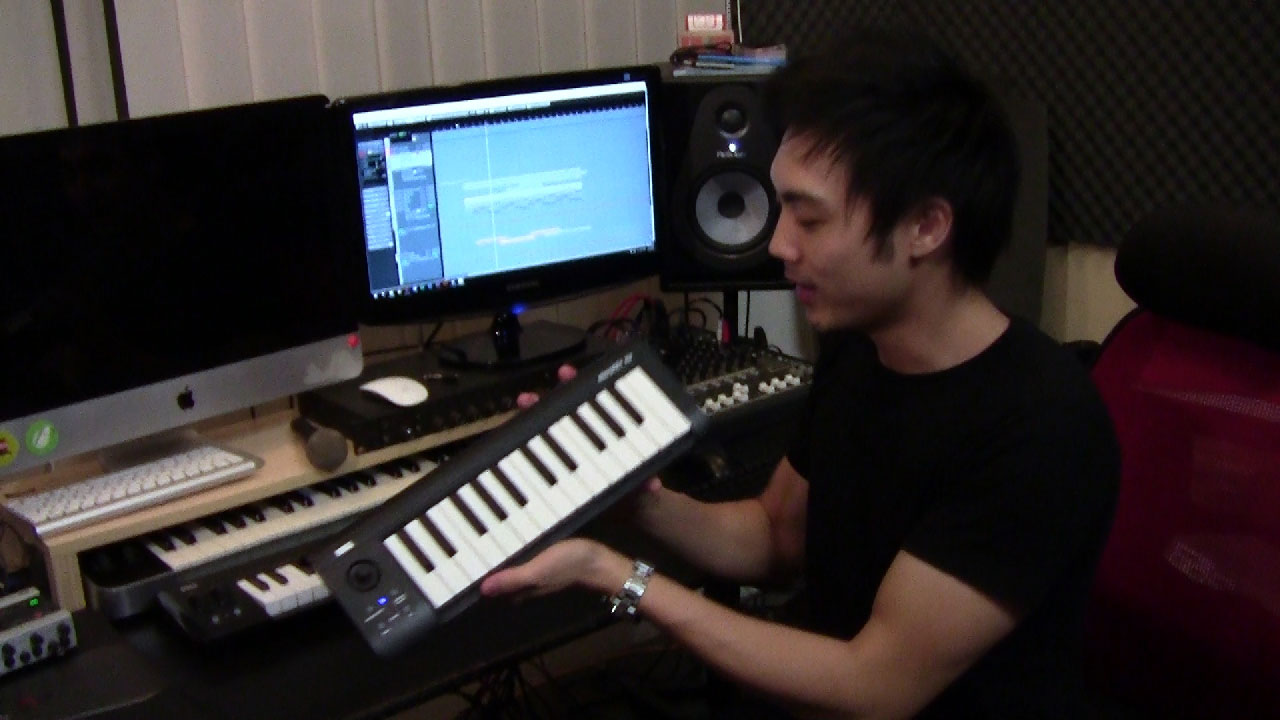

I finally got my hands on the Korg microKEY2 Air last week (check out the video below), and I want to share a review with you.
So what’s new in the microKEY2 Air compared to the previous microKEY? Besides some design update to the existing rectangle-designed MIDI controller, the microKEY2 now comes with a wireless capability. You can now connect the microKEY2 Air to your Mac, PC, tablet or phone with Bluetooth.
I must admit that I was skeptical before actually trying the controller. I’ve tested several wireless MIDI controllers in the past that utilizes WIFI and also Bluetooth to connect to your DAW wirelessly. However, the latency in those controllers was so bad that I decided that it totally makes no sense to use wireless MIDI controllers to make music.
I then had some problems setting the microKEY2 Air up with Windows 10. I had to install drivers provided by Korg and also use a MIDI device uninstall tool to remove some MIDI devices that I wasn’t being utilized on my Windows laptop before being able to use the microKEY2 Air.
However, once I got it sorted, my experience programming music with the microKEY and my main DAW, Steinberg Cubase was nothing but pure joy.
The keys on the microKEY2 Air feels incredible
I had both the 25-KEY and 37-KEY microKEY models to review. The microKEY came in a box, packed like how any other MIDI controllers would. While it came with all the basic things, a USB cable, pair of AA batteries, a manual & a card with Korg’s software license KEY, it didn’t come with an installation CD.
You’ll still need the MIDI drivers from Korg to use the microKEY on your computer, so you’ll have to visit Korg’s official support page to download the drivers.
I was setting the microKEY up on a Windows laptop. All together I downloaded 2 MIDI drivers, one for connecting the microKEY via USB and the other was a Bluetooth-MIDI driver that will be used when I connect to the computer with Bluetooth.
You’ll also probably need to download the Korg Kontrol Editor software, which is used to edit velocity curves, modulation & pitch wheels and the assignable port on the microKEY.
microKEY 25 VS microKEY 37
The microKEY and microKEY 37 have the exact same type of micro semi-weighted keys which felt very responsive.
Here are the main differences between them.
The microKEY 25 comes with a small XY joystick to control pitch and modulation. The is also an arpeggiator function that allows you to play auto arpeggios by just holding down a chord or note combination on the controller. The arpeggiator is a nice nifty function that would come useful if you’re planning to perform live with it. It’s not going to be too useful for production work as the arpeggiator does not sync to a BPM but rather, you tap in the tempo for the arpeggiator.

microKey 37 comes with an assignable input
microKEY 37 comes with the standard pitch and modulation wheels. There is no arpeggiator function on board, but there is a nice addition of an assignable input, which simply means you could use a sustain pedal or expression pedal with the microKEY 37. Because of this, the pianists and keyboardists who is very used to using sustain pedals would find the microKEY 37 more appealing than the 25-KEY variant.
Which to Choose?
That would heavily depend on how you plan to use the microKEY. Both the 25 and 37 KEY models are made portable, so traveling with them should be easy. However, the 25 KEY model is relatively smaller and I could fit it into my backpack.
Choose the microKEY 37 if you’re planning on programming piano lines or instruments that demand lots of KEYs like strings.
Go for the microKEY 25 if you think you’ll be touring a lot and value a very usable micro MIDI controller that would get the job done in tight places. Think about how you’ll be making music in a plane or in a car. The microKEY 25 would fit better in such constricted places due to its smaller size.
Prices (at time of writing)
- Korg microKEY2 Air 25 – $99
- Korg microKEY2 Air 37 – $129
- Korg microKEY2 Air 49 – $159
- Korg microKEY2 Air 61 – $189
Pairing the microKEY via Bluetooth
To pair the microKEY to your computer, you’ll have to first have the necessary drivers installed. Then simply pair the controller like how you would if you’re pairing a Bluetooth mouse. You’ll also need a Bluetooth 4.0 adapter to use the microKEY Air effectively.
My Windows laptop came with a Bluetooth 4.0 adapter inbuilt, so I didn’t have any glitches. Also, you need Windows 8 or later & MAC OS Yosemite to connect via Bluetooth successfully.
Once connected, launch your DAW or MIDI software and select microKEY Air as your MIDI input source.
The wireless experience was amazing with the really low latency. Together with a dedicated audio interface in your studio setup, I assure you that your latency would be so low that you won’t even notice it when programming music with the microKEY.
A small flaw with Windows Bluetooth
While the wireless experience was great, there is a small annoyance. You’ll have to remove and repair the microKEY under Bluetooth devices, every time you decide to connect the microKEY wirelessly after turning it off.
This means you’ll have to keep the microKEY connected or your computer on all the time. Once the connection is broke, you’ll have to remove and repair the microKEY again.
Although the process to remove and repair the microKEY again only takes a few seconds, it still annoys me that I’ve to go into the Bluetooth devices option and do it every single time. You simply can’t switch the wireless button on microKEY Air and expect to go right away.
What do you think of this flaw? Would you be able to live with it?
Switching between USB & Wireless
There is a small switch at the side of the microKEY used to switch the microKEY to run wirelessly or wired.
Korg stated that the microKEY would be able to run for a full 30 hours on a pair of AA batteries. The microKEY would power down if it doesn’t sense any use in 4 hours to save battery power.
Playability On The microKEY

The Korg Kontrol Editor
It seriously feels good to play on the microKEY. Touch response is amazing and if you have any problems with playability, you could always alter the velocity curve in the Korg Kontrol editor.
I had no problems playing on the microKEY but if you have large fingers, you might find yourself stumbling when playing fast lines on the microKEY because of the smaller KEY size. I, however, believe that most would get used to playing on the microKEY with some practice hours in.
The KEYs feel sturdy and would take some heavy playing, unlike the Korg nanoKEY (Mine broke just after a few music making sessions).
Baseline
The Korg microKEY is a MIDI controller that is worthy of being mentioned. It’s a very playable MIDI controller and I can see myself making music with it seriously.
The wireless capability is a godsend and if you get your hands on a unit, you’ll agree with me that that the midi controller is also made sturdy and should definitely last a while.
The Pros
Nice KEYs, durable and wireless is remarkable.
The Cons
Flaw in Bluetooth connection automatically pairing. Small KEY size.

Verdict
The microKEY2 Air is a good choice for traveling musicians & producers. It’s made small so traveling or having an additional KEYboard on stage would be easy. It’s advised however to look for a normal sized KEYboard/MIDI controller as your main KEYboard.
