
Close Menu

    Subscribe to Updates

    Get the latest creative news from FooBar about art, design and business.

    What's Hot

    Universal Audio’s Moog Minimoog is just $29 until January 1st

    dezembro 31, 2025

    Hilit Kolet shares how she uses Komplete Kontrol to capture her raw energy

    dezembro 31, 2025

    194db Audio releases FREE Vox Relief Lite vocal processing plugin

    dezembro 31, 2025
    Facebook X (Twitter) Instagram
    Facebook X (Twitter) Instagram Vimeo
    Producer Gang | Home of Producers
    • Home
    • Articles
    • Downloads
      • VST’s
    • Tutoriais
    • Plugins

      Universal Audio’s Moog Minimoog is just $29 until January 1st

      dezembro 31, 2025

      194db Audio releases FREE Vox Relief Lite vocal processing plugin

      dezembro 31, 2025

      Saint Mike DSP Vocal Acrobatics vocal compressor plugin is FREE for a limited time

      dezembro 31, 2025

      Soft Loop Audio releases FREE Harmonic Echo generative MIDI plugin

      dezembro 30, 2025

      Emily Hopkins releases Chippo, a FREE chiptune-inspired sequencer plugin

      dezembro 30, 2025
    • News
      1. Plugins
      2. VST’s
      3. Hip-Hop
      4. Billboard
      5. View All

      Universal Audio’s Moog Minimoog is just $29 until January 1st

      dezembro 31, 2025

      194db Audio releases FREE Vox Relief Lite vocal processing plugin

      dezembro 31, 2025

      Saint Mike DSP Vocal Acrobatics vocal compressor plugin is FREE for a limited time

      dezembro 31, 2025

      Soft Loop Audio releases FREE Harmonic Echo generative MIDI plugin

      dezembro 30, 2025

      Glitchmachines – Polygon v2.1.0 for Windows

      abril 23, 2025

      Toontrack – EZbass 1.3.0 Update for Windows

      abril 23, 2025

      deltarray – GigLad PC Arranger 4.0.2 for Windows

      abril 23, 2025

      Toontrack – Funk Fusion EBX (SOUNDBANK)

      abril 23, 2025

      Big Sean Breaks Down His Favorite Features, From Leon Thomas To Drake

      dezembro 31, 2025

      Doechii Addresses Industry Plant Rumors On SZA-Assisted “Girl, Get Up”

      dezembro 31, 2025

      A$AP Rocky Covers Rent For Harlem Tenants In Powerful Tribute To His Roots

      dezembro 30, 2025

      Janet Jackson’s “Folded” Transition Earns Praise From Kehlani

      dezembro 30, 2025

      Beyonce Cowboy Carter Tour July 4th in Washington, D.C.: Best Moments

      julho 5, 2025

      Morgan Wallen Notches 18th Country Airplay No. 1

      julho 5, 2025

      Best Moments in Cardiff, Wales

      julho 4, 2025

      Bad Bunny ‘NUEVAYol’ Pro-Immigrant Video Arrives on Fourth of July

      julho 4, 2025

      Student Spotlights of 2025 –

      dezembro 30, 2025

      Top 10 Most Shazamed Songs of 2025 –

      dezembro 29, 2025

      Capturing Christmas Magic with Butch Walker – Universal Audio

      dezembro 26, 2025

      pointblank Recordings Artist, Sam The Zoologist Performs with Casey Lowery –

      dezembro 26, 2025
    • Learn How to Sell Beats
    Producer Gang | Home of Producers
    • Home
    • Plugins
    • Hip-Hop
    • News
    • Learn How to Sell Beats
    Home»Articles»How To Use Your Keyboard or Digital Piano As MIDI Controller
    Articles

    How To Use Your Keyboard or Digital Piano As MIDI Controller

    Producer GangBy Producer Gangabril 26, 2025Nenhum comentário3 Mins Read
    Facebook Twitter Pinterest LinkedIn Tumblr WhatsApp VKontakte Email
    Audio Mentor
    Share
    Facebook Twitter LinkedIn Pinterest Email


    Do you happen to have a music keyboard or digital piano lying around somewhere at home? Put that keyboard into use by using it as a MIDI controller.

    It would still work even if the keyboard you have is really old.

    All you need is for your keyboard to have a MIDI OUT port to use it as a MIDI controller. Check out the video below.

    If you prefer to read, here we go

    Turning A Cheap Keyboard / Digital Piano Into A MIDI Controller

    First, check if you have MIDI out port on your keyboard. MIDI has existed for over 30 years now, so you can imagine even a very old keyboard sometimes have MIDI outputs. After all, before the USB MIDI controller came about, MIDI is what we use to connect gear so they work with each other.

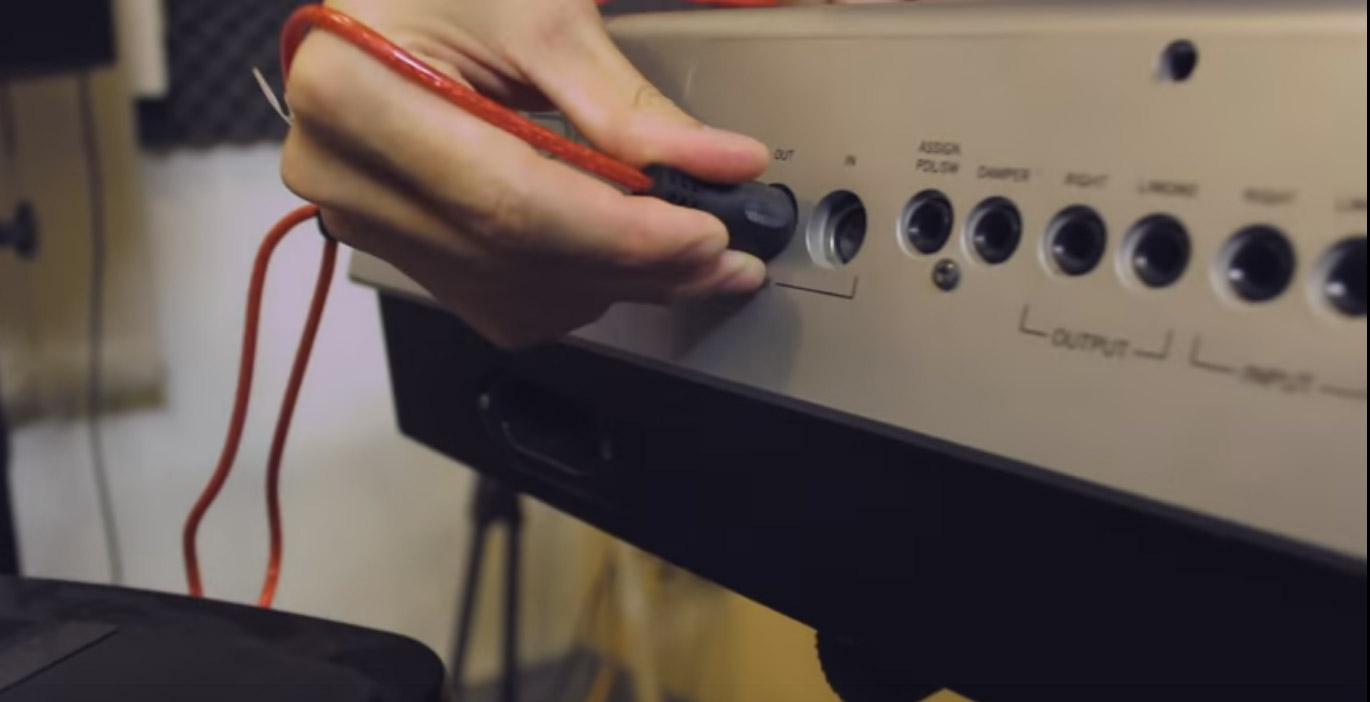
    This is what you should look for on your keyboard, the MIDI out

    So your keyboard has a MIDI out?

    Great! Here’s what you’ll need.

    1. An electronic music keyboard with MIDI out
    2. A USB to MIDI adapter cable (Don’t be cheap and get the cheapest one. I’ve tested them and the cheaper cables are usually very low quality & sometimes don’t work)
    3. A midi software or DAW on your PC or Mac

    The USB to MIDI adapter cable would have USB on one end and three MIDI ports (MIDI in, MIDI out & MIDI thru) on the other.

    What you’ll have to do is to connect the MIDI in of the cable to the MIDI out of your keyboard. Connect the USB end to an available USB port on your computer. At this point, you can hit the keys on your keyboard and check the indicator on the adapter, checking to see if any MIDI signal is being sent. The USB adapter will normally be installed automatically on your Windows or Mac computer. If it doesn’t and Windows reports it to be an unrecognizable USB device, chances are you received a faulty cable adapter.

    Once your computer has successfully recognized the USB to MIDI adapter, launch your MIDI software or DAW next. Most DAWswould be able to detect the MIDI inputs on your computer automatically, but if it doesn’t, you can check your MIDI inputs settings and select your USB to MIDI adapter as the input.

    And that’s really all to it. Load up and instrument and start playing away!

    Don't buy these cables. They don't work and is not reliable when they do.

    Don’t buy these cables. They don’t work and is not reliable when they do.

    Warning: Don’t buy the extra cheap MIDI to USB cables. Those usually don’t work or have very bad latencies. Buy a midrange USB to MIDI adapter cable like the one I recommended above and you’ll never go wrong. You can also choose to buy from a reputable brand like Alesis, but I don’t think it’s necessary to spend extra on a cable.

    Did The MIDI to USB Adapter Work For You?

    Let me know if you were successful in hooking your old keyboard to your computer as a MIDI controller. If you need help, please comment below.




    Source link

    Share. Facebook Twitter Pinterest LinkedIn Tumblr WhatsApp Email
    Previous ArticleKanye West, Pope Francis & Donald Trump Created Classic Conspiracy Collision
    Next Article GSi releases Genuine Sounds Vol. II

    Related Posts

    How Do I Get My Bass & Kick To Work Together in a Mix?

    dezembro 30, 2025

    Classic Drum Machines: The MPC60

    dezembro 27, 2025

    One Small Fix. A Completely Different Mix.

    dezembro 23, 2025

    Classic Drum Machines: The SP-1200

    dezembro 20, 2025
    Demo
    Our Picks
    • Facebook
    • Twitter
    • Pinterest
    • Instagram
    • YouTube
    • Vimeo
    Don't Miss
    Plugins

    Universal Audio’s Moog Minimoog is just $29 until January 1st

    By Producer Gangdezembro 31, 20250

    Universal Audio has discounted its Moog Minimoog instrument to just $29, marking one of the…

    Hilit Kolet shares how she uses Komplete Kontrol to capture her raw energy

    dezembro 31, 2025

    194db Audio releases FREE Vox Relief Lite vocal processing plugin

    dezembro 31, 2025

    Saint Mike DSP Vocal Acrobatics vocal compressor plugin is FREE for a limited time

    dezembro 31, 2025

    Subscribe to Updates

    Get the latest creative news from SmartMag about art & design.

    Producer Gang | Home of Producers
    Facebook X (Twitter) Instagram Pinterest
    • Home
    • Plugins
    • Hip-Hop
    • News
    • Learn How to Sell Beats
    © 2025 Producer Gang. Designed by Audio Escola.

    Type above and press Enter to search. Press Esc to cancel.