
Close Menu

    Subscribe to Updates

    Get the latest creative news from FooBar about art, design and business.

    What's Hot

    Universal Audio’s Moog Minimoog is just $29 until January 1st

    dezembro 31, 2025

    Hilit Kolet shares how she uses Komplete Kontrol to capture her raw energy

    dezembro 31, 2025

    194db Audio releases FREE Vox Relief Lite vocal processing plugin

    dezembro 31, 2025
    Facebook X (Twitter) Instagram
    Facebook X (Twitter) Instagram Vimeo
    Producer Gang | Home of Producers
    • Home
    • Articles
    • Downloads
      • VST’s
    • Tutoriais
    • Plugins

      Universal Audio’s Moog Minimoog is just $29 until January 1st

      dezembro 31, 2025

      194db Audio releases FREE Vox Relief Lite vocal processing plugin

      dezembro 31, 2025

      Saint Mike DSP Vocal Acrobatics vocal compressor plugin is FREE for a limited time

      dezembro 31, 2025

      Soft Loop Audio releases FREE Harmonic Echo generative MIDI plugin

      dezembro 30, 2025

      Emily Hopkins releases Chippo, a FREE chiptune-inspired sequencer plugin

      dezembro 30, 2025
    • News
      1. Plugins
      2. VST’s
      3. Hip-Hop
      4. Billboard
      5. View All

      Universal Audio’s Moog Minimoog is just $29 until January 1st

      dezembro 31, 2025

      194db Audio releases FREE Vox Relief Lite vocal processing plugin

      dezembro 31, 2025

      Saint Mike DSP Vocal Acrobatics vocal compressor plugin is FREE for a limited time

      dezembro 31, 2025

      Soft Loop Audio releases FREE Harmonic Echo generative MIDI plugin

      dezembro 30, 2025

      Glitchmachines – Polygon v2.1.0 for Windows

      abril 23, 2025

      Toontrack – EZbass 1.3.0 Update for Windows

      abril 23, 2025

      deltarray – GigLad PC Arranger 4.0.2 for Windows

      abril 23, 2025

      Toontrack – Funk Fusion EBX (SOUNDBANK)

      abril 23, 2025

      Big Sean Breaks Down His Favorite Features, From Leon Thomas To Drake

      dezembro 31, 2025

      Doechii Addresses Industry Plant Rumors On SZA-Assisted “Girl, Get Up”

      dezembro 31, 2025

      A$AP Rocky Covers Rent For Harlem Tenants In Powerful Tribute To His Roots

      dezembro 30, 2025

      Janet Jackson’s “Folded” Transition Earns Praise From Kehlani

      dezembro 30, 2025

      Beyonce Cowboy Carter Tour July 4th in Washington, D.C.: Best Moments

      julho 5, 2025

      Morgan Wallen Notches 18th Country Airplay No. 1

      julho 5, 2025

      Best Moments in Cardiff, Wales

      julho 4, 2025

      Bad Bunny ‘NUEVAYol’ Pro-Immigrant Video Arrives on Fourth of July

      julho 4, 2025

      Student Spotlights of 2025 –

      dezembro 30, 2025

      Top 10 Most Shazamed Songs of 2025 –

      dezembro 29, 2025

      Capturing Christmas Magic with Butch Walker – Universal Audio

      dezembro 26, 2025

      pointblank Recordings Artist, Sam The Zoologist Performs with Casey Lowery –

      dezembro 26, 2025
    • Learn How to Sell Beats
    Producer Gang | Home of Producers
    • Home
    • Plugins
    • Hip-Hop
    • News
    • Learn How to Sell Beats
    Home»Articles»How to Set Up Your Home Studio Speakers
    Articles

    How to Set Up Your Home Studio Speakers

    Producer GangBy Producer Gangmaio 1, 2025Nenhum comentário4 Mins Read
    Facebook Twitter Pinterest LinkedIn Tumblr WhatsApp VKontakte Email
    How to Set Up Your Home Studio Speakers
    Share
    Facebook Twitter LinkedIn Pinterest Email


    How do you set up studio monitors at home?
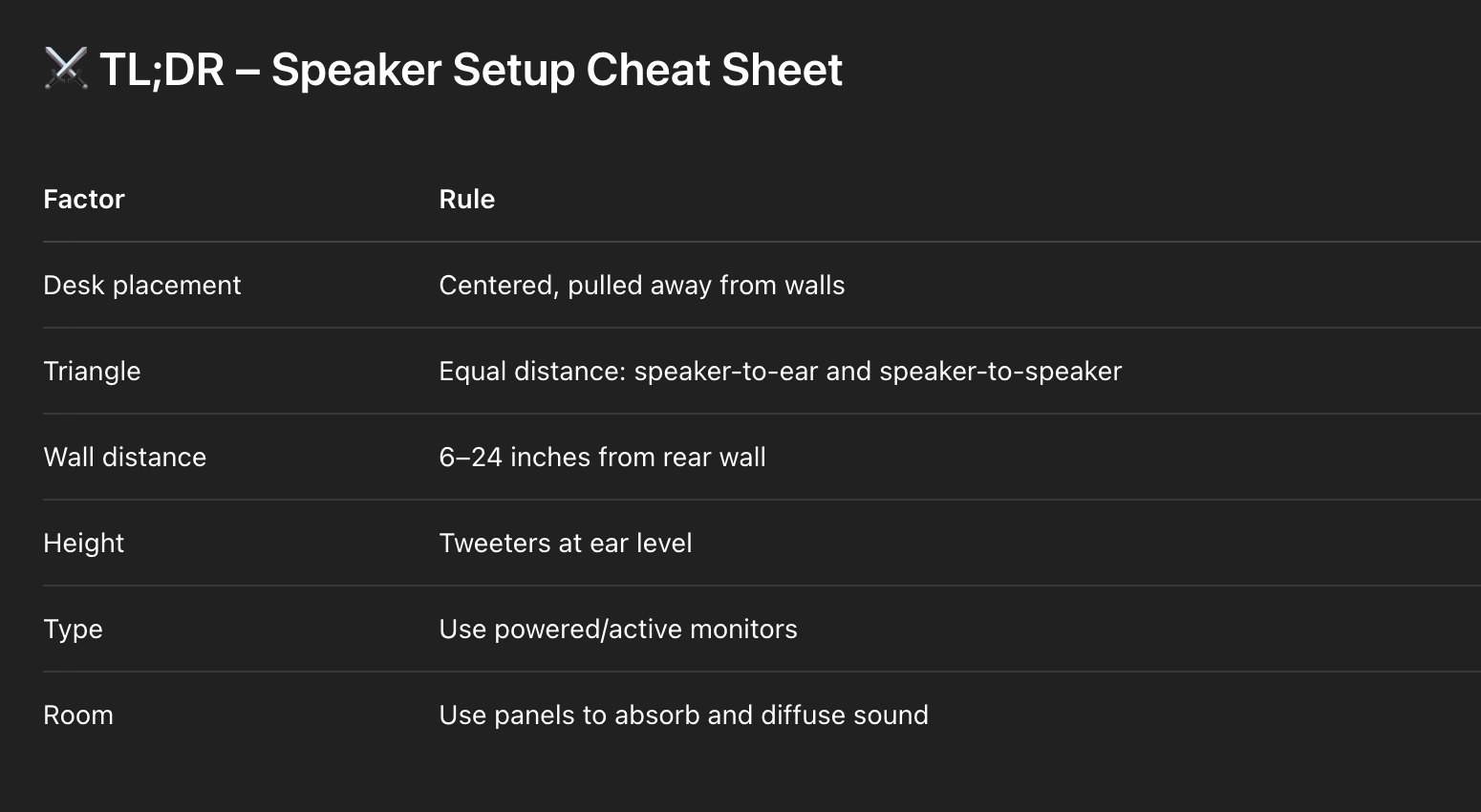
    To set up your home studio speakers properly:

    1. Place your desk away from the wall

    2. Form an equilateral triangle between your two speakers and your head

    3. Keep speakers at ear level, pointed toward your ears

    4. Avoid placing them too close to walls

    5. Use powered monitors unless you have an amplifier

    6. Add acoustic panels for deadening and diffusion to improve clarity

    The Home Studio Setup Guide: How To Get The Best Sound Out Of Your Room


    You can have great songs, killer plugins, and the best laptop in the game —
    but if your speakers aren’t set up right, your mix will always lie to you.

    Let’s break down the fundamentals of proper monitor setup so you can trust what you’re hearing — and make better mixing decisions.


    🪑 1. Desk Location: Centered, But Not Flush

    Don’t shove your desk right up against a wall.
    Pull it out at least a foot or two, and center it between the side walls of your room. This helps minimize early reflections and keeps your stereo field balanced.

    🎧 Rule: symmetry helps. Chaos hurts.


    ⭐️ Start by downloading all of my FREE Music Production Guides ⭐️ It took me years to learn this stuff!


    🔺 2. The Speaker Triangle (Equilateral = Equal Trust)

    The golden rule: your head and both speakers should form an equilateral triangle.

    That means:

    For example: if the speakers are 3 feet apart, they should also be 3 feet from your head.

    Angle the speakers inward so they point directly at your ears — not straight forward, and not outward into the room.

    🥷 Think of it like a ninja’s focus — all energy pointed to the center.


    📏 3. Distance from Walls

    Don’t back your monitors all the way up to a wall. The bass will build up and lie to you.

    Try to keep at least 6–12 inches between the rear of the speaker and the wall.

    If you have rear-ported speakers, give them even more room (12–24 inches).
    Otherwise, you’ll end up cutting bass you actually need.

    How to Build an Inspiring Home Studio for Singer-Songwriters


    🧠 4. Ear Height = Truth

    Your speakers should be at ear level — not on your desk blasting into your chest, and not high above your head. You want the tweeters to hit your ears directly.

    Use speaker stands, risers, or foam pads to lift them into position.

    🎯 If the highs sound dull, you’re probably not at the sweet spot.


    ⭐️ Download my FREE Home Studio Setup Guide ⭐️ 


    🔌 5. Powered vs Passive Monitors

    In 2024, powered monitors (also called active monitors) are your best bet. They have built-in amps and are plug-and-play for most home studios.

    Passive monitors need an external amp and are typically found in hi-fi or vintage setups.

    Unless you know exactly what you’re doing, go with powered speakers from brands like:

    • KRK

    • Yamaha (HS5, HS7, HS8)

    • Kali

    • JBL

    • Adam Audio

    ⚡ Simplicity = power. No amp? Go active.


    🧱 6. Deadening and Diffusion

    Your room is lying to you. But you can fight back with acoustic treatment.

    Focus on:

    • Deadening: absorb early reflections using acoustic panels, especially on side walls and behind your head

    • Diffusion: scatter sound to avoid harsh reflections using bookshelves, diffusers, or angled wood

    Bass traps in the corners help tame low-frequency buildup.

    You don’t need to kill your room — just tame it enough so your mix decisions are based on the song, not the space.

    Soundproofing 101: Affordable Solutions for a Quiet Home Studio


    🥷 Final Thought

    Your monitors are your dojo windows.
    If they’re aimed wrong, too close to a wall, or lost in reflections, you’ll make the right moves for the wrong reasons.

    Set them up right —
    and suddenly, every mix move feels clear, calculated, and confident.

    🎧 Want to hear your truth?
    🔊 Then shape your space with intention.


    ⭐️ Download my Free Magic Compressor Settings Guide ⭐️ 

    ⭐️ Download my Free 10 Characteristic of a Sound Wave Guide ⭐️


    #protools #daw #homestudio #recordingschool #recording #musicproduction 

    Also read: 

    How to Start Your Own Online Business Teaching Music


    Hey, I’m Futch – Music Production Coach and Ableton Certified Trainer


    Learn how to make your first song and beat in Ableton Live with my

    FREE 90-minute Ableton Live course


    I’ve been teaching audio engineering and music production for 35 years.⭐️ 

    Check out my new online music production program: Music Production Ninja…


    Source link

    Share. Facebook Twitter Pinterest LinkedIn Tumblr WhatsApp Email
    Previous Article‘Morgan Wallen Radio’ Arrives on SiriusXM Ahead of ‘I’m the Problem’
    Next Article Aurora DSP releases Laboga Diamond Sound Suite

    Related Posts

    How Do I Get My Bass & Kick To Work Together in a Mix?

    dezembro 30, 2025

    Classic Drum Machines: The MPC60

    dezembro 27, 2025

    One Small Fix. A Completely Different Mix.

    dezembro 23, 2025

    Classic Drum Machines: The SP-1200

    dezembro 20, 2025
    Demo
    Our Picks
    • Facebook
    • Twitter
    • Pinterest
    • Instagram
    • YouTube
    • Vimeo
    Don't Miss
    Plugins

    Universal Audio’s Moog Minimoog is just $29 until January 1st

    By Producer Gangdezembro 31, 20250

    Universal Audio has discounted its Moog Minimoog instrument to just $29, marking one of the…

    Hilit Kolet shares how she uses Komplete Kontrol to capture her raw energy

    dezembro 31, 2025

    194db Audio releases FREE Vox Relief Lite vocal processing plugin

    dezembro 31, 2025

    Saint Mike DSP Vocal Acrobatics vocal compressor plugin is FREE for a limited time

    dezembro 31, 2025

    Subscribe to Updates

    Get the latest creative news from SmartMag about art & design.

    Producer Gang | Home of Producers
    Facebook X (Twitter) Instagram Pinterest
    • Home
    • Plugins
    • Hip-Hop
    • News
    • Learn How to Sell Beats
    © 2025 Producer Gang. Designed by Audio Escola.

    Type above and press Enter to search. Press Esc to cancel.


