
Close Menu

    Subscribe to Updates

    Get the latest creative news from FooBar about art, design and business.

    What's Hot

    Lizzo Speaks Out After Fat-Shaming Claims Are Dropped In Dancers’ Lawsuit

    dezembro 16, 2025

    Tyla Reacts After PETA Criticizes Her Tiger-Walking Video

    dezembro 15, 2025

    Future Named Louis Vuitton Brand Ambassador By Pharrell

    dezembro 15, 2025
    Facebook X (Twitter) Instagram
    Facebook X (Twitter) Instagram Vimeo
    Producer Gang | Home of Producers
    • Home
    • Articles
    • Downloads
      • VST’s
    • Tutoriais
    • Plugins

      Kushview releases ReTuner, a FREE tuning conversion plugin

      dezembro 15, 2025

      Orchestral Tools releases FFOSSO, a freemium instrument player for macOS and Windows

      dezembro 15, 2025

      Zebralette 3 is here: The latest version of u-he’s freeware classic is official

      dezembro 15, 2025

      IK Multimedia drops huge AmpliTube 5 CS December promo with 6 freebies

      dezembro 15, 2025

      AmenBreak VST offers a generous FREE edition and a hands-on approach to break mangling

      dezembro 15, 2025
    • News
      1. Plugins
      2. VST’s
      3. Hip-Hop
      4. Billboard
      5. View All

      Kushview releases ReTuner, a FREE tuning conversion plugin

      dezembro 15, 2025

      Orchestral Tools releases FFOSSO, a freemium instrument player for macOS and Windows

      dezembro 15, 2025

      Zebralette 3 is here: The latest version of u-he’s freeware classic is official

      dezembro 15, 2025

      IK Multimedia drops huge AmpliTube 5 CS December promo with 6 freebies

      dezembro 15, 2025

      Glitchmachines – Polygon v2.1.0 for Windows

      abril 23, 2025

      Toontrack – EZbass 1.3.0 Update for Windows

      abril 23, 2025

      deltarray – GigLad PC Arranger 4.0.2 for Windows

      abril 23, 2025

      Toontrack – Funk Fusion EBX (SOUNDBANK)

      abril 23, 2025

      Lizzo Speaks Out After Fat-Shaming Claims Are Dropped In Dancers’ Lawsuit

      dezembro 16, 2025

      Tyla Reacts After PETA Criticizes Her Tiger-Walking Video

      dezembro 15, 2025

      Future Named Louis Vuitton Brand Ambassador By Pharrell

      dezembro 15, 2025

      Clipse To Support Linkin Park’s 2026 “From Zero World Tour” In Europe

      dezembro 15, 2025

      Beyonce Cowboy Carter Tour July 4th in Washington, D.C.: Best Moments

      julho 5, 2025

      Morgan Wallen Notches 18th Country Airplay No. 1

      julho 5, 2025

      Best Moments in Cardiff, Wales

      julho 4, 2025

      Bad Bunny ‘NUEVAYol’ Pro-Immigrant Video Arrives on Fourth of July

      julho 4, 2025

      Uncover Your Inner Songwriter on a pointblank Degree –

      dezembro 11, 2025

      Stem Separation in Ableton Live –

      dezembro 11, 2025

      Best Plug-Ins for Your Volt Recording Studio – Universal Audio

      dezembro 10, 2025

      Save Thousands with Huge Black Friday Deals

      dezembro 9, 2025
    • Learn How to Sell Beats
    Producer Gang | Home of Producers
    • Home
    • Plugins
    • Hip-Hop
    • News
    • Learn How to Sell Beats
    Home»Articles»How EQ Works: Types, Bands & Filters
    Articles

    How EQ Works: Types, Bands & Filters

    Producer GangBy Producer Gangjunho 12, 2025Nenhum comentário3 Mins Read
    Facebook Twitter Pinterest LinkedIn Tumblr WhatsApp VKontakte Email
    How EQ Works: Types, Bands & Filters
    Share
    Facebook Twitter LinkedIn Pinterest Email


    🎯 How does EQ work in music production?
    EQ (Equalization) adjusts the volume of specific frequency ranges in your audio. There are 4 popular EQ types—graphic, semi-parametric, parametric, and dynamic. EQ bands divide sound into zones like sub-bass, mids, and air. Filters such as high-pass, low-pass, and notch shape the tone by boosting, cutting, or isolating frequencies.

    The Best Equalizer Settings: The 5 Step Magic EQ Settings that work on Everything!


    Everything You Need to Know About Equalization in Music Production

    Equalization is one of the most fundamental tools in music production. Whether you’re cleaning up a muddy mix, shaping a kick drum, or adding sparkle to vocals, understanding EQ gives you superpowers over your sound.

    In this guide, we’ll break EQ into three essential parts:

    1. Types of EQ

    2. EQ Frequency Bands

    3. Filters and Their Functions


    Part 1: Types of EQ 

    Each EQ type offers a different level of control and complexity.

    🎛️ Graphic EQ

    • Uses fixed frequency bands.

    • You adjust each band with a slider.

    • Great for live sound and quick shaping.

    • Example: Waves API 560

    🎛️ Semi-Parametric EQ

    • Offers control over gain and Q (bandwidth), but not frequency selection.

    • Common on older analog mixing consoles.

    🎛️ Parametric EQ

    🎛️ Dynamic EQ

    • Reacts to incoming signals like a compressor.

    • Boosts or cuts a frequency only when needed.

    • Great for taming harsh vocals or resonant instruments.

    • Example: Sound Theory Gullfoss, TDR Nova


    Dynamic EQ: Taming Resonant Frequencies in Your Audio Tracks

    ⭐️ Start by downloading all of my FREE Music Production Guides ⭐️ It took me years to learn this stuff!


    Part 2: EQ Frequency Bands
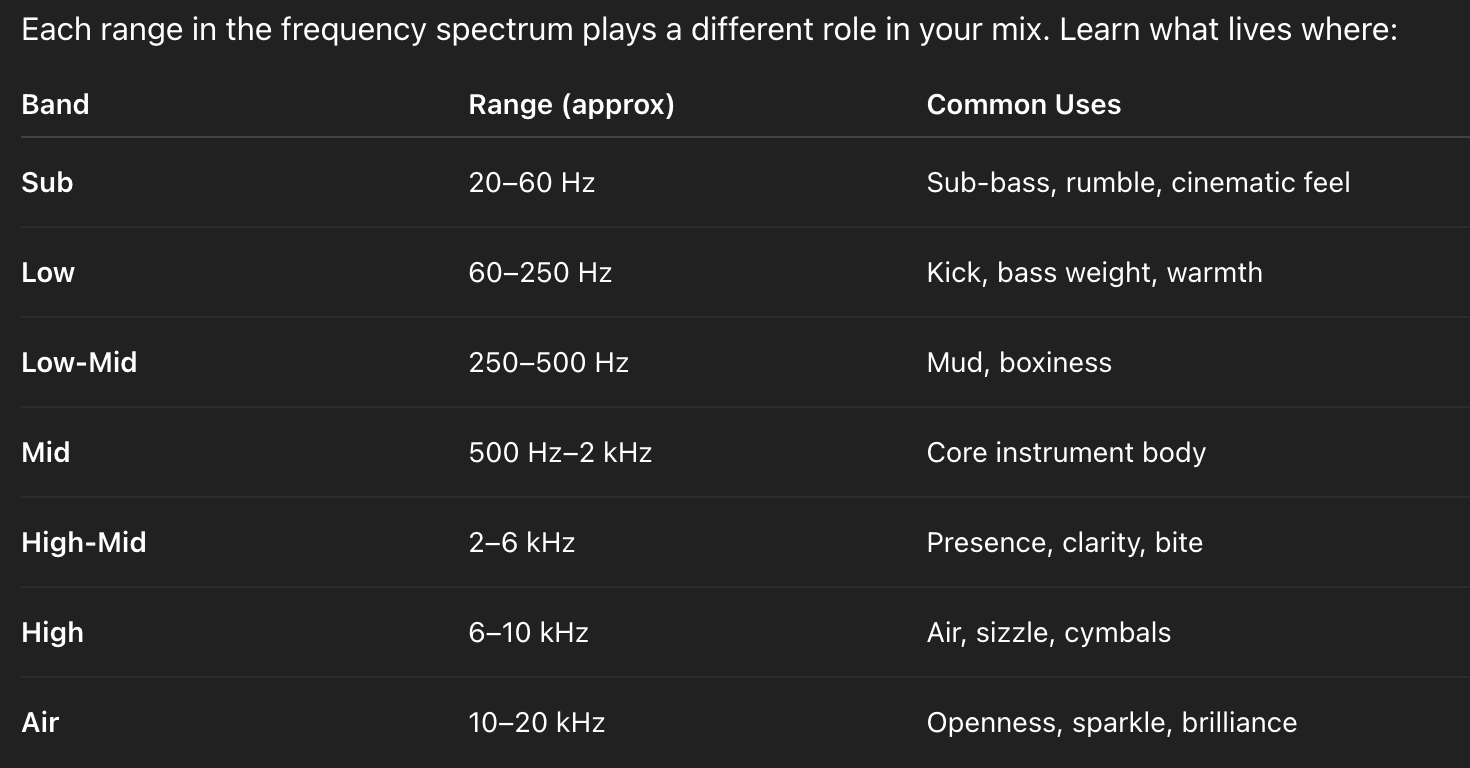
    Balancing these zones helps create clean, full, and expressive mixes.


    Part 3: Filters

    Filters let you isolate, remove, or shape specific parts of the spectrum.

    🧼 High-Pass Filter (HPF)

    💨 Low-Pass Filter (LPF)

    🎯 Band-Pass Filter (BPF)

    🪵 Notch Filter

    🎚️ Peak (Bell) Filter

    🪜 Low Shelf / High Shelf

    Best Equalizer Settings for Vocals, Instruments & Mixes


    Final Thoughts

    EQ is both art and science. Start with broad strokes—low cuts, basic shaping—then get surgical when needed. Knowing the tools, the frequency ranges, and how to hear what’s happening is what separates a beginner from a balanced mix ninja.

    Want to go deeper? Try EQing the same sound with each type and filter. Your ears will thank you.


    ⭐️ Download my Free Magic Reverb settings Guide ⭐️
    ⭐️ Download my Free Magic Compressor Settings Guide ⭐️ 


    #protools #daw #homestudio #recordingschool #recording #musicproduction 

    Also read: 

    How to Start Your Own Online Business Teaching Music

      

    Hey, I’m Futch – Music Production Coach and Ableton Certified Trainer

     

    Learn how to make your first song and beat in Ableton Live with my

    FREE 90-minute Ableton Live course


    I’ve been teaching audio engineering and music production for 35 years.⭐️ 

    Check out my new online music production program: Music Production Ninja…


    Source link

    Share. Facebook Twitter Pinterest LinkedIn Tumblr WhatsApp Email
    Previous ArticleRolling Loud Festival Coming to India
    Next Article Cory Booker Says He Once Went on Blind Date With Mariah C…

    Related Posts

    Synth Legends: The Roland Juno-106

    dezembro 13, 2025

    Ethos, Pathos, and Logos in Music Production

    dezembro 11, 2025

    How To Land Your First Podcast Editor Job

    dezembro 11, 2025

    What Is a Hook in Songwriting and Music Production?

    dezembro 8, 2025
    Demo
    Our Picks
    • Facebook
    • Twitter
    • Pinterest
    • Instagram
    • YouTube
    • Vimeo
    Don't Miss
    Hip-Hop

    Lizzo Speaks Out After Fat-Shaming Claims Are Dropped In Dancers’ Lawsuit

    By Producer Gangdezembro 16, 20250

    Image Image Credit Dia Dipasupil / Staff via Getty Images Image Alt Lizzo attends the…

    Tyla Reacts After PETA Criticizes Her Tiger-Walking Video

    dezembro 15, 2025

    Future Named Louis Vuitton Brand Ambassador By Pharrell

    dezembro 15, 2025

    Clipse To Support Linkin Park’s 2026 “From Zero World Tour” In Europe

    dezembro 15, 2025

    Subscribe to Updates

    Get the latest creative news from SmartMag about art & design.

    Producer Gang | Home of Producers
    Facebook X (Twitter) Instagram Pinterest
    • Home
    • Plugins
    • Hip-Hop
    • News
    • Learn How to Sell Beats
    © 2025 Producer Gang. Designed by Audio Escola.

    Type above and press Enter to search. Press Esc to cancel.
