
Close Menu

    Subscribe to Updates

    Get the latest creative news from FooBar about art, design and business.

    What's Hot

    Unfiltered Audio releases BattleFX, a FREE multi-FX plugin based on Battalion

    maio 16, 2026

    091Audio releases 091HPDoctor, a FREE precision high-pass filter plugin

    maio 15, 2026

    Darkstarz Technologies releases FREE DustBox lo-fi plugin for Windows

    maio 15, 2026
    Facebook X (Twitter) Instagram
    Facebook X (Twitter) Instagram Vimeo
    Producer Gang | Home of Producers
    • Home
    • Articles
    • Downloads
      • VST’s
    • Tutoriais
    • Plugins

      Unfiltered Audio releases BattleFX, a FREE multi-FX plugin based on Battalion

      maio 16, 2026

      091Audio releases 091HPDoctor, a FREE precision high-pass filter plugin

      maio 15, 2026

      Darkstarz Technologies releases FREE DustBox lo-fi plugin for Windows

      maio 15, 2026

      Warmth releases Touched Lite, a FREE shoegaze-inspired multi-FX plugin

      maio 14, 2026

      Polarity releases Polarity-RES, a FREE resonator effect

      maio 14, 2026
    • News
      1. Plugins
      2. VST’s
      3. Hip-Hop
      4. Billboard
      5. View All

      Unfiltered Audio releases BattleFX, a FREE multi-FX plugin based on Battalion

      maio 16, 2026

      091Audio releases 091HPDoctor, a FREE precision high-pass filter plugin

      maio 15, 2026

      Darkstarz Technologies releases FREE DustBox lo-fi plugin for Windows

      maio 15, 2026

      Warmth releases Touched Lite, a FREE shoegaze-inspired multi-FX plugin

      maio 14, 2026

      Glitchmachines – Polygon v2.1.0 for Windows

      abril 23, 2025

      Toontrack – EZbass 1.3.0 Update for Windows

      abril 23, 2025

      deltarray – GigLad PC Arranger 4.0.2 for Windows

      abril 23, 2025

      Toontrack – Funk Fusion EBX (SOUNDBANK)

      abril 23, 2025

      Drake Snippet Leaks Before J. Cole’s ‘The Fall-Off’ Drops

      fevereiro 6, 2026

      J. Cole Releases His “Last” Album ‘The Fall Off’

      fevereiro 6, 2026

      GloRilla’s Sister Says She’s “Obligated” To Give Family $2,500 Each

      fevereiro 6, 2026

      Bad Bunny Reveals What To Expect For Super Bowl LX Halftime Show

      fevereiro 6, 2026

      Beyonce Cowboy Carter Tour July 4th in Washington, D.C.: Best Moments

      julho 5, 2025

      Morgan Wallen Notches 18th Country Airplay No. 1

      julho 5, 2025

      Best Moments in Cardiff, Wales

      julho 4, 2025

      Bad Bunny ‘NUEVAYol’ Pro-Immigrant Video Arrives on Fourth of July

      julho 4, 2025

      Native vs. DSP Plug-Ins – Universal Audio

      maio 13, 2026

      Best Guitar Amp Sims for 2026 – Universal Audio

      maio 13, 2026

      How to Record Electric Guitar at Home – Universal Audio

      maio 6, 2026

      Legendary Dumble Amp Tones in Your DAW – Universal Audio

      maio 6, 2026
    • Learn How to Sell Beats
    Producer Gang | Home of Producers
    • Home
    • Plugins
    • Hip-Hop
    • News
    • Learn How to Sell Beats
    Home»Articles»How Do I Save a Project in My DAW?
    Articles

    How Do I Save a Project in My DAW?

    Producer GangBy Producer Gangmaio 25, 2025Nenhum comentário4 Mins Read
    Facebook Twitter Pinterest LinkedIn Tumblr WhatsApp VKontakte Email
    How Do I Save a Project in My DAW?
    Share
    Facebook Twitter LinkedIn Pinterest Email


    The Pro Method for Never Losing Your Music


    🎯How do you save a project in a DAW?


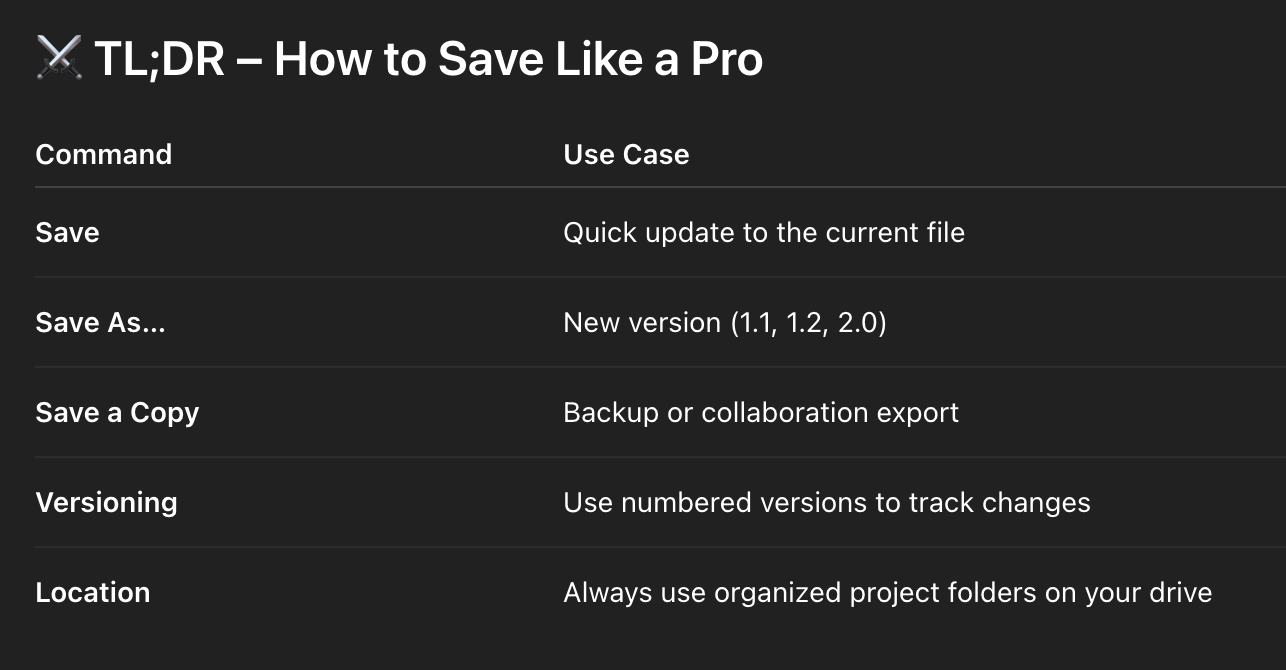
    To save a project in your DAW, use “Save” to overwrite the current version, “Save As…” to create a new version (with a new name), and “Save a Copy” to back up your session without closing the original. Use version naming (e.g., 1.0, 1.1, 1.2) and save to a dedicated project folder on your hard drive to stay organized.

     How to Install DAW Software and Plugins: A Step-by-Step Guide


    You’ve just finished a fire vocal take.
    You tweak the mix. Tweak it more.
    Then something crashes. Or freezes. Or gets overwritten.

    Now it’s gone.

    Welcome to the world of saving your session wrong.

    Let’s fix that right now — by learning how to save like a pro in any DAW.


    💾 1. The Core Saving Commands (and What They Actually Mean)

    Most DAWs offer these three options:

    ✅ Save

    This overwrites the current file. Fast and simple — but risky if you make a mistake you can’t undo.

    Use when:

    ✅ Save As…

    This creates a new version of your session under a new name. It’s essential for versioning.

    Use when:

    • You’re trying something risky

    • You want to create a new mix direction or backup

    • You’ve made significant progress and want to archive this moment

    🥷 Save As is your undo button when life doesn’t give you one.

    ✅ Save a Copy

    Creates a backup without changing the currently open session. Great for archiving or sending files to collaborators.

    Use when:


    ⭐️ Download my FREE Magic EQ Settings that work on EVERYTHING ⭐️ 


    🗂 2. Version Naming: The 1.0, 1.1, 1.2 Method

    Naming matters.
    If every session is called “final mix”, you’ll eventually lose the one that mattered.

    Here’s a pro tip:

    Use consistent naming like:

    • Song_Title_1.0.als

    • Song_Title_1.2.logicx

    • Song_Title_2.0.ptx

    This way, you can always go back — and you’ll know what each version was.

    🎯 Organization = creative freedom.


    💽 3. Where to Save Your DAW Projects

    Avoid the dreaded “Downloads” or “Desktop dump” situation.
    Create a dedicated Project Folder on your external or internal drive:

    Example:

    Music Production > Projects > Artist_Name > Song_Title > Versions

    Inside that, keep:

    • .als, .ptx, .logicx, etc.

    • Audio files / samples (most DAWs manage this automatically)

    • Mixdown bounces

    • Reference tracks

    🎯 Keep your session together. If you move the file but not the folder, things break.


    ⭐️ Start by downloading all of my FREE Music Production Guides ⭐️ It took me years to learn this stuff!


    Always double-check:

    • Audio files are stored with the project

    • Samples are collected or frozen (if needed)

    • You’re not working from a temp folder or cloud drive (unless it’s syncing properly)


    🥷 Final Thought:

    Saving your project isn’t just about protecting your work — it’s about owning your workflow.

    🎧 Save often.
    🧠 Save smart.
    🥷 And never lose the idea that could change everything.
     

    ⭐️ Download my Free Magic Compressor Settings Guide ⭐️ 

    ⭐️ Download my Free 10 Characteristic of a Sound Wave Guide ⭐️


    #protools #daw #homestudio #recordingschool #recording #musicproduction 

    Also read: 

    How to Start Your Own Online Business Teaching Music



    Hey, I’m Futch – Music Production Coach and Ableton Certified Trainer

     

    Learn how to make your first song and beat in Ableton Live with my

    FREE 90-minute Ableton Live course


    I’ve been teaching audio engineering and music production for 35 years.⭐️ 

    Check out my new online music production program: Music Production Ninja…


    Source link

    Share. Facebook Twitter Pinterest LinkedIn Tumblr WhatsApp Email
    Previous ArticleLGP QUA UPDATE: Arrests Made In Murder, Danger Still Looms
    Next Article Producer/Writer Rodney Barnes Talks “Boondocks,” “Sinners,” Batman & More

    Related Posts

    Ableton Live Intro vs Standard vs Suite

    maio 14, 2026

    Classic Synths: Oberheim OB-X

    maio 12, 2026

    Music Production for Beatmakers, Electronic Musicians, and Musicians

    maio 10, 2026

    From a Music Fan to a Music Producer

    maio 7, 2026
    Demo
    Our Picks
    • Facebook
    • Twitter
    • Pinterest
    • Instagram
    • YouTube
    • Vimeo
    Don't Miss
    Plugins

    Unfiltered Audio releases BattleFX, a FREE multi-FX plugin based on Battalion

    By Producer Gangmaio 16, 20260

    Unfiltered Audio has released BattleFX, a free multi-FX plugin built around the send effects section…

    091Audio releases 091HPDoctor, a FREE precision high-pass filter plugin

    maio 15, 2026

    Darkstarz Technologies releases FREE DustBox lo-fi plugin for Windows

    maio 15, 2026

    Warmth releases Touched Lite, a FREE shoegaze-inspired multi-FX plugin

    maio 14, 2026

    Subscribe to Updates

    Get the latest creative news from SmartMag about art & design.

    Producer Gang | Home of Producers
    Facebook X (Twitter) Instagram Pinterest
    • Home
    • Plugins
    • Hip-Hop
    • News
    • Learn How to Sell Beats
    © 2026 Producer Gang. Designed by Audio Escola.

    Type above and press Enter to search. Press Esc to cancel.
