

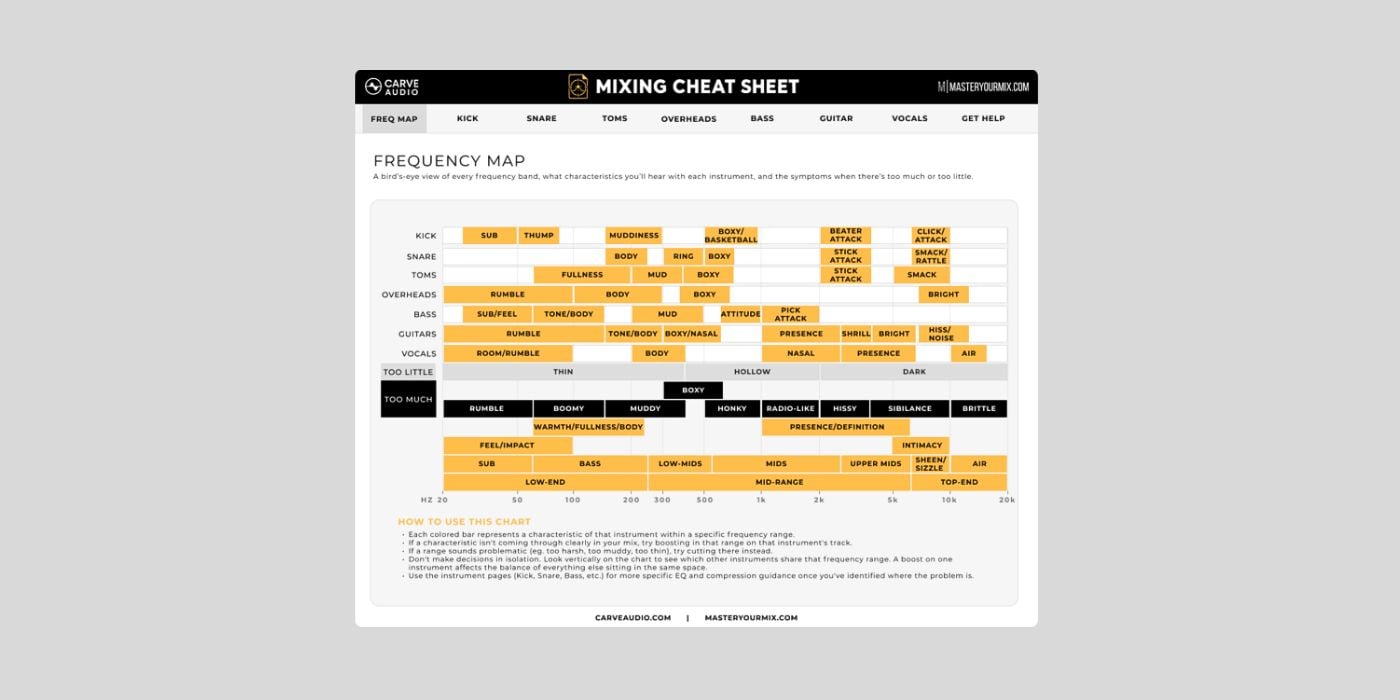

Carve Audio has released Mixing Cheat Sheet, a free mixing-reference plugin for macOS and Windows.
So instead of giving you another PDF chart full of frequency numbers, Mixing Cheat Sheet opens inside your DAW and helps you connect common mixing terms to what those ranges actually sound like.
To be honest, I haven’t seen another plugin like this one, so kudos to Carve Audio for the idea and for making it free.
We’ve all been in a situation where something feels off in a mix, but it’s not clear what needs fixing. For example, the vocal might feel dull, the guitars might feel harsh, the low end might feel messy, or the whole mix might feel thin or badly balanced.
Traditional cheat sheets can be useful, but they aren’t flexible and, unfortunately, can also lead to mistakes. It’s usually generic advice like cutting a specific frequency, boosting another one, using a compression setting, and so on.
Carve Audio took a different angle here, focusing on listening and decision-making rather than on universal settings.
The Mixing Cheat Sheet includes a Frequency Map to identify important areas of the spectrum and understand what they typically affect. You can solo frequency ranges to hear them in context, which helps make terms like mud, body, fizz, bite, presence, harshness, and air easier to connect to the sound coming through your speakers.
The plugin also includes individual instrument pages with EQ decisions, compression ideas, and mixing tips for specific sources. That makes it more of an interactive reference tool than a processor you would use to shape the sound directly.
This is aimed mostly at home-studio musicians, indie producers, and mix engineers who want help identifying what they hear as they mix. It will not tell you exactly what to do to every vocal, guitar, or drum bus. The goal is to help you make better decisions for the song in front of you.
I like seeing more tools that try to improve how producers listen rather than simply adding another EQ or compressor to the pile. In that sense, Mixing Cheat Sheet sits somewhere between a mixing reference and an ear-training tool, and it’s worth a try if you’re improving your mixing skills.
Mixing Cheat Sheet is completely free. It is available for macOS and Windows in VST3, AU, and AAX formats.
Download: Mixing Cheat Sheet (FREE)
Deal of the day 🔥: Get the VATRA mix finisher plugin by Flame Sound!
More:
Last Updated on August 10, 2026 by Tomislav Zlatic.

