
Close Menu

    Subscribe to Updates

    Get the latest creative news from FooBar about art, design and business.

    What's Hot

    091Audio releases 091HPDoctor, a FREE precision high-pass filter plugin

    maio 15, 2026

    Darkstarz Technologies releases FREE DustBox lo-fi plugin for Windows

    maio 15, 2026

    Warmth releases Touched Lite, a FREE shoegaze-inspired multi-FX plugin

    maio 14, 2026
    Facebook X (Twitter) Instagram
    Facebook X (Twitter) Instagram Vimeo
    Producer Gang | Home of Producers
    • Home
    • Articles
    • Downloads
      • VST’s
    • Tutoriais
    • Plugins

      091Audio releases 091HPDoctor, a FREE precision high-pass filter plugin

      maio 15, 2026

      Darkstarz Technologies releases FREE DustBox lo-fi plugin for Windows

      maio 15, 2026

      Warmth releases Touched Lite, a FREE shoegaze-inspired multi-FX plugin

      maio 14, 2026

      Polarity releases Polarity-RES, a FREE resonator effect

      maio 14, 2026

      Get 87% off SSL Native Bus Compressor 2 at Plugin Boutique

      maio 14, 2026
    • News
      1. Plugins
      2. VST’s
      3. Hip-Hop
      4. Billboard
      5. View All

      091Audio releases 091HPDoctor, a FREE precision high-pass filter plugin

      maio 15, 2026

      Darkstarz Technologies releases FREE DustBox lo-fi plugin for Windows

      maio 15, 2026

      Warmth releases Touched Lite, a FREE shoegaze-inspired multi-FX plugin

      maio 14, 2026

      Polarity releases Polarity-RES, a FREE resonator effect

      maio 14, 2026

      Glitchmachines – Polygon v2.1.0 for Windows

      abril 23, 2025

      Toontrack – EZbass 1.3.0 Update for Windows

      abril 23, 2025

      deltarray – GigLad PC Arranger 4.0.2 for Windows

      abril 23, 2025

      Toontrack – Funk Fusion EBX (SOUNDBANK)

      abril 23, 2025

      Drake Snippet Leaks Before J. Cole’s ‘The Fall-Off’ Drops

      fevereiro 6, 2026

      J. Cole Releases His “Last” Album ‘The Fall Off’

      fevereiro 6, 2026

      GloRilla’s Sister Says She’s “Obligated” To Give Family $2,500 Each

      fevereiro 6, 2026

      Bad Bunny Reveals What To Expect For Super Bowl LX Halftime Show

      fevereiro 6, 2026

      Beyonce Cowboy Carter Tour July 4th in Washington, D.C.: Best Moments

      julho 5, 2025

      Morgan Wallen Notches 18th Country Airplay No. 1

      julho 5, 2025

      Best Moments in Cardiff, Wales

      julho 4, 2025

      Bad Bunny ‘NUEVAYol’ Pro-Immigrant Video Arrives on Fourth of July

      julho 4, 2025

      Native vs. DSP Plug-Ins – Universal Audio

      maio 13, 2026

      Best Guitar Amp Sims for 2026 – Universal Audio

      maio 13, 2026

      How to Record Electric Guitar at Home – Universal Audio

      maio 6, 2026

      Legendary Dumble Amp Tones in Your DAW – Universal Audio

      maio 6, 2026
    • Learn How to Sell Beats
    Producer Gang | Home of Producers
    • Home
    • Plugins
    • Hip-Hop
    • News
    • Learn How to Sell Beats
    Home»Articles»Mono vs Stereo: What Is LCR Mixing?
    Articles

    Mono vs Stereo: What Is LCR Mixing?

    Producer GangBy Producer Gangsetembro 4, 2025Nenhum comentário3 Mins Read
    Facebook Twitter Pinterest LinkedIn Tumblr WhatsApp VKontakte Email
    Mono vs Stereo: What Is LCR Mixing?
    Share
    Facebook Twitter LinkedIn Pinterest Email


    Wondering how to make space in your mix? Learn the difference between mono, stereo, and LCR mixing. LCR means keeping all of the elements either hard left, center, or hard right—and it can make your mix clearer and more powerful.


    What Is Mono, Stereo, and LCR?

    • Mono sends sound equally to both speakers from one track. Great for bass, kick drum, and vocals to keep focus tight.

    • Stereo spreads sound between both speakers with smooth panning—used for ambience, reverb, or wide instruments.

    • LCR (Left-Center-Right) limits panning to just three spots: hard left, center, or hard right. This clears clutter and delivers bold, structured mixes.

    Should I Mix on Headphones or Speakers?


    Why Use LCR Mixing?

    • Builds clarity and openness by avoiding crowded panning.

    • Helps maintain balance, especially on mono-compatible systems.

    • Simplifies mixing decisions, reducing overthinking.


    ⭐️ Start by downloading all of my FREE Music Production Guides ⭐️ It took me years to learn this stuff!


    When Mono or Stereo Might Work Better

    • Mono is perfect when your sound systems collapse everything into one speaker—or you want a focused, powerful center image.

    • Stereo suits cinematic textures, wide pads, or ambient elements that enhance width and mood.

    • LCR shines when you want bold separation, punch, and mix clarity. Just don’t forget to check how it translates in mono to avoid phase issues.


    Quick Tips for Using LCR Mixing

    1. Keep vocals, kick, snare, and bass in the center for clarity and impact.

    2. Hard-pan guitars, synths, or overdubs to left or right to balance the mix and add width.

    3. Check your mix in mono—make sure nothing cancels out or disappears.

    4. Use LCR as a starting point. You can always soften a pan later with automation or blending.

    Headphones 101: Which Headphones Should I Buy for My Home Studio? 🎧


    ⭐️ Download my Free Guide The Magic Compressor Settings (That Work on Everything!)


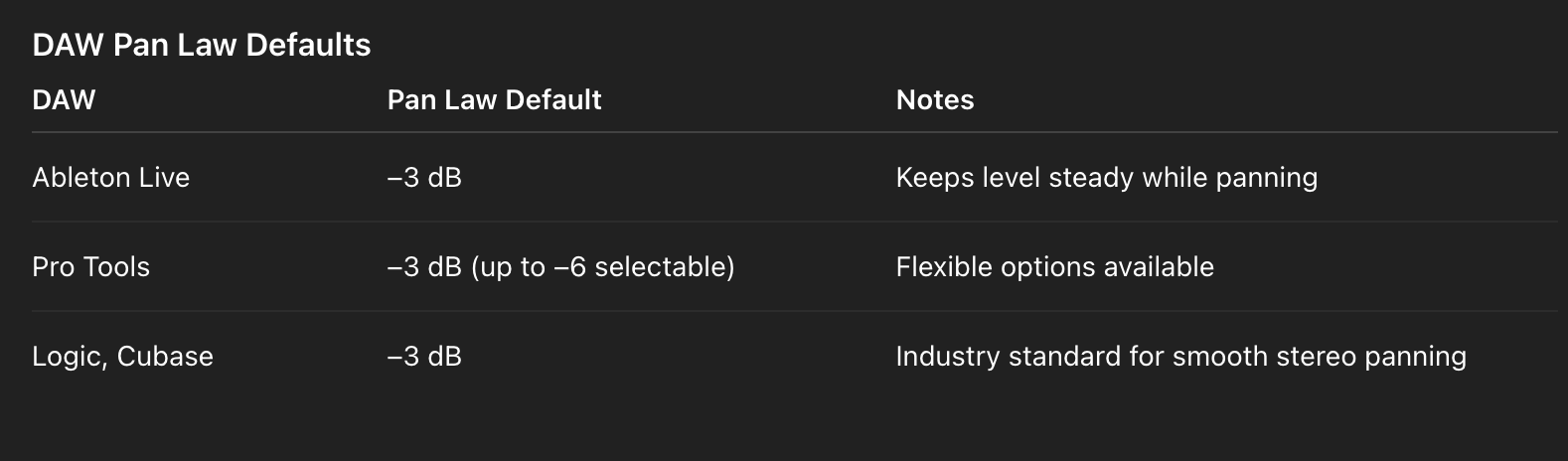
    Side Note: What Is Pan Law?

    When you move a sound from center to left or right, the overall loudness can feel different. Pan Law is the rule your DAW uses to balance volume when panning. For example, at the center, some DAWs lower the level slightly (often by -3 dB) so the combined signal doesn’t sound louder than when it’s panned hard left or right. Different DAWs use different pan laws, but the goal is always the same: keep your mix sounding balanced no matter where instruments sit in the stereo field.


    Final Word

    Mono packs power. Stereo adds space. LCR delivers clarity with structure.

    When you understand how each approach works, you’ll know when to use them—and when to break the rules.


    ⭐️ Download my Free Magic Delay settings Guide ⭐️


    ⭐️ Download my Free Magic Reverb settings Guide ⭐️


    #protools #daw #homestudio #recordingschool #recording #musicproduction 

    Also read: 

    How to Start Your Own Online Business Teaching Music

      

    Hey, I’m Futch – Music Production Coach and Ableton Certified Trainer

     

    Learn how to make your first song and beat in Ableton Live with my

    FREE 90-minute Ableton Live course


    I’ve been teaching audio engineering and music production for 35 years.⭐️ 

    Check out my new online music production program: Music Production Ninja…


    Source link

    Share. Facebook Twitter Pinterest LinkedIn Tumblr WhatsApp Email
    Previous ArticleZL Audio releases FREE ZL Splitter plugin for macOS, Windows, and Linux
    Next Article Ocean Swift Re-Releases Legacy Synthesizers collection for Windows

    Related Posts

    Ableton Live Intro vs Standard vs Suite

    maio 14, 2026

    Classic Synths: Oberheim OB-X

    maio 12, 2026

    Music Production for Beatmakers, Electronic Musicians, and Musicians

    maio 10, 2026

    From a Music Fan to a Music Producer

    maio 7, 2026
    Demo
    Our Picks
    • Facebook
    • Twitter
    • Pinterest
    • Instagram
    • YouTube
    • Vimeo
    Don't Miss
    Plugins

    091Audio releases 091HPDoctor, a FREE precision high-pass filter plugin

    By Producer Gangmaio 15, 20260

    091Audio has released 091HPDoctor, a free precision high-pass filter plugin for macOS, Windows, and Linux.…

    Darkstarz Technologies releases FREE DustBox lo-fi plugin for Windows

    maio 15, 2026

    Warmth releases Touched Lite, a FREE shoegaze-inspired multi-FX plugin

    maio 14, 2026

    Polarity releases Polarity-RES, a FREE resonator effect

    maio 14, 2026

    Subscribe to Updates

    Get the latest creative news from SmartMag about art & design.

    Producer Gang | Home of Producers
    Facebook X (Twitter) Instagram Pinterest
    • Home
    • Plugins
    • Hip-Hop
    • News
    • Learn How to Sell Beats
    © 2026 Producer Gang. Designed by Audio Escola.

    Type above and press Enter to search. Press Esc to cancel.
