
Close Menu

    Subscribe to Updates

    Get the latest creative news from FooBar about art, design and business.

    What's Hot

    194db Audio releases FREE Vox Relief Lite vocal processing plugin

    dezembro 31, 2025

    Saint Mike DSP Vocal Acrobatics vocal compressor plugin is FREE for a limited time

    dezembro 31, 2025

    Big Sean Breaks Down His Favorite Features, From Leon Thomas To Drake

    dezembro 31, 2025
    Facebook X (Twitter) Instagram
    Facebook X (Twitter) Instagram Vimeo
    Producer Gang | Home of Producers
    • Home
    • Articles
    • Downloads
      • VST’s
    • Tutoriais
    • Plugins

      194db Audio releases FREE Vox Relief Lite vocal processing plugin

      dezembro 31, 2025

      Saint Mike DSP Vocal Acrobatics vocal compressor plugin is FREE for a limited time

      dezembro 31, 2025

      Soft Loop Audio releases FREE Harmonic Echo generative MIDI plugin

      dezembro 30, 2025

      Emily Hopkins releases Chippo, a FREE chiptune-inspired sequencer plugin

      dezembro 30, 2025

      The Usual Suspects officially release JE-8086, a FREE Roland JP-8080 emulation

      dezembro 30, 2025
    • News
      1. Plugins
      2. VST’s
      3. Hip-Hop
      4. Billboard
      5. View All

      194db Audio releases FREE Vox Relief Lite vocal processing plugin

      dezembro 31, 2025

      Saint Mike DSP Vocal Acrobatics vocal compressor plugin is FREE for a limited time

      dezembro 31, 2025

      Soft Loop Audio releases FREE Harmonic Echo generative MIDI plugin

      dezembro 30, 2025

      Emily Hopkins releases Chippo, a FREE chiptune-inspired sequencer plugin

      dezembro 30, 2025

      Glitchmachines – Polygon v2.1.0 for Windows

      abril 23, 2025

      Toontrack – EZbass 1.3.0 Update for Windows

      abril 23, 2025

      deltarray – GigLad PC Arranger 4.0.2 for Windows

      abril 23, 2025

      Toontrack – Funk Fusion EBX (SOUNDBANK)

      abril 23, 2025

      Big Sean Breaks Down His Favorite Features, From Leon Thomas To Drake

      dezembro 31, 2025

      Doechii Addresses Industry Plant Rumors On SZA-Assisted “Girl, Get Up”

      dezembro 31, 2025

      A$AP Rocky Covers Rent For Harlem Tenants In Powerful Tribute To His Roots

      dezembro 30, 2025

      Janet Jackson’s “Folded” Transition Earns Praise From Kehlani

      dezembro 30, 2025

      Beyonce Cowboy Carter Tour July 4th in Washington, D.C.: Best Moments

      julho 5, 2025

      Morgan Wallen Notches 18th Country Airplay No. 1

      julho 5, 2025

      Best Moments in Cardiff, Wales

      julho 4, 2025

      Bad Bunny ‘NUEVAYol’ Pro-Immigrant Video Arrives on Fourth of July

      julho 4, 2025

      Student Spotlights of 2025 –

      dezembro 30, 2025

      Top 10 Most Shazamed Songs of 2025 –

      dezembro 29, 2025

      Capturing Christmas Magic with Butch Walker – Universal Audio

      dezembro 26, 2025

      pointblank Recordings Artist, Sam The Zoologist Performs with Casey Lowery –

      dezembro 26, 2025
    • Learn How to Sell Beats
    Producer Gang | Home of Producers
    • Home
    • Plugins
    • Hip-Hop
    • News
    • Learn How to Sell Beats
    Home»Articles»10 Steps to Layering Guitars
    Articles

    10 Steps to Layering Guitars

    Producer GangBy Producer Gangdezembro 18, 2025Nenhum comentário4 Mins Read
    Facebook Twitter Pinterest LinkedIn Tumblr WhatsApp VKontakte Email
    10 Steps to Layering Guitars
    Share
    Facebook Twitter LinkedIn Pinterest Email


    Introduction — The Secret to Huge Guitar Sounds

    Layered guitars are the backbone of rock, pop, metal, indie, and cinematic production.
    But big guitar tones don’t just “happen.” They come from a repeatable, organized workflow that keeps everything tight, in tune, and mix-ready.

    This 10-step process is a standard studio method used in professional sessions — simple enough for beginners, detailed enough for engineers.


    Quick Summary

    👉 Layering guitars involves capturing a clean DI signal, recording bed tracks, choosing or overdubbing a main take, tuning, editing, doubling, organizing panning, adding more layers with different tones, and overdubbing harmonies to build a full, balanced wall of sound.


    Start by recording:

    Why the DI matters:

    This dual-track setup is standard in every modern studio.

    Recording: What Is a DI Box and When Do I Need One? 🎛️


    Before overdubs, record the full band or scratch version:

    • drums

    • bass

    • guitars

    • keys

    • guide vocals

    This creates the “map” of the song.
    Even if you replace everything later, the bed tracks give you timing, arrangement, and feel.

    10 Universal Rules for Recording Anything with a Microphone 🎤


    Listen back to the bed tracks.
    If the original guitar performance feels strong, use it as the main take.
    If not, overdub a new one.

    The goal is to establish one definitive performance that represents the part.


    If you re-record the part:

    This comp becomes your master reference guitar — the version everything else must match.


    Great guitar layers start with perfect pitch.

    Two approaches:

    Micro-tuning punch-ins

    Punch in chords or notes that sound sharp or flat.

    Full-performance tuning and timing

    Go phrase-by-phrase with a tuner for maximum accuracy.

    Small fixes now prevent pitch issues later.


    ⭐️ Start by downloading all of my FREE Music Production Guides ⭐️ It took me years to learn this stuff! 


    Once the performance is final:

    • tighten the timing of a few notes, or even edit the whole track to the song’s tempo grid

    • add crossfades to punch-ins

    • fade the ending

    • consolidate to a clean audio file

    • rename it clearly

    This becomes your reference track for all doubling and layering.

    Editing Audio is Just like Editing a Text Document


    Now record the same guitar part again — as close as humanly possible.

    Doubling gives guitars their width, density, and cinematic feel.

    You can:

    The goal: perfectly mimic the timing and feel of the master take.


    You now have two takes:

    • Take A (master)

    • Take B (double)

    Monitoring Options

    • Hard L/R for maximum width

    • Tighter panning for a focused center

    • Use a 6dB volume drop on the track you’re not playing so you can hear your performance clearly

    Monitoring correctly helps you match feel, timing, and tone.


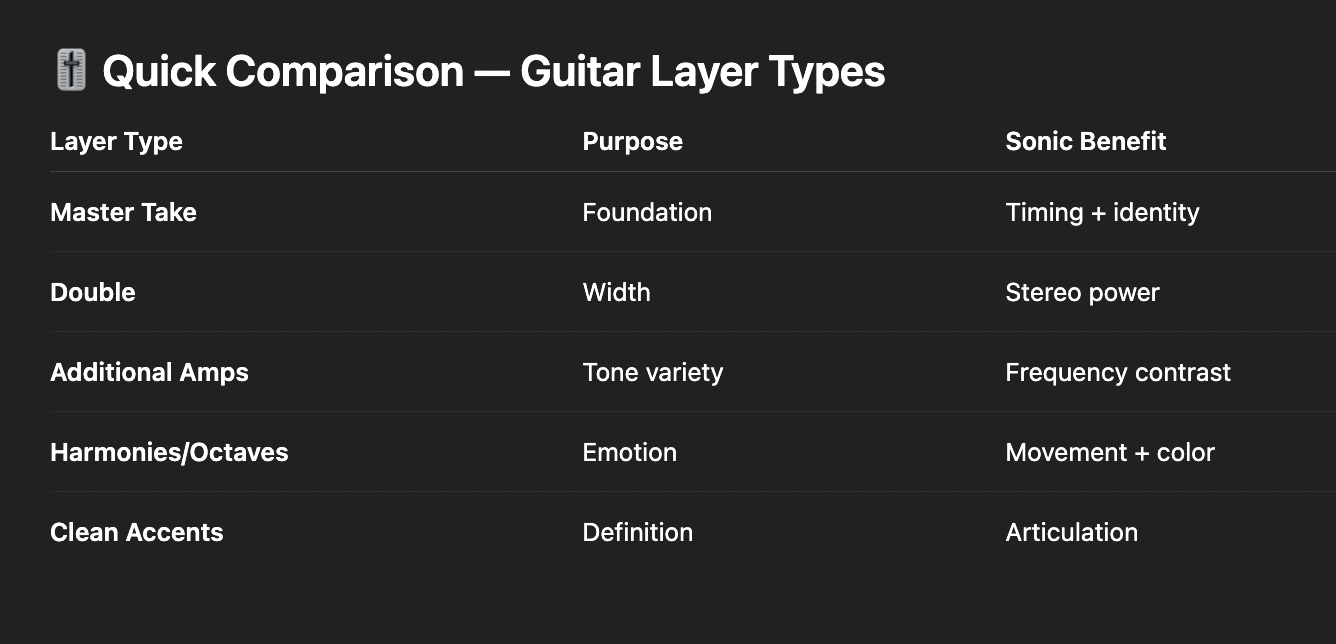
    Once doubles are done, expand the palette.

    Try layering:

    • Marshall (crunch, roar)

    • Fender (clean, sparkle)

    • Mesa Boogie (tight, heavy)

    • Fuzz for texture

    • Clean picking for clarity

    • Stereo pairs for movement

    Think of it like EQ with amps — each layer fills a different frequency space.


    Finally, shape the emotional arc of the guitars:

    • octave-up lines

    • octave-down lines

    • fifth harmonies

    • counter-melodies

    • rhythmic accents

    For each new layer:

    This step transforms rhythm guitars into a finished, expressive guitar arrangement.


    Q: Why record both amp and DI?
    A: The DI allows re-amping, clean editing, and long-term tone flexibility.

    Q: How many layers are too many?
    A: When clarity disappears. Use different tones to avoid stacking the same frequencies.

    Q: Is doubling required?
    A: For wide guitars, yes. One take per side is the standard.

    Q: How do I keep layers tight?
    A: Tune each pass, follow the master comp, and record in small sections if necessary.
     

    ⭐️ Download my Free Guide The Magic Compressor Settings that work on EVERYTHING!


    Layered guitars aren’t about “more tracks.”
    They’re about clarity, intention, and organization.

    This 10-step method gives you:

    Great guitar production is built, not guessed.
    Follow the structure — then experiment with tone, space, and emotion.


    ⭐️ Download my Free Magic Delay settings Guide ⭐️


    ⭐️ Download my Free Magic Reverb settings Guide ⭐️


    #protools #daw #homestudio #recordingschool #recording #musicproduction 

    Also read: 

    How to Start Your Own Online Business Teaching Music

      

    Hey, I’m Futch – Music Production Coach and Ableton Certified Trainer

     

    Learn how to make your first song and beat in Ableton Live with my

    FREE 90-minute Ableton Live course


    I’ve been teaching audio engineering and music production for 35 years.⭐️ 

    Check out my new online music production program: Music Production Ninja…


    Source link

    Share. Facebook Twitter Pinterest LinkedIn Tumblr WhatsApp Email
    Previous ArticleACE Studio 2.0 is an AI music studio for AI-generated vocals, instruments, and more
    Next Article 5 ways to get club-ready guitar hooks into your house track (no guitar skills required)

    Related Posts

    How Do I Get My Bass & Kick To Work Together in a Mix?

    dezembro 30, 2025

    Classic Drum Machines: The MPC60

    dezembro 27, 2025

    One Small Fix. A Completely Different Mix.

    dezembro 23, 2025

    Classic Drum Machines: The SP-1200

    dezembro 20, 2025
    Demo
    Our Picks
    • Facebook
    • Twitter
    • Pinterest
    • Instagram
    • YouTube
    • Vimeo
    Don't Miss
    Plugins

    194db Audio releases FREE Vox Relief Lite vocal processing plugin

    By Producer Gangdezembro 31, 20250

    194db Audio has released Vox Relief Lite, a free vocal processing plugin for macOS and…

    Saint Mike DSP Vocal Acrobatics vocal compressor plugin is FREE for a limited time

    dezembro 31, 2025

    Big Sean Breaks Down His Favorite Features, From Leon Thomas To Drake

    dezembro 31, 2025

    Doechii Addresses Industry Plant Rumors On SZA-Assisted “Girl, Get Up”

    dezembro 31, 2025

    Subscribe to Updates

    Get the latest creative news from SmartMag about art & design.

    Producer Gang | Home of Producers
    Facebook X (Twitter) Instagram Pinterest
    • Home
    • Plugins
    • Hip-Hop
    • News
    • Learn How to Sell Beats
    © 2025 Producer Gang. Designed by Audio Escola.

    Type above and press Enter to search. Press Esc to cancel.
