
Close Menu

    Subscribe to Updates

    Get the latest creative news from FooBar about art, design and business.

    What's Hot

    Get iZotope Neutron 5 Elements for FREE + a massive plugin bundle until March 17th

    março 12, 2026

    Go Inside the Studio with Saba and No ID – Universal Audio

    março 11, 2026

    Kaizen DSP releases Choroboros, a FREE multi-engine chorus plugin (open beta)

    março 11, 2026
    Facebook X (Twitter) Instagram
    Facebook X (Twitter) Instagram Vimeo
    Producer Gang | Home of Producers
    • Home
    • Articles
    • Downloads
      • VST’s
    • Tutoriais
    • Plugins

      Get iZotope Neutron 5 Elements for FREE + a massive plugin bundle until March 17th

      março 12, 2026

      Kaizen DSP releases Choroboros, a FREE multi-engine chorus plugin (open beta)

      março 11, 2026

      Get Morso, a distortion and tone shaping effect by FedDSP, for FREE in a LIMITED time offer

      março 11, 2026

      GARUC Audio releases FREE Deess-ertic Lite de-esser plugin

      março 11, 2026

      Baby Audio releases Grainferno granular synthesizer with intro price

      março 11, 2026
    • News
      1. Plugins
      2. VST’s
      3. Hip-Hop
      4. Billboard
      5. View All

      Get iZotope Neutron 5 Elements for FREE + a massive plugin bundle until March 17th

      março 12, 2026

      Kaizen DSP releases Choroboros, a FREE multi-engine chorus plugin (open beta)

      março 11, 2026

      Get Morso, a distortion and tone shaping effect by FedDSP, for FREE in a LIMITED time offer

      março 11, 2026

      GARUC Audio releases FREE Deess-ertic Lite de-esser plugin

      março 11, 2026

      Glitchmachines – Polygon v2.1.0 for Windows

      abril 23, 2025

      Toontrack – EZbass 1.3.0 Update for Windows

      abril 23, 2025

      deltarray – GigLad PC Arranger 4.0.2 for Windows

      abril 23, 2025

      Toontrack – Funk Fusion EBX (SOUNDBANK)

      abril 23, 2025

      Drake Snippet Leaks Before J. Cole’s ‘The Fall-Off’ Drops

      fevereiro 6, 2026

      J. Cole Releases His “Last” Album ‘The Fall Off’

      fevereiro 6, 2026

      GloRilla’s Sister Says She’s “Obligated” To Give Family $2,500 Each

      fevereiro 6, 2026

      Bad Bunny Reveals What To Expect For Super Bowl LX Halftime Show

      fevereiro 6, 2026

      Beyonce Cowboy Carter Tour July 4th in Washington, D.C.: Best Moments

      julho 5, 2025

      Morgan Wallen Notches 18th Country Airplay No. 1

      julho 5, 2025

      Best Moments in Cardiff, Wales

      julho 4, 2025

      Bad Bunny ‘NUEVAYol’ Pro-Immigrant Video Arrives on Fourth of July

      julho 4, 2025

      Go Inside the Studio with Saba and No ID – Universal Audio

      março 11, 2026

      Heavy Strings – Universal Audio

      março 10, 2026

      Best UAD Plug-Ins for 2026 – Universal Audio

      março 10, 2026

      Popular Artists Touring in 2026 –

      março 6, 2026
    • Learn How to Sell Beats
    Producer Gang | Home of Producers
    • Home
    • Plugins
    • Hip-Hop
    • News
    • Learn How to Sell Beats
    Home»Tutorials»Top 7 Melody & Chords Writing Features
    Tutorials

    Top 7 Melody & Chords Writing Features

    Producer GangBy Producer Gangabril 23, 2025Nenhum comentário4 Mins Read
    Facebook Twitter Pinterest LinkedIn Tumblr WhatsApp VKontakte Email
    Top 7 Melody & Chords Writing Features
    Share
    Facebook Twitter LinkedIn Pinterest Email


    Live 12 is an incredible update – and the biggest part of it is the newly improved Piano Roll. Now it’s an incredible tool for creating melodic patterns and chords – especially with the updated scale features and generative tools. From the huge set of harmony-oriented updates, we’ve picked our top 7. These techniques can significantly improve your composition workflow in the new edition of Ableton. Let’s get started!


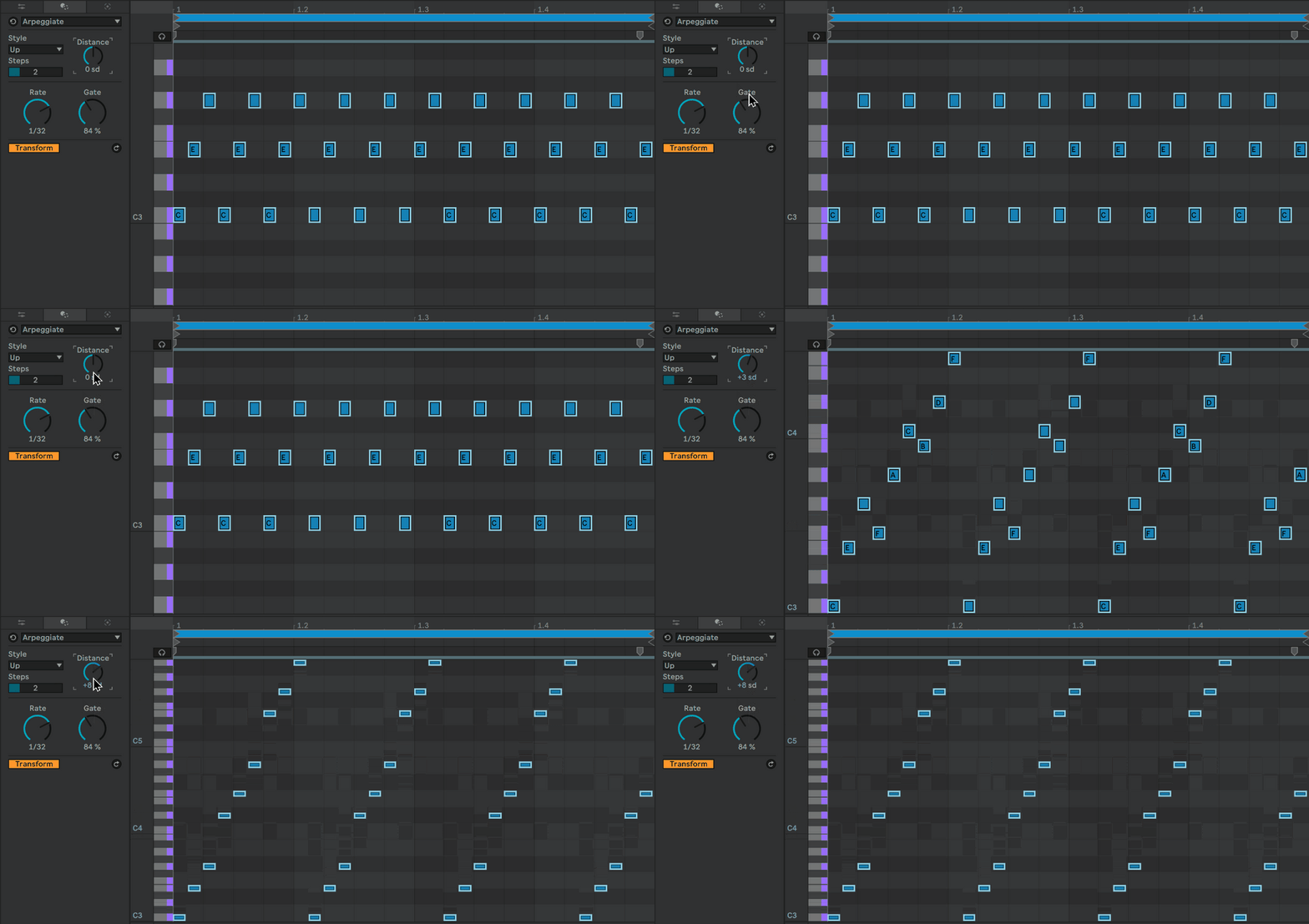
    1. Piano Roll Arpeggiator

    Before, Arpeggiator was only in the form of a MIDI device. In Live 12, you are able to create arpeggios straight from the Piano Roll – without having to “record the MIDI” to be able to do more nuanced edits. Here you are able to generate an arpeggiated pattern, and make advanced edits, while at the same time being able to clearly see each note.
     

    2. Add Interval

    In Live 12 you have an option to easily add intervals – for example to create chords. It works in a different way depending on whether you have the Scale function enabled in the MIDI clip. If it’s off, this option enables you to simply add intervals above or below the currently selected note. When you enable the scale, this function lets you add notes by a certain amount of steps above or below. It allows you to create chords extremely easily. For basic chord shapes, all you need is the Scale function and using the “+2 sd” setting. With a few clicks of the “Add Interval” button you can create thirds, fifths, sevenths and even higher chord extensions.


    3. Fit to Scale

    When you have a scale selected in the MIDI clip, this function shifts selected notes to the chosen scale. This option won’t work for transposition, but it’s useful if you’ve written chords or melodies that sound dissonant – it’s a very quick fix.


    4. Ornament: Grace notes

    In the “transformation tools” section, the Ornament option is particularly cool for making melodic phrases. All you need is to select a note and enable the “Grace notes” option. Live is going to automatically add a few notes before the selected one – and depending on whether the Scale is enabled in the MIDI clip, it will also make sure the grace notes are in key.


    5. Strum

    Ableton Live 12 brings the much-needed strum features – both in the Chord MIDI device, and MIDI clip settings. The MIDI clip strumming is especially flexible – you have a special curve editor which allows you to adjust exactly how you want the offsetting of notes to look like. This feature is not only useful for string instruments, but also to “humanize” any piano or synth chord progression.


    6. Scale mode

    In Live 12, you have the option of choosing a scale for the entire project (scale mode). It’s available in the top bar, next to the play and record buttons. If you enable that option, you will find the same icon (b/#) in various devices and clips across the entire project. You can either commit these devices to the scale, or leave them unaffected. This function makes it much easier to keep composing in scale, especially when harmony gets complex.


    7. “Seed” melody generator

    The “Seed” generative tool is amazing for writing melodic patterns. To use it, first you need to select the pitch and velocity ranges, as well as the note density and duration for the new pattern. Once that’s done, you simply click Generate and Ableton does its magic. You can re-generate for new patterns as much as you like, or tweak the parameters for instant adjustments.


    See Also:

    Top 10 Features in the Live 12 Update

    Live 12 Piano Roll: Top 9 Drum Programming Updates


    CUT YEARS OFF
    YOUR LEARNING CURVE.

    Course: Beginner to Advanced in Ableton Live - Music Production from Start To Finish

    Learn the foundations of Music Production.
    Instant lifetime access to all included courses and sound packs.
    Watch, re-watch at your own speed!

    Get an intensive deep dive into one of the best music production tools out there! After this class you can finally focus on making music, because you know Ableton inside out.

    We share all our knowledge – so you will be familiar with the techniques professional producers use.

    Curriculum:

    • Part 1 – Hands on Ableton
    • Part 2 – Start to Finish: Ableton Live 11
    • Part 3 – Ableton Audio & MIDI Effects and Wavetable Sound Design
    • Part 4 – Learn Ableton Session View
    • Part 5 – Start to Finish: Making A Track with Ableton Live + Serum
    • Part 6 – Mixing & Mastering
    • Part 7 – BONUS: Making 5 Beats from Scratch
    • Part 8 – BONUS: Playing Live using Ableton

    Click here to learn about this Beginner to Advanced Course.


    Source link

    Share. Facebook Twitter Pinterest LinkedIn Tumblr WhatsApp Email
    Previous ArticleRemove Vocals from Songs Perfectly with Artificial Intelligence
    Next Article Save 80% on Italian Harpsichord 1540 by Realsamples

    Related Posts

    The Sample Rate & Bit Depth You Should ACTUALLY Be Using Is…

    março 10, 2026

    Pythagoras and Music (A Deep Dive + Examples Old & New)

    fevereiro 17, 2026

    Melodic House with LFO Plucks like “NOHR

    outubro 21, 2025

    How to make Oskar Med K

    outubro 14, 2025
    Demo
    Our Picks
    • Facebook
    • Twitter
    • Pinterest
    • Instagram
    • YouTube
    • Vimeo
    Don't Miss
    Plugins

    Get iZotope Neutron 5 Elements for FREE + a massive plugin bundle until March 17th

    By Producer Gangmarço 12, 20260

    iZotope Japan is giving away Neutron 5 Elements for free as part of a large…

    Go Inside the Studio with Saba and No ID – Universal Audio

    março 11, 2026

    Kaizen DSP releases Choroboros, a FREE multi-engine chorus plugin (open beta)

    março 11, 2026

    Get Morso, a distortion and tone shaping effect by FedDSP, for FREE in a LIMITED time offer

    março 11, 2026

    Subscribe to Updates

    Get the latest creative news from SmartMag about art & design.

    Producer Gang | Home of Producers
    Facebook X (Twitter) Instagram Pinterest
    • Home
    • Plugins
    • Hip-Hop
    • News
    • Learn How to Sell Beats
    © 2026 Producer Gang. Designed by Audio Escola.

    Type above and press Enter to search. Press Esc to cancel.
