


Free Doesn’t Mean Limited
“The best way to get started is to stop waiting.”
There was a time when making music required:
- expensive studios
- expensive gear
- expensive software
Not anymore.
Today, you can download a DAW for free…
and make professional music.
Quick Summary
👉 The best free DAWs include Pro Tools Intro, Cakewalk, GarageBand, and Waveform Free. Each offers professional-level features, with differences in workflow, platform, and focus.
🥇 1. Pro Tools Intro — The Studio Standard (Free)
If you want to learn how real studios work…
This is the one.
Why It’s #1
- used in professional studios
- industry-standard workflow
- powerful audio editing
Limitations
- track count limits
- fewer plugins
Best for: recording, editing, learning the industry
🥉 2. GarageBand — Simple and Musical (Mac)
GarageBand is often underestimated.
Why It Works
- easy to learn
- great built-in sounds
- clean interface
Limitation
- Mac only
- fewer advanced features
Best for: beginners, songwriters, Mac users
🎛️ 3. Waveform Free — Flexible and Modern
Waveform Free is a modern DAW with fewer artificial limits.
Strengths
- unlimited tracks
- modern workflow
- cross-platform
Limitation
- interface can feel unfamiliar
Best for: experimentation and flexibility
⭐️ Download my Free Music Production Guides or take my free Ableton Live Course ⭐️
🎹 4. Ableton Live Lite — A Taste of Ableton
Often bundled with hardware.
Strengths
- real Ableton workflow
- great for electronic music
- Session View included
Limitations
- limited tracks
- limited instruments
Best for: trying Ableton before upgrading
🎚️ 5. FL Studio Trial — Unlimited, With One Catch
Technically not free… but worth mentioning.
Strengths
- full access to features
- powerful MIDI tools
- great for beat-making
Limitation
- cannot reopen saved projects in trial
Best for: exploring before committing
Choose Pro Tools Intro if you:
- want to learn studio workflows
- focus on recording and mixing
Choose GarageBand if you:
- use a Mac
- want a simple, musical start
Choose Waveform Free if you:
- want flexibility
- don’t mind learning a new interface
Choose Ableton Live Lite if you:
- want to produce electronic music
- plan to upgrade later
Ableton Live Intro vs. Pro Tools Intro: What’s the Difference?
The truth is that all of these DAWs can help you make professional music.
The difference isn’t the software.
It’s:
- consistency
- creativity
- finishing songs
A free DAW is enough.
If you use it.
Q: Can I make professional music with a free DAW?
A: Yes — absolutely.
Q: Which free DAW is easiest?
A: GarageBand or Ableton Lite.
Q: Which is most powerful?
A: Cakewalk (Windows) or Pro Tools Intro (workflow-wise).
Q: Should I upgrade later?
A: Only when you feel limited.
Free tools used to mean compromise.
Now they mean opportunity.
The best free DAW is the one you actually open.
Pick one.
Start making music.
And don’t wait for “better” tools.
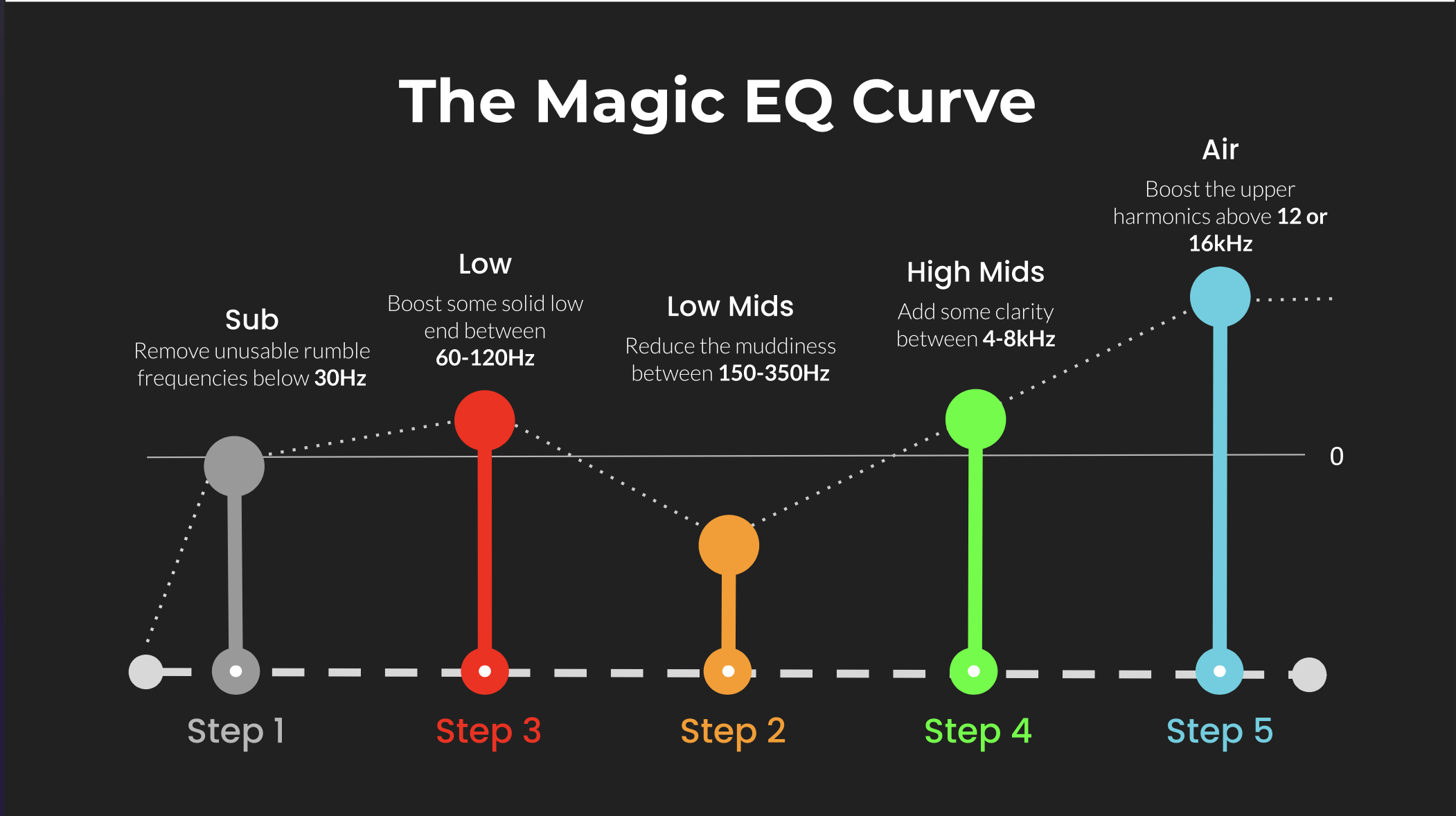 ⭐️ Download my Free Magic EQ settings Guide ⭐️

⭐️ Download my Free Magic Reverb settings Guide ⭐️
#protools #daw #homestudio #recordingschool #recording #musicproduction
Also read:
How to Start Your Own Online Business Teaching Music

Hey, I’m Futch – Music Production Coach and Ableton Certified Trainer

Learn how to make your first song and beat in Ableton Live with my
FREE 90-minute Ableton Live course
I’ve been teaching audio engineering and music production for 35 years.⭐️
Check out my new online music production program: Music Production Ninja…


