


Have you ever wanted to make a vocal track artistically sound like a robot? Well, a way to achieve that is to use a vocoder effect.
In this post, you’ll learn how a vocoder works and how to use it in your music production.
Let’s get started!
A vocoder is an analog device or software plugin that manipulates the voice using a musical synthesizer to produce speech sounds. Sounds, like a mouthful? Let’s simplify that.
Essentially, a vocoder manipulates the human voice by filtering out all but a set of frequency bands. That gives you that robotic voice effect in pop music.
Here’s an example of a vocoder effect, in The Middle by Zedd (you’ll hear the vocoder kicking in at 0:30):
A vocoder is a great tool for creating exciting vocal effects – especially when you’re looking for that extra excitement, asides from the usual effects you add to a vocal track.
What are vocoder effects?
The vocoder was created in the 1920s, and you’ll hear them on many records from the 1970’s era. Vocoders were also used extensively by artists such as Kraftwerk, Giorgio Moroder, Stevie Wonder, and Daft Punk.
If you’re reading this post, you’re probably got interested to use them in your music – due to their resurgence in pop music.
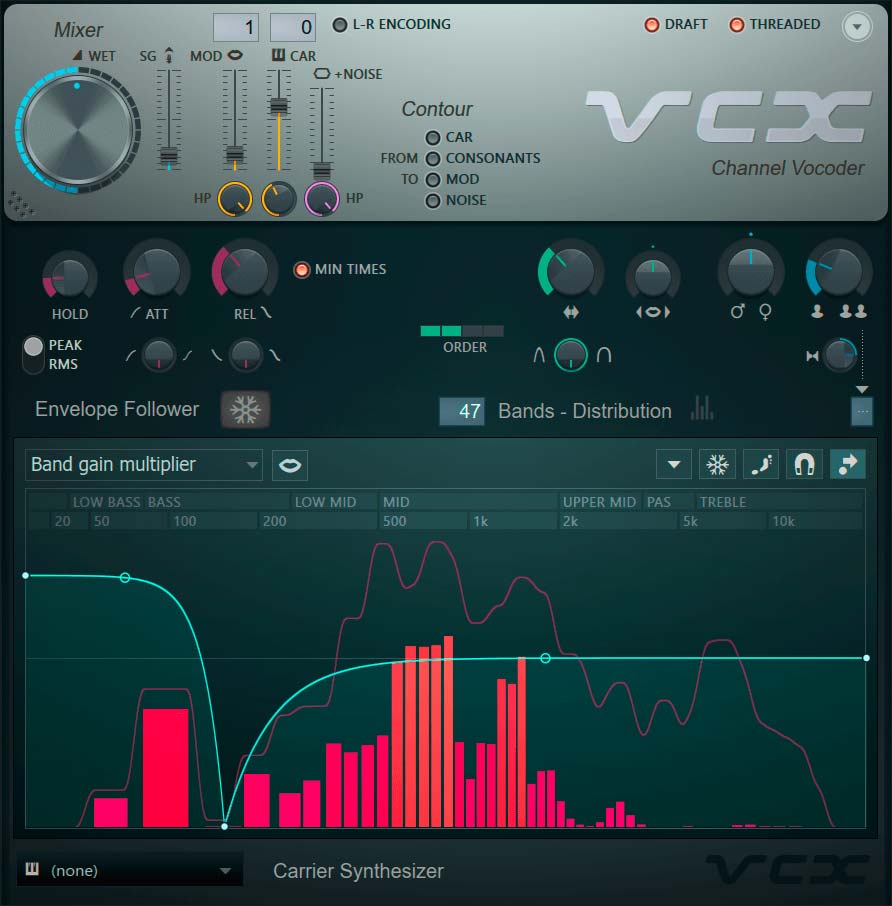
The Vocodex Vocoder in FL Studio
First of all, it’s important to note that you’ll find both hardware and software-based vocoders.
Hardware Vocoders
Hardware vocoders usually come in the form of keyboard synthesizers. Here are some popular hardware vocoders, that are also used for stage performances asides from production work.
Korg MicroKORG
The microKORG is a compact synthesizer and vocoder that uses an analog modeling tone generator. It includes a mini-mic and processes external audio via its audio inputs – opening up a world of creative possibilities.

Roland VP-03 Boutique
An affordable, portable version of the VP-330 Vocoder Plus, one of the most popular vocoders in the industry, the Roland VP-03 brings together synthesis and human voice to create an interesting sound. The vocoder comes with the microphone for you to sing into, together with onboard human voice and string sounds.

It has to be paired up with an additional keyboard unit, called the K-25M keyboard that is sold separately – to extend its playability.
Roland JD-X
Big sounds in a small package, the Roland JD-X is another example of a digital/analog synthesizer that enables you to explore vocoder effects as you perform on it with the gooseneck mic and AutoPitch effect. A powerful compact synthesizer that packs a lot of fun.

Software Plugin-Based Vocoders
If you have a computer capable of running a DAW, you already have everything you need to start using vocoder effects. Most DAWs come with a stock Vocoder plugin. In FL Studio, for example, it’s called Vocodex (which we’re using for the tutorial in this post).

If you don’t like the Vocoder plugin that came included with your DAW, there are many third-party vocoder plugins that are more robust and add more creative possibilities, such as:
How does a vocoder work?
For a vocoder to work it needs a Modulator signal (usually a human voice) to analyze. The vocoder splits the signal into multiple frequency bands. These frequency bands are then set as bandpass filters, following the same frequencies.
Then a sound source, called a Carrier, is sent through the bandpass filters. The carrier signals are filtered, with harmonic content following the frequencies of the modulator signals – resulting in the sound source sounding like a robotic voice (when the signal passes through fewer frequency bands).
Software vocoders have a lot more freedom in how many bands can be used. For example, the one I use in FL Studio has 100 bands available.
Kraftwerk’s song “The Robots” is a good example of using a lower number of bands to achieve a very synthetic robot sound.
Daft Punk is famous for their use of vocoders. Here is a good example:
How to set up a Vocoder in your DAW.
In this tutorial, we’ll use the vocoder plugin in FL Studio. Don’t worry if you’re using a different DAW, because fundamentally, the steps to using a vocoder are similar.
Once you are familiar with how to use it, then you can begin exploring more creative uses. Lets’ move on.
Step 1 – Record your vocals.
Record a vocal that you want to use for the Modulator.
Even if you already have a lead vocal track you want to use, it is still good to record a version for use in the vocoder. The reason for this is you want to have an exaggerated pronunciation in the vocal. This enables the vocoder to switch bands more easily.
Ideally, you can record the lyrics by just speaking them instead of singing them, to get a more robotic sound. Then to create an interesting sound, layer the lead vocal with the vocoder track.
Step 2 – Launch the vocoder (on its on track)

Open your vocoder plugin on its own track, not on the vocal track. The vocoder acts as an instrument on its own, so make sure that it’s not loaded on your vocal or synth track (in the next step).
Step 3 – Launch a synth & program a chord progression.

Launch a synth and load up (preferably) an unfiltered saw wave sound. Add some unison voices to fill out the patch for a more fuller sound.
Then program a chord progression to fit with your vocal track. Once you’ve arranged a chord progression, here’s the important part: make sure to sidechain the output of the synth track into the vocoder.
Many beginners miss out on this part when they attempt using vocoders for the first time. Remember, for a vocoder to work, it needs a Modulator signal, which in this case is our synth chord progression track.
Step 4 – Sidechain the vocal track into Vocoder.

Next, we’re going to sidechain the earlier vocal track into the vocoder plugin. The steps to sidechain a track might be different depending on the DAW you use, so make sure to check out how to do sidechaining on your DAW.
Step 5 – Select input tracks on the vocoder plugin.

Launch the vocoder plugin effect. You’ll find that you have two input tracks on the top part of the window.
Choose to input both tracks – Modulator (vocal track) and the Carrier (synth track) into the vocoder plugin. Make sure to choose the correct tracks.
That’s it.
Hit play on your DAW and your vocoder should be working, producing a robotic-sounding vocal track. Once you’re able to accomplish this, play around with the settings and experiment producing a unique sound.
How to alter the sound of the vocoder.
Here’s a quick run-down of what the dials and knobs on most vocoders do.

Bands – On all software vocoders you can select the number of frequency bands to affect the sound. Generally, the lower the number of bands – the more robotic the sound and visa-versa the high number – the more natural sounding.
Bandwidth – This simply changes the frequency range of each band. You can increase the bandwidth so that the bands cross over one another and this creates a shimmery effect.
Modular Pitch or Formant control – Much like in Pitch Correction plugins, the modular pitch gives you the ability to choose whether the sound is high pitched or low pitched without changing the notes.
Filters – For the Carrier and Modulator signals. These respective filters just allow you to cut out unwanted frequencies from the input of each.
Attack and Release – Effects like compressors have this function and in the vocoder, it works in much the same way. The attack and release control the envelope and determine the speed at which the effects will work on the sound. For vocals, it is better to have a fast attack and release to get more sibilance.
Unison – This control allows you to add unison voices to the sound that are slightly offset to give the impression of a fuller sound.
Carrier – By changing the tonal quality of the carrier you can make the sound of the vocoder drastically different. Play around with different synths to get the sound you want.
Getting creative with vocoder effects.
Vocoder effects are usually used for vocal tracks, but there’s no reason why you can’t experiment with other sound inputs. Use it on guitars, drums, keyboards, and sound effects, to see what interesting sounds you’ll get.
The best way to learn to use vocoders is to practically use and experiment with them. I hope reading this post has given you some ideas about using a vocoder, but the magic comes when you launch your DAW and actually use it.
How are you creatively using vocoder effects? Let me know in the comment section below.
Guest post by:
 Graeme is the founder and chief editor at HomeStudioLabs.com. His goal is simple…to help you cut through the fluff and figure what you need to make great music at home. He’s been a working musician and hobbyist music producer for the last 17 years. He studied music in Canada and received a Bachelor of Arts in Music. In 2004 he bought his first audio interface and a copy of Pro Tools. Since then he has spent countless hours learning, recording, and mixing. His passion has been his Home Studio.

