

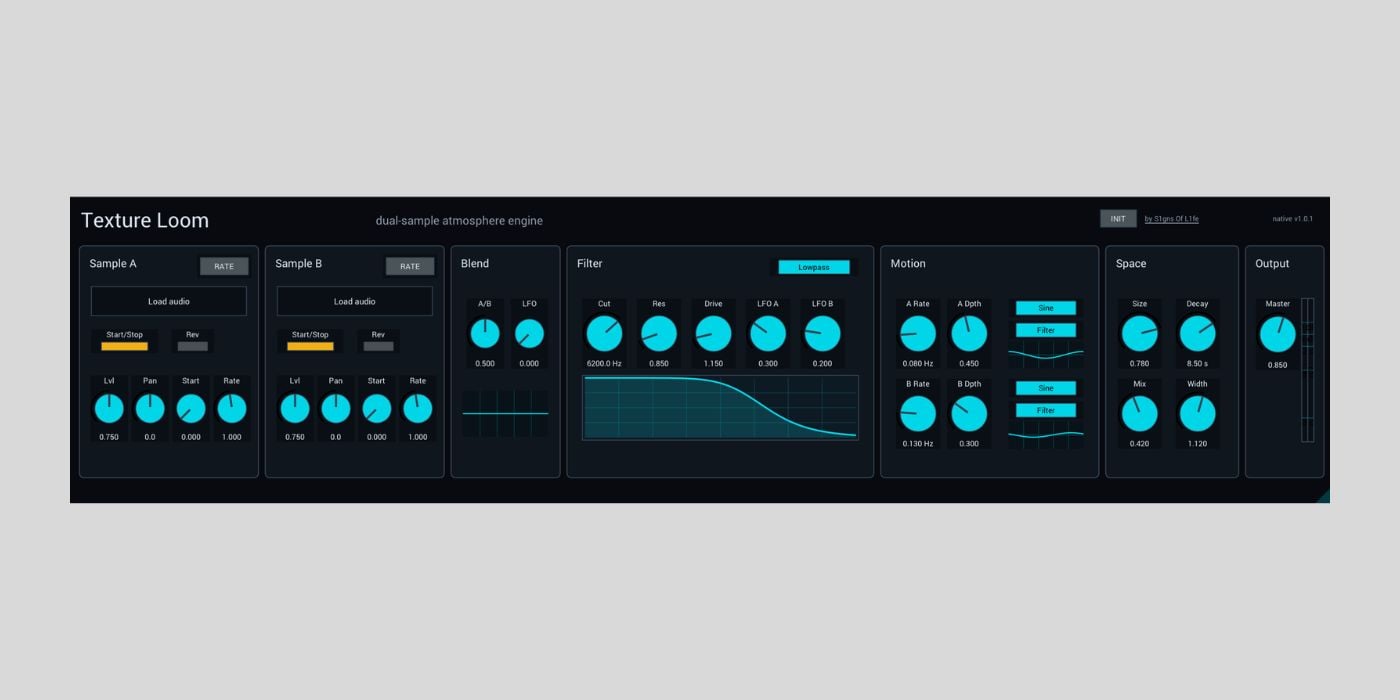

S1gns Of L1fe has released Texture Loom, a free dual-sample atmosphere engine for Ableton Live, macOS, and Windows.
I tested Texture Loom last night and ended up playing it for over an hour while also coming up with several layered sounds that I’ll use in future sound design projects. I have also seen some of Chris Bryant’s S1gns Of L1fe videos in the past, so it is nice to see a free plugin that fits so neatly into the kind of ambient sound design he teaches.
Texture Loom is built for creating evolving pads, drones, cinematic beds, and slow-moving ambient material from your own samples and recordings.
Chris says the idea came from his love of using textures as soundscapes to build tracks from. He wanted something that does more than just basic sample playback. It lets you pitch material in semitones or by rate, reverse it, filter it, and send it through a big space section to make the source sound more atmospheric.
The plugin started as a Max for Live device, but the current release also includes native plugin versions, so you can use it outside Ableton while keeping the same visual style and workflow.
Texture Loom has two sample slots, Sample A and Sample B, with controls for start/stop, reverse, start position, level, pan, and rate. The Rate/Semi mode is useful because you can either treat playback speed continuously or move the pitch in semitone steps.
The A/B blend control lets you fade between the two loaded samples, and there is a dedicated Blend LFO for slow crossfading motion. And works surprisingly well when you combine field recordings, synth tones, vocal snippets, or noise layers.
The manual suggests starting with two contrasting samples, where one provides body and the other adds air, texture, or motion. From there, the signal flow is easy to follow. The two layers move through an equal-power crossfade, then a post-blend filter and drive stage, and finally into the stereo reverb and output section.
The sound then moves through a multimode filter with lowpass, highpass, bandpass, notch, peak, and allpass modes. You also get cutoff, resonance, drive, and LFO modulation depth controls.
Texture Loom includes two Motion LFOs with sine, triangle, ramp up, ramp down, random, drift, and glider shapes. The modulation destinations include Blend, Filter, Space, Sample A Start, and Sample B Speed, which should be enough for anything from gentle movement to more unpredictable generative ambiance.
The onboard space section handles reverb duties with Size, Decay, Mix, and Width controls. Chris says the Clouds reverb is based on Valdemar Erlingsson’s original Cloudseed reverb, and it adds the spaciousness that is required for ambient and cinematic sounds.
Texture Loom will not make sound from a blank instance until you load samples. The Max for Live version installs as a Max Audio Effect, while the native desktop versions are available for AU/VST3 hosts.
It is available as a Max for Live device for Ableton Live 12 and Max 9, a macOS AU/VST3 instrument, and a Windows VST3 instrument. It is offered as a free/name-your-price download on Gumroad.
Download: S1gns Of L1fe Texture Loom (FREE/PWYW)
Deal of the day 🔥: EXCLUSIVE ROLAND SALE (up to 80% OFF)!
More:
Last Updated on June 3, 2026 by Tomislav Zlatic.

