
Close Menu

    Subscribe to Updates

    Get the latest creative news from FooBar about art, design and business.

    What's Hot

    Cure Audio releases Scream, a FREE recreation of Massive’s iconic Scream filter

    abril 6, 2026

    FSK Audio updates Bark24 | Dyn psychoacoustic dynamics processor (+ 2 FREE Copies)

    abril 6, 2026

    Free Amorph AI-driven text-to-DSP plugin gets a major visual update

    abril 3, 2026
    Facebook X (Twitter) Instagram
    Facebook X (Twitter) Instagram Vimeo
    Producer Gang | Home of Producers
    • Home
    • Articles
    • Downloads
      • VST’s
    • Tutoriais
    • Plugins

      Cure Audio releases Scream, a FREE recreation of Massive’s iconic Scream filter

      abril 6, 2026

      FSK Audio updates Bark24 | Dyn psychoacoustic dynamics processor (+ 2 FREE Copies)

      abril 6, 2026

      Free Amorph AI-driven text-to-DSP plugin gets a major visual update

      abril 3, 2026

      Mr. Jefferson releases Stepista, a FREE AI-assisted MIDI pattern generator

      abril 3, 2026

      Fuse Audio Labs releases Tube Lab vintage channel strip plugin ($29 intro price)

      abril 3, 2026
    • News
      1. Plugins
      2. VST’s
      3. Hip-Hop
      4. Billboard
      5. View All

      Cure Audio releases Scream, a FREE recreation of Massive’s iconic Scream filter

      abril 6, 2026

      FSK Audio updates Bark24 | Dyn psychoacoustic dynamics processor (+ 2 FREE Copies)

      abril 6, 2026

      Free Amorph AI-driven text-to-DSP plugin gets a major visual update

      abril 3, 2026

      Mr. Jefferson releases Stepista, a FREE AI-assisted MIDI pattern generator

      abril 3, 2026

      Glitchmachines – Polygon v2.1.0 for Windows

      abril 23, 2025

      Toontrack – EZbass 1.3.0 Update for Windows

      abril 23, 2025

      deltarray – GigLad PC Arranger 4.0.2 for Windows

      abril 23, 2025

      Toontrack – Funk Fusion EBX (SOUNDBANK)

      abril 23, 2025

      Drake Snippet Leaks Before J. Cole’s ‘The Fall-Off’ Drops

      fevereiro 6, 2026

      J. Cole Releases His “Last” Album ‘The Fall Off’

      fevereiro 6, 2026

      GloRilla’s Sister Says She’s “Obligated” To Give Family $2,500 Each

      fevereiro 6, 2026

      Bad Bunny Reveals What To Expect For Super Bowl LX Halftime Show

      fevereiro 6, 2026

      Beyonce Cowboy Carter Tour July 4th in Washington, D.C.: Best Moments

      julho 5, 2025

      Morgan Wallen Notches 18th Country Airplay No. 1

      julho 5, 2025

      Best Moments in Cardiff, Wales

      julho 4, 2025

      Bad Bunny ‘NUEVAYol’ Pro-Immigrant Video Arrives on Fourth of July

      julho 4, 2025

      Introducing UAD Labs – Universal Audio

      abril 2, 2026

      Unlock Derek Ali’s Bass Mixing Cheat Code – Universal Audio

      abril 2, 2026

      Why Top Engineers Love It – Universal Audio

      abril 2, 2026

      Apollo and UAD Bring Timeless Analog Sound to Broadway – Universal Audio

      março 30, 2026
    • Learn How to Sell Beats
    Producer Gang | Home of Producers
    • Home
    • Plugins
    • Hip-Hop
    • News
    • Learn How to Sell Beats
    Home»Plugins»Cure Audio releases Scream, a FREE recreation of Massive’s iconic Scream filter
    Plugins

    Cure Audio releases Scream, a FREE recreation of Massive’s iconic Scream filter

    Producer GangBy Producer Gangabril 6, 2026Nenhum comentário3 Mins Read
    Facebook Twitter Pinterest LinkedIn Tumblr WhatsApp VKontakte Email
    Scream Filter
    Share
    Facebook Twitter LinkedIn Pinterest Email


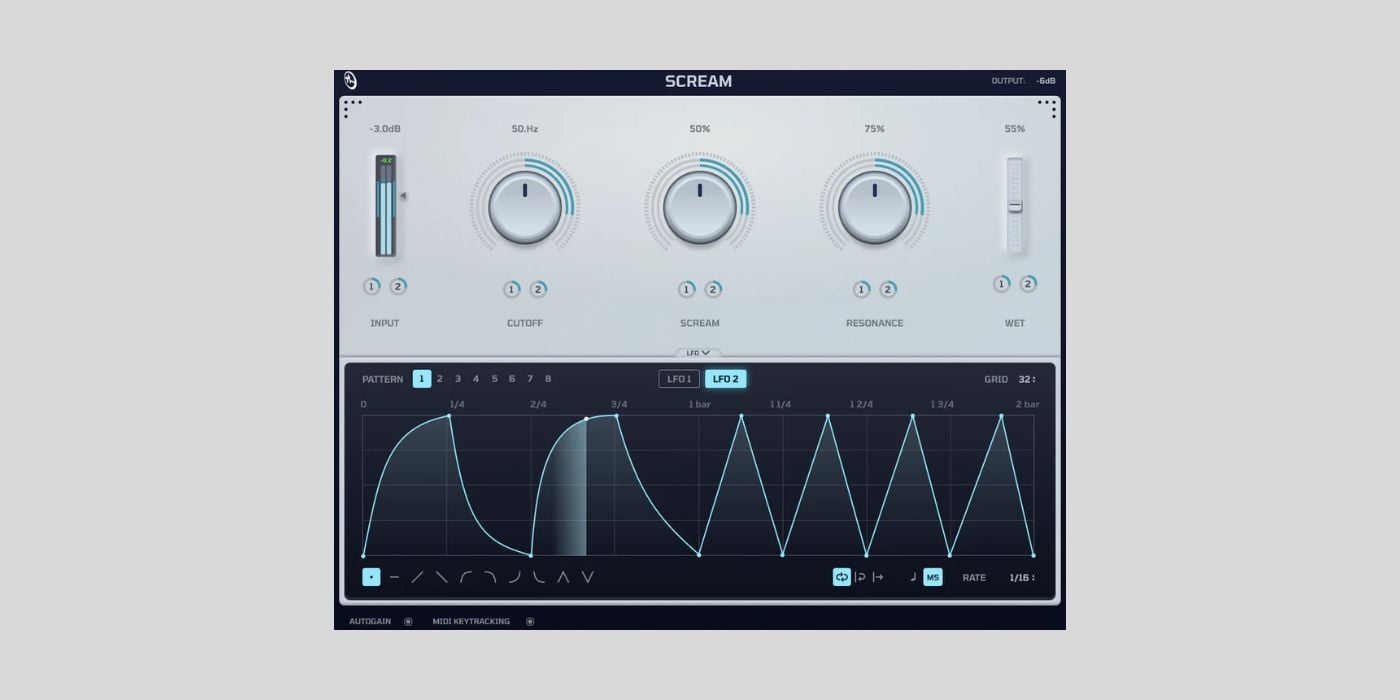
    Cure Audio has released Scream, a free and open-source plugin that recreates the Scream filter from Native Instruments’ Massive synthesizer as a standalone effect you can use in any DAW.

    I’m used to seeing plugins that emulate hardware, but here’s a plugin that emulates software.

    The Scream filter was one of Massive’s iconic modules, known for its aggressive tone and modulation features that defined the dubstep era of electronic music production.

    Massive may not be as popular today as it was at its peak (Vital, Serum, and other modern synths have taken over much of that territory), but it remains a legendary synthesizer with a huge number of sound banks still in circulation.

    If you’ve used Massive in the past and always wanted that filter available to combine with other plugins and synths, Scream basically lets you do it for free.

    The modulation engine is one of the two standout features here.

    The built-in LFO and Performer system lets you draw complex modulation patterns directly inside the plugin, store up to eight patterns per LFO (each up to two bars long), and sync everything to your DAW’s tempo.

    This drawable filter modulation was the backbone of the aggressive dubstep sound from the 2010s. It was used to animate those mid-range-heavy bass sounds that defined the genre.

    Nowadays, Scream isn’t the only free filter that can do this. Filt-R by Tilr, TAL-Filter, and Obvious Filter are the first that come to mind, but I’m sure there are more options out there.

    That said, Scream goes very deep into the details, with customizable shapes, a one-shot mode, key tracking, and optional autogain. And it’s fun to use. I wanted to test it for a few minutes before writing this, and spent half an hour playing with the modulation editor.

    It’s really well done.

    YouTube video

    The other standout is the Scream distortion itself, which gives the plugin its name and really does sound wild. You can use it for the obvious dubstep-style bass sounds, but it works just as well on synths, guitars, background textures, and even vocals.

    There’s a dry/wet knob for parallel processing, so you can blend in just a touch of the effect to add interest to drum loops, percussion, or anything else that needs some movement.

    The project spent over a year in development and beta testing before reaching its official 1.0 release. The developers rebuilt the graphics renderer from scratch along the way, dropping CPU frame time from around 443 microseconds to 58 microseconds, so the plugin is lightweight despite the visual polish.

    Scream is completely free and open source. You can download it instantly after submitting your email address on the Cure Audio website. The downloaded zip file contains installers for both macOS and Windows, and the available formats are VST3, CLAP, and AU.

    Download: Cure Audio Scream (FREE)

    Deal of the day 🔥: Get 90% OFF Ripple Phaser by Minimal Audio!

    More:

    Last Updated on April 6, 2026 by Tomislav Zlatic.


    Source link

    Share. Facebook Twitter Pinterest LinkedIn Tumblr WhatsApp Email
    Previous ArticleFSK Audio updates Bark24 | Dyn psychoacoustic dynamics processor (+ 2 FREE Copies)

    Related Posts

    FSK Audio updates Bark24 | Dyn psychoacoustic dynamics processor (+ 2 FREE Copies)

    abril 6, 2026

    Free Amorph AI-driven text-to-DSP plugin gets a major visual update

    abril 3, 2026

    Mr. Jefferson releases Stepista, a FREE AI-assisted MIDI pattern generator

    abril 3, 2026

    Fuse Audio Labs releases Tube Lab vintage channel strip plugin ($29 intro price)

    abril 3, 2026
    Demo
    Our Picks
    • Facebook
    • Twitter
    • Pinterest
    • Instagram
    • YouTube
    • Vimeo
    Don't Miss
    Plugins

    Cure Audio releases Scream, a FREE recreation of Massive’s iconic Scream filter

    By Producer Gangabril 6, 20260

    Cure Audio has released Scream, a free and open-source plugin that recreates the Scream filter…

    FSK Audio updates Bark24 | Dyn psychoacoustic dynamics processor (+ 2 FREE Copies)

    abril 6, 2026

    Free Amorph AI-driven text-to-DSP plugin gets a major visual update

    abril 3, 2026

    Mr. Jefferson releases Stepista, a FREE AI-assisted MIDI pattern generator

    abril 3, 2026

    Subscribe to Updates

    Get the latest creative news from SmartMag about art & design.

    Producer Gang | Home of Producers
    Facebook X (Twitter) Instagram Pinterest
    • Home
    • Plugins
    • Hip-Hop
    • News
    • Learn How to Sell Beats
    © 2026 Producer Gang. Designed by Audio Escola.

    Type above and press Enter to search. Press Esc to cancel.
