
Close Menu

    Subscribe to Updates

    Get the latest creative news from FooBar about art, design and business.

    What's Hot

    How to Make Tech House Like Mau P: 5 Lessons

    agosto 14, 2026

    Windows-G releases E-PeakClipper500 as a FREE VST3 clipper for Windows

    agosto 14, 2026

    Sample Dicer is a FREE four-layer one-shot sampler for macOS and Windows

    agosto 14, 2026
    Facebook X (Twitter) Instagram
    Facebook X (Twitter) Instagram Vimeo
    Producer Gang | Home of Producers
    • Home
    • Articles
    • Downloads
      • VST’s
    • Tutoriais
    • Plugins

      Windows-G releases E-PeakClipper500 as a FREE VST3 clipper for Windows

      agosto 14, 2026

      Sample Dicer is a FREE four-layer one-shot sampler for macOS and Windows

      agosto 14, 2026

      Okay Synthesizer releases Okay Shaper, a FREE three-band volume shaper

      agosto 14, 2026

      Tuva 1.5 adds project playback across five major DAWs (30% OFF)

      agosto 14, 2026

      Semedo releases AEROMOTION, a FREE multi-mode modulation plugin

      agosto 14, 2026
    • News
      1. Plugins
      2. VST’s
      3. Hip-Hop
      4. Billboard
      5. View All

      Windows-G releases E-PeakClipper500 as a FREE VST3 clipper for Windows

      agosto 14, 2026

      Sample Dicer is a FREE four-layer one-shot sampler for macOS and Windows

      agosto 14, 2026

      Okay Synthesizer releases Okay Shaper, a FREE three-band volume shaper

      agosto 14, 2026

      Tuva 1.5 adds project playback across five major DAWs (30% OFF)

      agosto 14, 2026

      Glitchmachines – Polygon v2.1.0 for Windows

      abril 23, 2025

      Toontrack – EZbass 1.3.0 Update for Windows

      abril 23, 2025

      deltarray – GigLad PC Arranger 4.0.2 for Windows

      abril 23, 2025

      Toontrack – Funk Fusion EBX (SOUNDBANK)

      abril 23, 2025

      Drake Snippet Leaks Before J. Cole’s ‘The Fall-Off’ Drops

      fevereiro 6, 2026

      J. Cole Releases His “Last” Album ‘The Fall Off’

      fevereiro 6, 2026

      GloRilla’s Sister Says She’s “Obligated” To Give Family $2,500 Each

      fevereiro 6, 2026

      Bad Bunny Reveals What To Expect For Super Bowl LX Halftime Show

      fevereiro 6, 2026

      Beyonce Cowboy Carter Tour July 4th in Washington, D.C.: Best Moments

      julho 5, 2025

      Morgan Wallen Notches 18th Country Airplay No. 1

      julho 5, 2025

      Best Moments in Cardiff, Wales

      julho 4, 2025

      Bad Bunny ‘NUEVAYol’ Pro-Immigrant Video Arrives on Fourth of July

      julho 4, 2025

      How iHeart’s Ruby Studio Uses Apollo to Podcast at Scale – Universal Audio

      julho 29, 2026

      A Guide to Distortion for Home Recordists – Universal Audio

      julho 24, 2026

      UAFX Guitar Amp Emulators – Universal Audio

      julho 17, 2026

      Step-by-Step Guide – Universal Audio

      julho 17, 2026
    • Learn How to Sell Beats
    Producer Gang | Home of Producers
    • Home
    • Plugins
    • Hip-Hop
    • News
    • Learn How to Sell Beats
    Home»Articles»Adding Rhythm That Flows With Your Melody and Chords
    Articles

    Adding Rhythm That Flows With Your Melody and Chords

    Producer GangBy Producer Gangagosto 26, 2025Nenhum comentário3 Mins Read
    Facebook Twitter Pinterest LinkedIn Tumblr WhatsApp VKontakte Email
    Adding Rhythm That Flows With Your Melody and Chords
    Share
    Facebook Twitter LinkedIn Pinterest Email


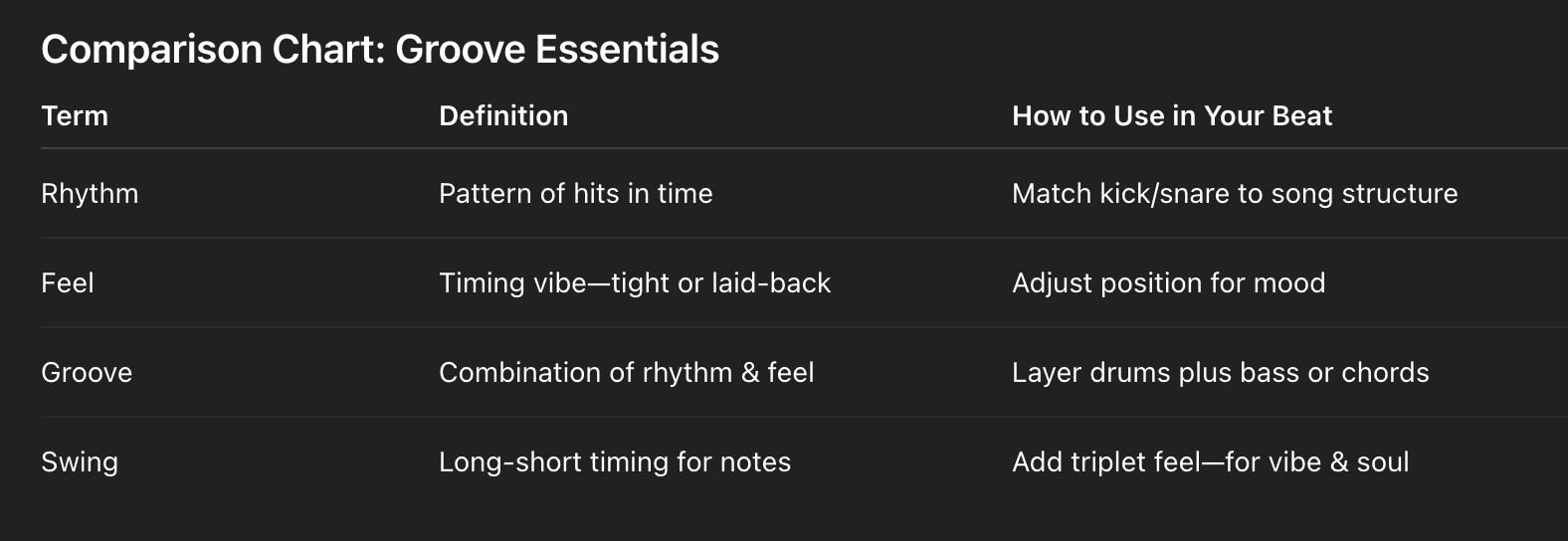
    Want your drums to fit your song instead of fight it? Learn the difference between rhythm, groove, feel, and swing, and how to use them to make your beat complement your melody—so your music breathes.

    Creating Basslines, Chords, and Melodies 🎹


    What Is Rhythm?

    Rhythm is the pattern of sound in time.

    • It’s when your drums hit—like kicks on 1 and 3, snares on 2 and 4.

    • Melody and chords usually follow that pattern or contrast it for interest.

    • Good rhythm gives your song structure and helps everything line up.


    What Is Feel?

    Feel is how the rhythm sits in time.

    • It’s whether your drums are tight and on the grid or lazy and laid-back.

    • A slow feel can make a beat relaxed; rushing the feel can push energy.

    • Use feel to match the mood of your melody or lyrics.


    What Is Groove?

    Groove is the vibe created when rhythm and feel work together.

    • It’s the magic that makes you nod your head or tap your foot.

    • Groove comes from instruments playing off each other—drums, bass, chords.

    • It’s that locked-in pocket that makes a song feel alive.

    Songwriting and Beatmaking: How to Create Movement in Your Songs 🎢


    ⭐️ Start by downloading all of my FREE Music Production Guides ⭐️ It took me years to learn this stuff!


    What Is Swing?

    Swing makes rhythms sound human—not robotic.

    • It tweaks timing so pairs of notes land in a long-short pattern.

    • Instead of “1-and, 2-and,” you hear “1—ah, 2—ah.”

    • Swing adds personality, especially in jazz, funk, and hip-hop.


    How to Add Drums That Flow

    1. Start with the Melody Feel
      Lay down your melody. Feel it. Does it feel relaxed, urgent, melancholic? Match the drums to that vibe.

    2. Play with Time and Groove
      Try a basic beat locked to the grid. Next, nudge your snare or hi-hats slightly ahead or behind the beat to add groove or swing.

    3. Mix Rhythm with Melody
      Copy motifs from your melody into drum elements—like snare accents on strong melody notes to reinforce flow.

    4. Test Multiple Feel Options
      Try it straight, swing it, or lay back. Compare how each version changes the emotional impact of your melody.

    How to Write Memorable Melodies That Get Stuck in Your Head 🎶


    Final Word

    Drums don’t need to overpower your melody—they should support and amplify it.

    When your drums flow with your melody and chords, the entire song breathes. Less fight. More feel.


    ⭐️ Download my Free Magic Delay settings Guide ⭐️


    ⭐️ Download my Free Magic Reverb settings Guide ⭐️


    #protools #daw #homestudio #recordingschool #recording #musicproduction 

    Also read: 

    How to Start Your Own Online Business Teaching Music

      

    Hey, I’m Futch – Music Production Coach and Ableton Certified Trainer

     

    Learn how to make your first song and beat in Ableton Live with my

    FREE 90-minute Ableton Live course


    I’ve been teaching audio engineering and music production for 35 years.⭐️ 

    Check out my new online music production program: Music Production Ninja…


    Source link

    Share. Facebook Twitter Pinterest LinkedIn Tumblr WhatsApp Email
    Previous ArticleGhosthack launches flash sale on Ultimate Vocal Library 3 sample pack
    Next Article TDR Limiter 6 GE plugin by Tokyo Dawn Labs on sale for $15 USD

    Related Posts

    REAPER vs Ableton Live

    agosto 13, 2026

    The Best Drum Kit Sampler Instruments

    agosto 11, 2026

    How To Record Bass Guitar

    agosto 8, 2026

    What Are You Trying to Achieve as a Music Producer?

    agosto 6, 2026
    Demo
    Our Picks
    • Facebook
    • Twitter
    • Pinterest
    • Instagram
    • YouTube
    • Vimeo
    Don't Miss
    Tutorials

    How to Make Tech House Like Mau P: 5 Lessons

    By Producer Gangagosto 14, 20260

    Mau P’s productions stand out because they are club-focused, high-energy and incredibly detailed. This breakdown…

    Windows-G releases E-PeakClipper500 as a FREE VST3 clipper for Windows

    agosto 14, 2026

    Sample Dicer is a FREE four-layer one-shot sampler for macOS and Windows

    agosto 14, 2026

    Okay Synthesizer releases Okay Shaper, a FREE three-band volume shaper

    agosto 14, 2026

    Subscribe to Updates

    Get the latest creative news from SmartMag about art & design.

    Producer Gang | Home of Producers
    Facebook X (Twitter) Instagram Pinterest
    • Home
    • Plugins
    • Hip-Hop
    • News
    • Learn How to Sell Beats
    © 2026 Producer Gang. Designed by Audio Escola.

    Type above and press Enter to search. Press Esc to cancel.
