

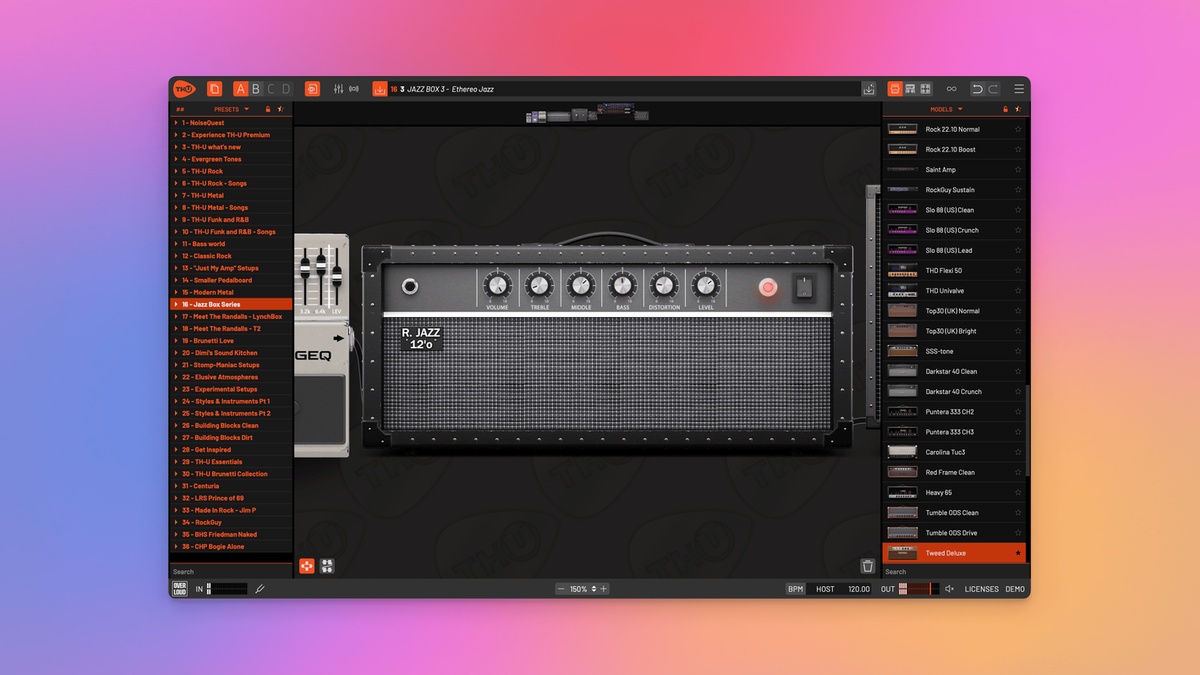

Overloud has recently a major update to its amp simulator. Josh Turvey of NoiseQuest shares his thoughts about TH-U V2 in our latest review.
Summary
The long-awaited upgrade to Overloud’s TH-U delivers improvements to the user experience, with the premium Amplifier, Cabinet, Pedal, and Effect modeller prioritising evolution rather than wholesale reinvention.
Pros:
- Excellent range of quality Amplifiers, Cabinets, and effect modules.
- Intuitive, drag and drop system for adding and organising modules.
- Flexible ‘Splitter’ module for building complex routings.
- Fluid Impulse Responses (IRs) provide more flexibility and accuracy than traditional IRs.
- The SuperCabinet module offers an innovative approach to working with IRs.
Cons:
- Users are unable to capture their personal gear rigs and share them with the wider Overloud community.
- Subtle workflow enhancements are absent, such as accessing the module list via right-click, swapping/replacing modules via drag and drop, and resizing individual modules.
- The Scene Selector feature is useful but limited in functionality because it only stores changes to the on/off states of the modules.
- Users are limited to fifteen automation slots.
Intro
Initially launched in 2008, Overloud’s TH1 was an early Amplifier, Cabinet, and Effect modeller that quickly cemented its status as a versatile, premium solution. Although not as widely used as IK Multimedia’s AmpliTube, and Native Instruments’ Guitar Rig, TH1 was praised for its large selection of high-quality modules, its routing options, and its processing capabilities—all attributes that have been steadily honed and maintained throughout its evolution.
Now, nearly two decades since its introduction, constant technological advancements have led to an explosion of highly sophisticated Amp Simulators, with increasingly more guitarists and bassists adopting software solutions for professional recording and live performance. The influx of competitive alternatives has pushed TH-U’s development, and although its last major upgrade occurred in 2019, Overloud hinted that changes were on the horizon when they unveiled their proprietary Fluid IR technology in 2024. This update greatly enhanced the realism of TH-U’s included Cabinets by making use of artificial intelligence (AI) to capture the dynamic behaviour and harmonics of various speaker-types.
Ultimately, Fluid IRs expand on the capability of traditional IRs, which only capture frequency response. With the arrival of the highly anticipated TH-U V2, the platform now includes 248 Premium Models: Amplifiers, Cabinets, Pedals, Rack Mounted Effects, and Microphones. Before exploring the platform in detail, there are some components within the ecosystem that are worth highlighting.
- Modelled Gear: Modelling underpins the Amp and Effect emulations within the library. This approach provides lots of flexibility when sculpting unique tones and timbres.
- Fluid IRs: Described earlier, all the cabinet emulations throughout Overloud’s catalogue now make use of Fluid IRs, thus enhancing their realism.
- Cabinet IR: This module allows users to import custom IRs into TH-U. Further information is provided later in the review.
- SuperCabinet: The SuperCabinet is essentially an advanced version of Cabinet IR. Overloud provides many additional libraries for this module, which also supports user IRs. Further information is provided later in the review.
- Rig Player: This module supports the professionally captured rigs included in Overloud’s catalogue, but users cannot capture their personal gear at the time of writing. Further information is provided later in the review.
Design & Features
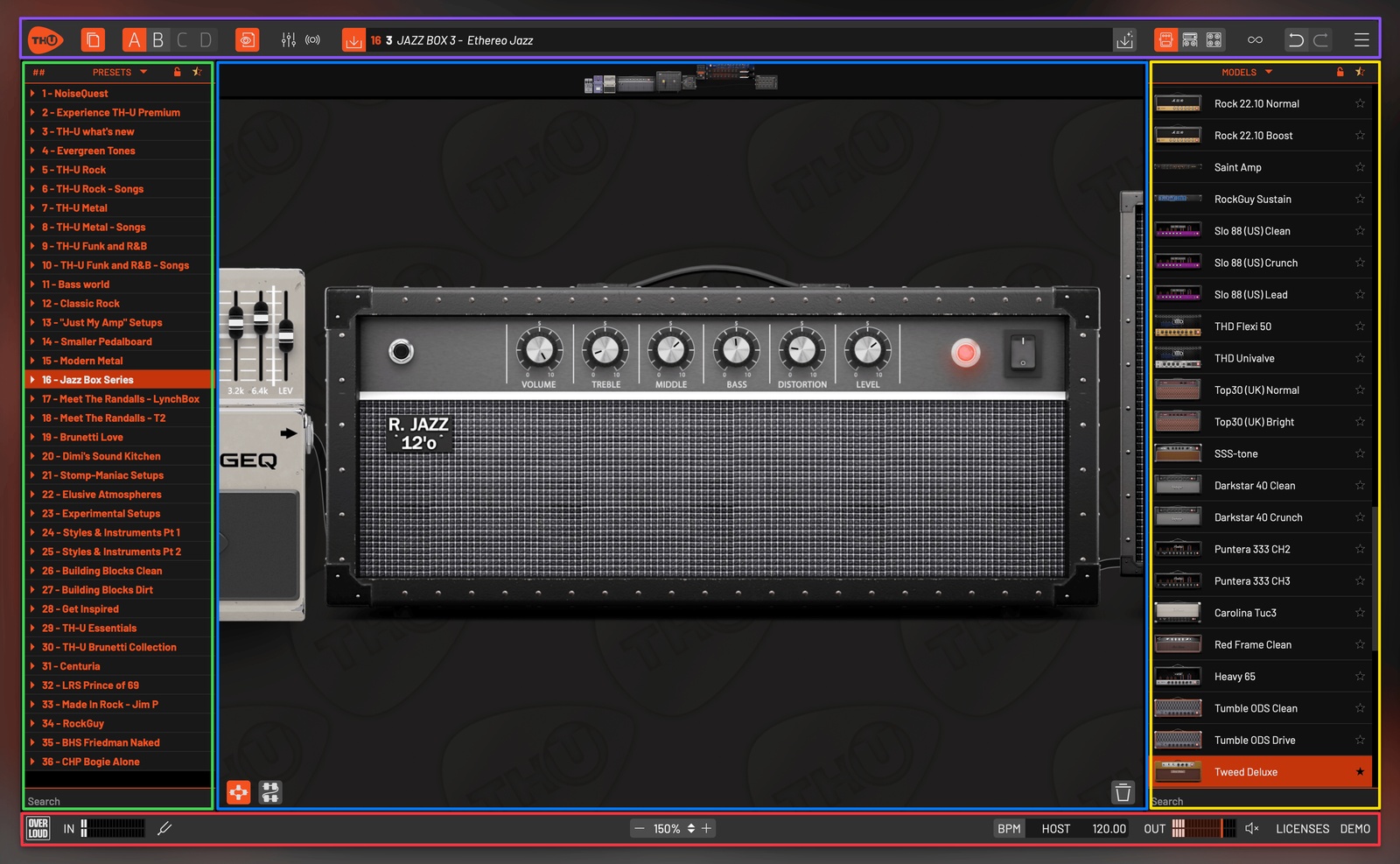
TH-U packs all of its features into an intuitive, one-page layout (see image above):
- Header (Purple Box): Ability to show/hide panels and access important features, such as the Scene Selector, Master Controls, Looper, and plugin settings.
- Left Panel (Green Box): Comprehensive Preset Manager, organised into banks and lists.
- Right Panel (Yellow Box): A switchable Component Menu that navigates through the various Amplifiers, Cabinets, Effects, Rigs, and SuperCabinets.
- Sound Chain (Blue Box): The main panel of the plugin. Modules from the Component Menu are dragged into this window when creating processing chains.
- Footer (Red Box): This panel contains a Tuner, Stereo Metering, Tempo settings, and Zoom controls.
The Header

The Header (see image above) accesses essential features and global settings. In addition to toggling the Preset panel (yellow box) and the various Component panels (green box), the header activates the in-built Looper (pink box), as well as the Master Controls and a dedicated Live Mode (blue box).
The Scene Selector (purple box) has the potential to be an exceptional feature because it enables users to store up to four, different module states within the same Sound Chain. It should be noted each scene only captures changes to the on/off states of the individual modules, which is similar to how guitarists ‘stomp’ on their pedal board effects.
Changes to the individual module parameters (e.g. Dry/Wet, Drive, Depth, Level etc.) are unfortunately not captured in the scenes, so there’s room for this feature to better capitalise on the benefits of working within the digital domain. Similarly, the Live Mode essentially only disables alerts and warnings when changing presets. Although undeniably useful when performing, an improved ‘live mode’ could feel more immersive, perhaps by removing visual distractions and unnecessary panels, and by providing quick access to some user-definable macro controls.
The Sound Chain
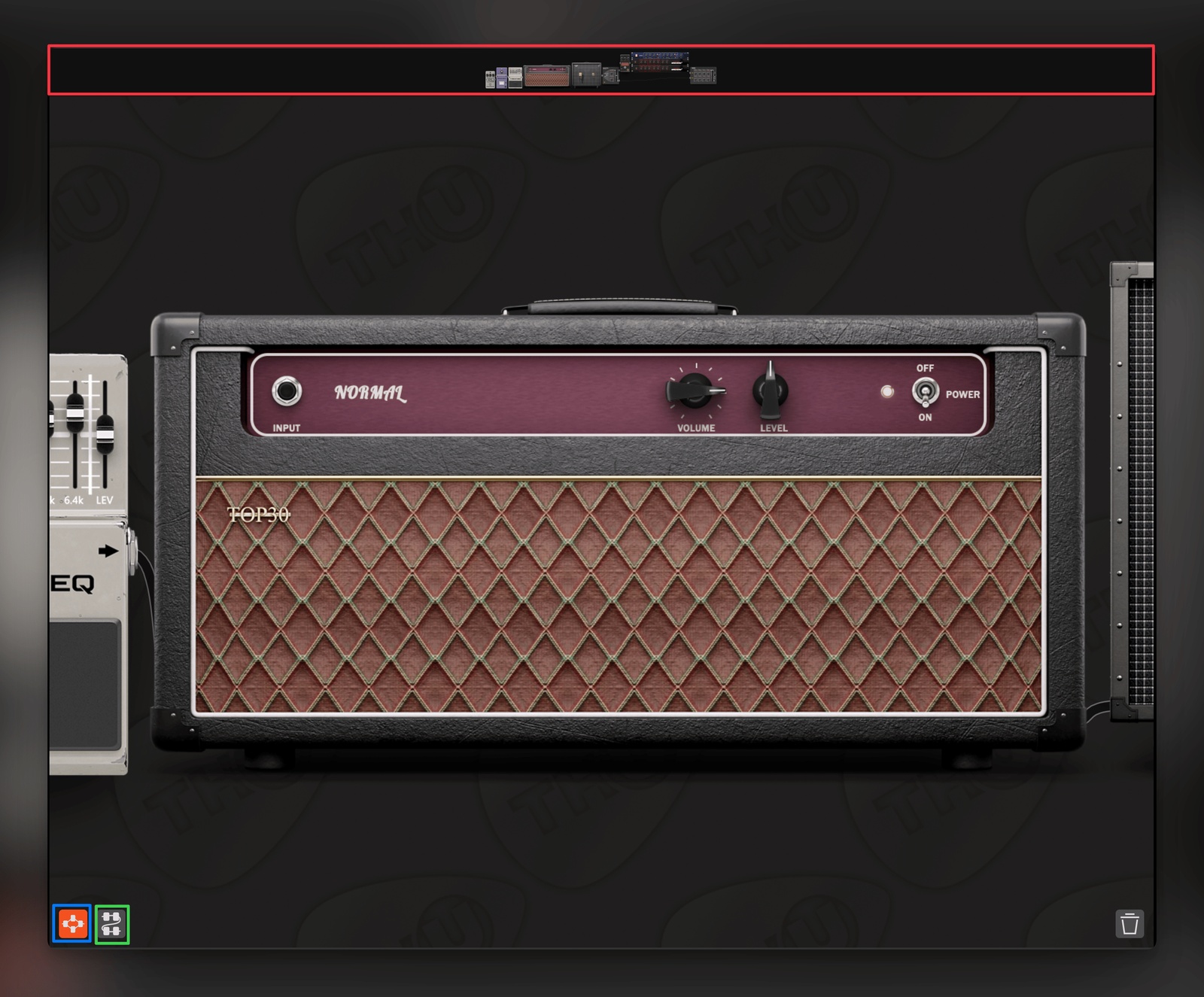
Users will no doubt spend the majority of their time in the Sound Chain (see image above) because it serves multiple, vital functions that maximise TH-U’s potential. In addition to building the processing chain, users interact directly with parameters of all the modules in this window. It therefore operates as a multipurpose, infinite canvas that is uninterrupted by extra pages and panels that could interrupt one’s workflow.
To help navigate large effect chains, users can click on the modules in the resizable Overview panel (red box), which centres the module in the Sound Chain. Additionally, Wrap Points (green box) can be inserted to stack modules vertically, which prevents arduous, horizontal scrolling. This is a purely visual aid, so it differs from the Splitter (blue box) because it doesn’t alter the routing of the audio signal, which will be discussed later in the review.
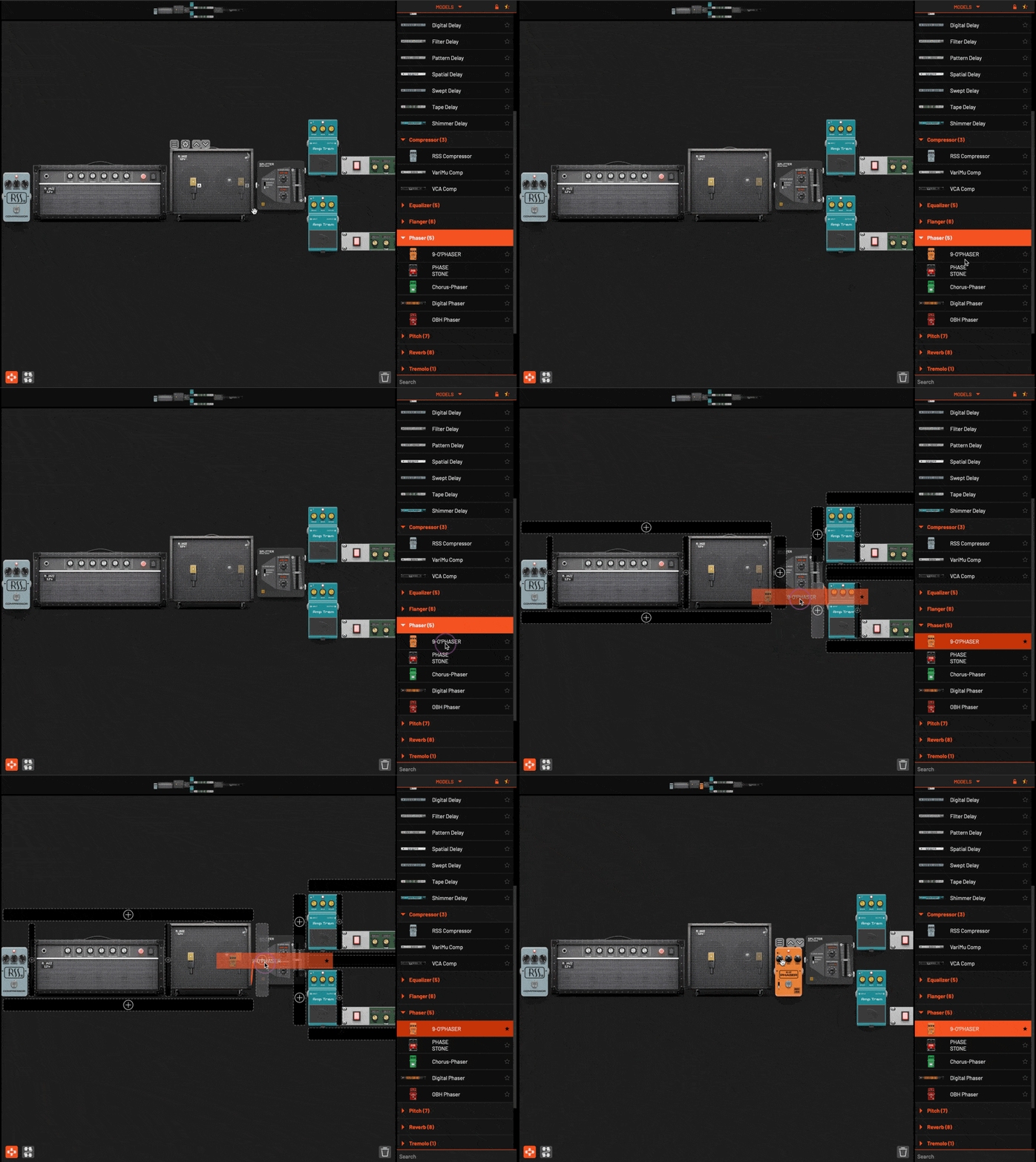
Building processing chains is as simple as dragging modules from the Component Menu and dropping them into the Sound Chain (see GIF above, click to play). Conveniently, TH-U provides useful, visual targets so that users can easily identify where to insert the modules when constructing the Sound Chain. These targets are also available when dragging inserted modules to rearrange and reorder them.
Although working within the Sound Chain is a mostly painless process, users aren’t able to replace modules by dragging and dropping them directly on top of existing modules. Nor is it possible to select new modules by right-clicking on a blank space in the Sound Chain to call up a contextual selection menu. Furthermore, multiple modules cannot be selected at once, so users are forced to delete them one at a time by dragging them onto the ‘Trash’ icon located in the bottom-right corner of the Sound Chain. Fortunately, clicking directly on the ‘Trash’ icon gives users the option to wipe the Sound Chain clean, so it’s easy to start afresh.
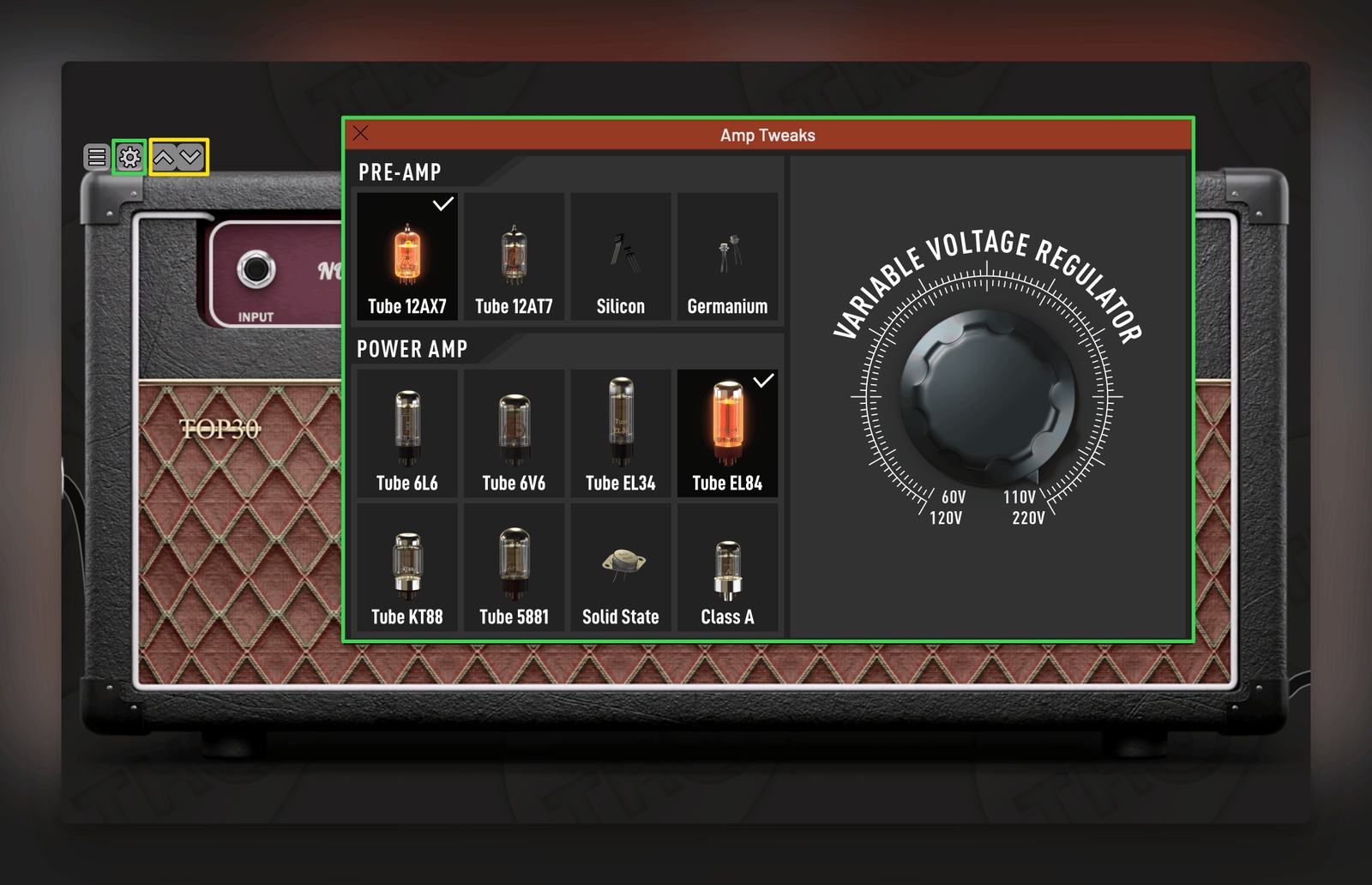
Once inserted, users can access and interact with the parameters of each module (see image above). There’s a lot of potential for exploration here, with some modules containing additional settings that offer deep customisation (green boxes), thereby allowing users to sculpt and hone their ideal tone. It’s also possible to quickly scroll between modules within the same category using the arrow selectors (yellow box). This is a simple, but considerate touch that encourages experimentation and makes it easy to explore new modules.
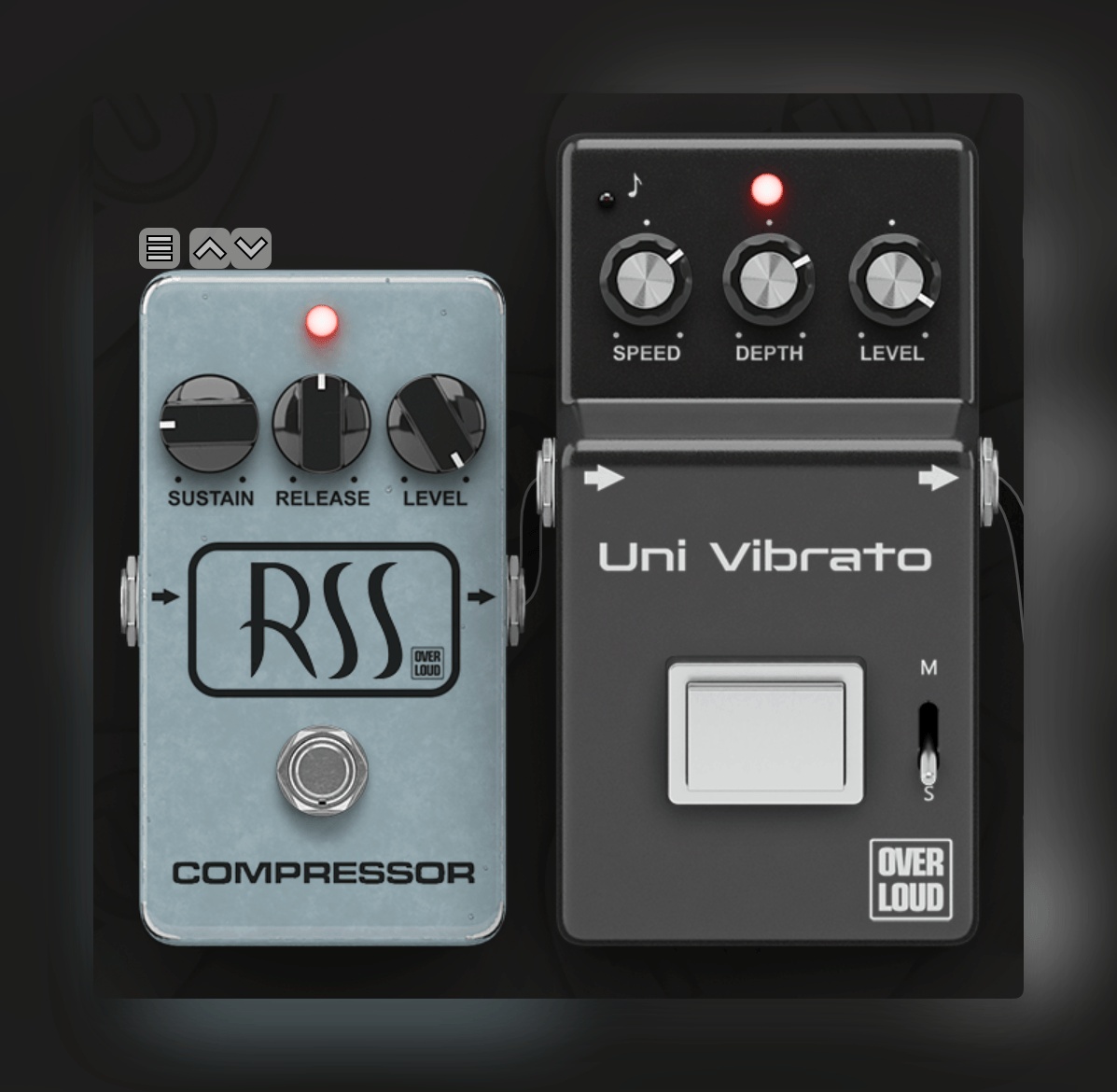
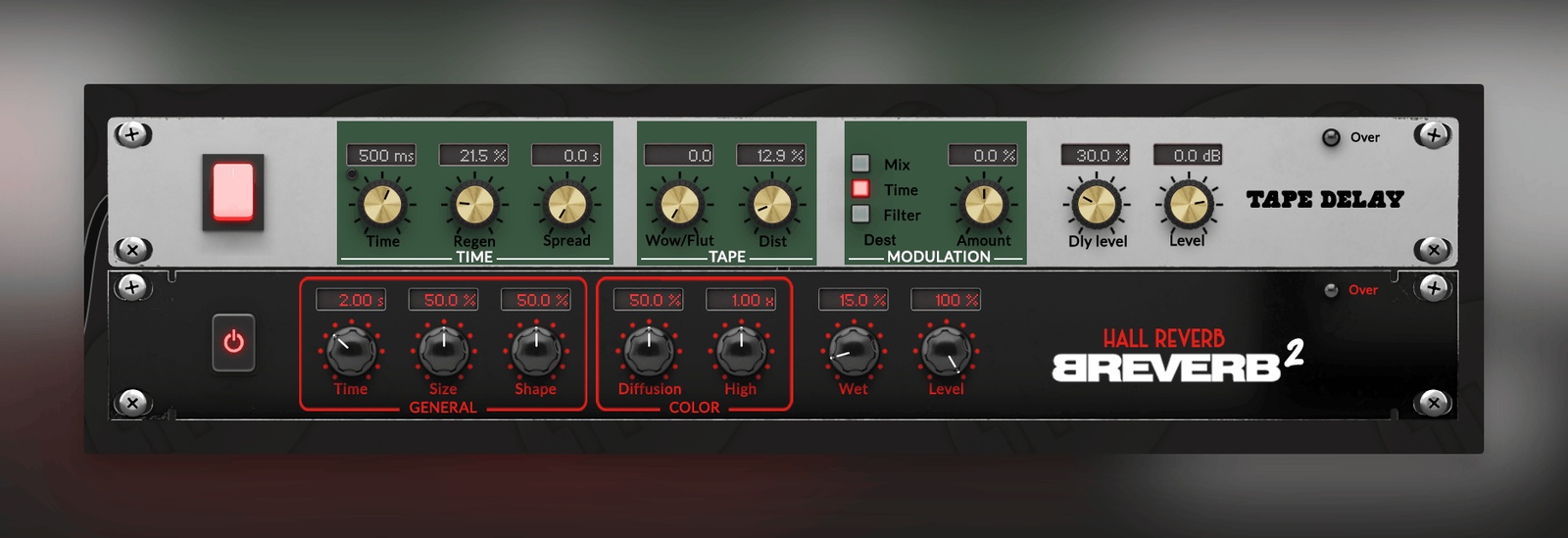
TH-U features an incredible range of high-quality Pedals and Rack-Mounted effects (see images above) that can be inserted into any area of the signal path. True to Overloud’s pedigree, the effects sound fantastic, and although they are aimed at guitarists, they can truly accommodate multiple use-cases, thus providing fertile ground for sound-design and sonic experimentation.
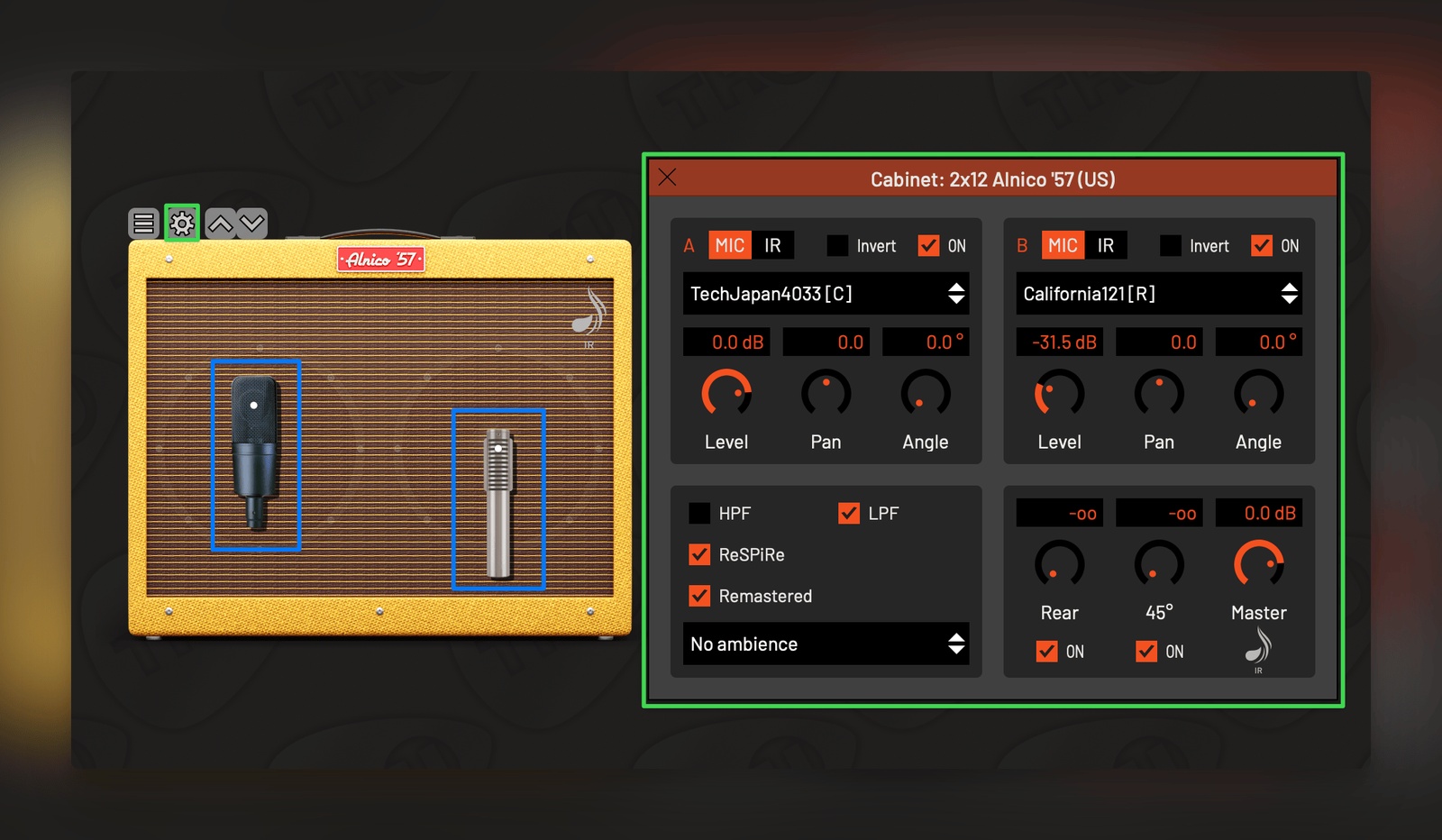
The cabinets (see image above) represent another area where TH-U excels. As with the other modules, users interact with the cabinets directly in the Sound Chain, which includes the ability to reposition the microphones (blue boxes). Clicking on the cabinet settings reveals a context menu (green boxes) whereupon it’s possible to switch microphones, adjust their panning, and make wholesale adjustments to the mix of the cabinet module.
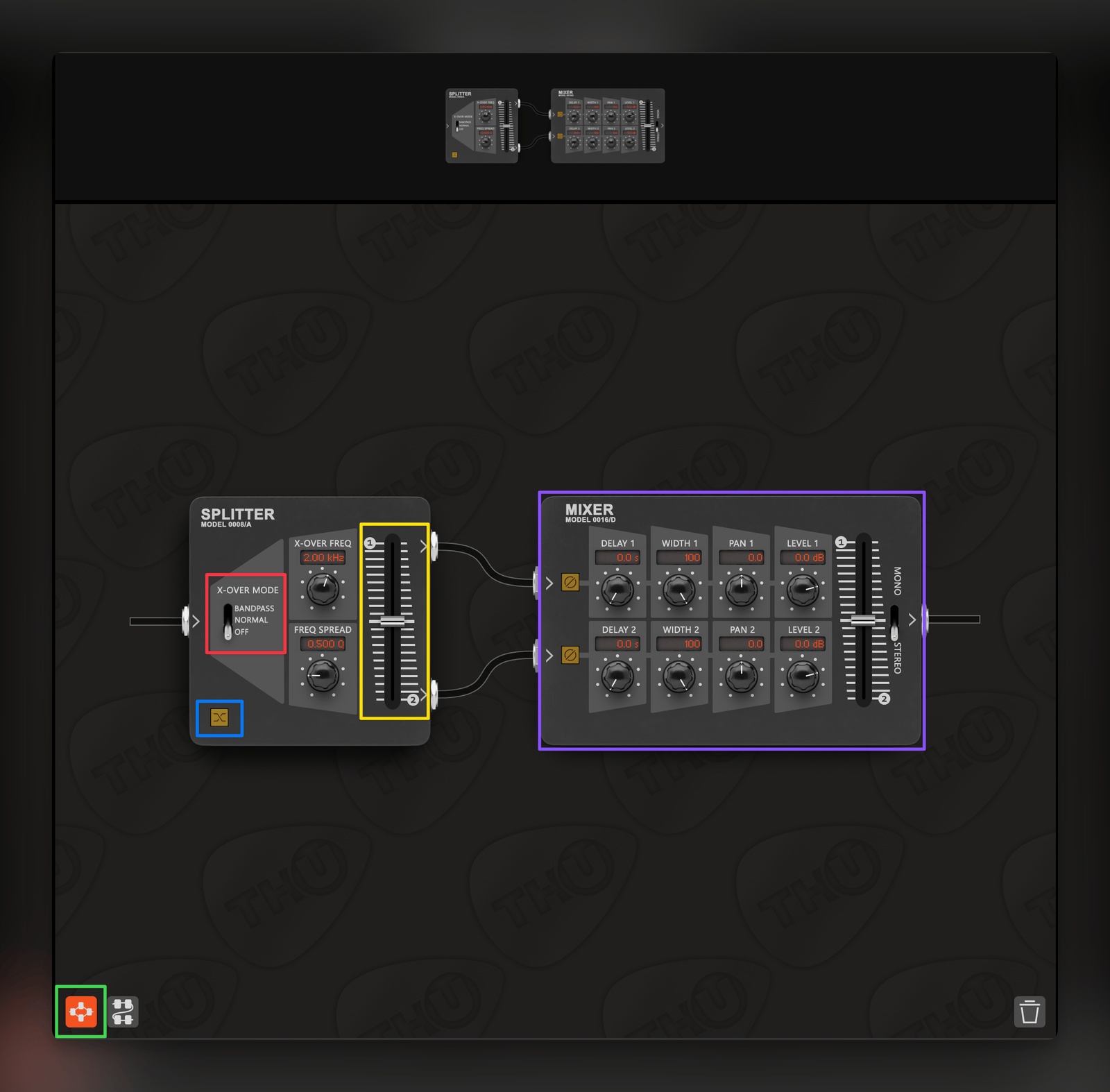
The Splitter (see image above) is one of TH-U’s most important features. It enables users to create parallel signal paths in the Sound Chain, allowing for complex and creative routings that elevate the capabilities of the plugin. Once loaded, users can insert modules into two separate paths, which are then mixed back together (purple box) in various ways. Three splitting modes are available (red box):
- Off: Splits the audio into two parallel chains that can be balanced by level. Notably, the frequency-dependent parameters mentioned below are disabled when this mode is selected.
- Normal: This splits the audio into two frequency bands, which are defined by a customisable crossover point.
- Bandpass: This also separates the audio into two bands; however, the Mids occupy one split, with the Lows and Highs grouped together.
Once a mode has been selected, the signal splits can be blended (yellow box) or swapped (blue box), thus resulting in a huge amount of flexibility when building processing chains.
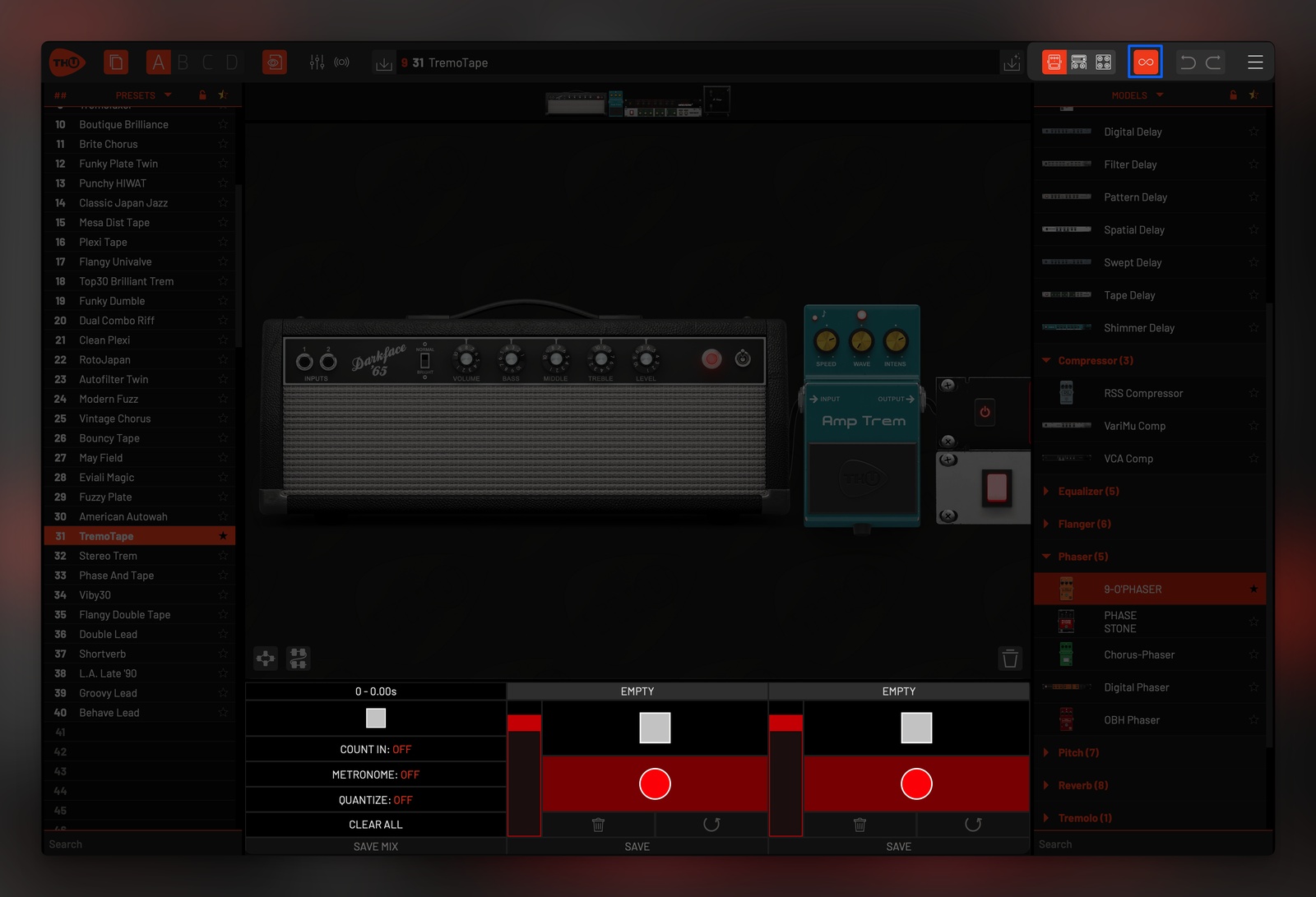
The Looper (see image above) is another useful feature within TH-U that is accessed from the Header (blue box). Designed for practice purposes, it can house two recordings simultaneously, which can be mixed and exported as a single audio file. Although it’s not a comprehensive recording solution, this is a solid addition that is particularly useful when using the standalone app.
Rig Player
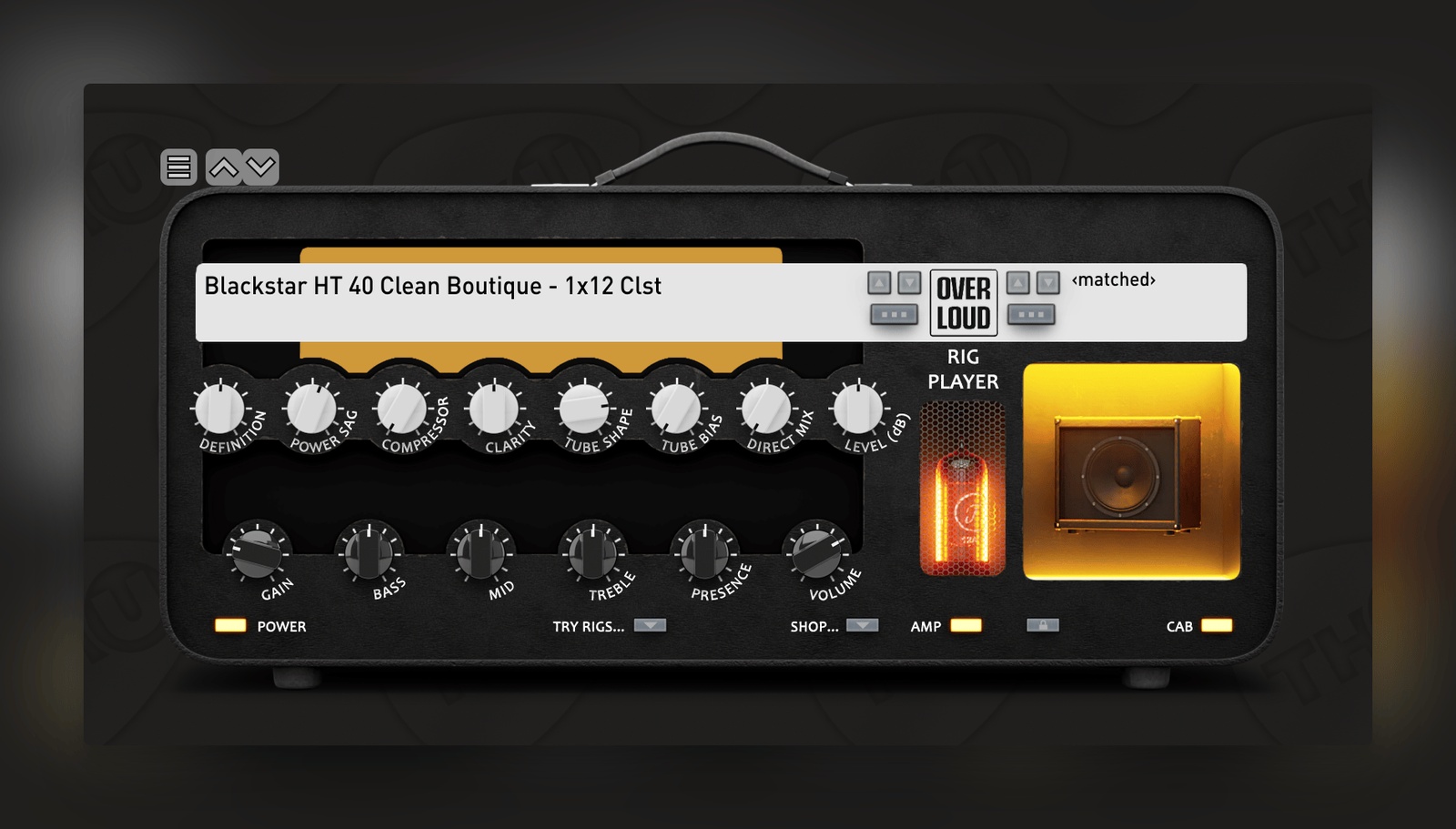
The Rig Player (see image above) may share many functional similarities, but it is noticeably different to the other modules within TH-U. The libraries inside this module capture complete rigs, essentially combining Preamps, Amplifiers, Cabinets, Microphones, and ambient Effects into one module. As such, it’s useful to think of these libraries as snapshots that preserve configurations of coveted analog rigs.
Overloud provides a considerable selection of these libraries—available at an additional cost—and although they don’t offer the same depth of customisation as other modelled modules and Fluid IRs, there are still plenty of parameters that can be tweaked and adjusted. Importantly, the Amplifier and Cabinet sections can be independently disabled, thus opening up the possibility of combining the Rig Player with the myriad other modules within the TH-U ecosystem. The main benefit to this module is speed, efficiency, and accessibility.
The captures mostly sound fantastic, and users can explore different tones without getting tangled up in complex Sound Chains that incorporate multiple modules. This offers the additional benefit of reducing the impact that TH-U has on the CPU, which may be an important consideration for certain scenarios. Although improvements have been made to its visual design, it still feels relatively dated when compared to the other modules. This may turn some users away, but there can be no denying that the Rig Player is still a rich source of inspiration that’s deserving of attention.
Cabinet IR
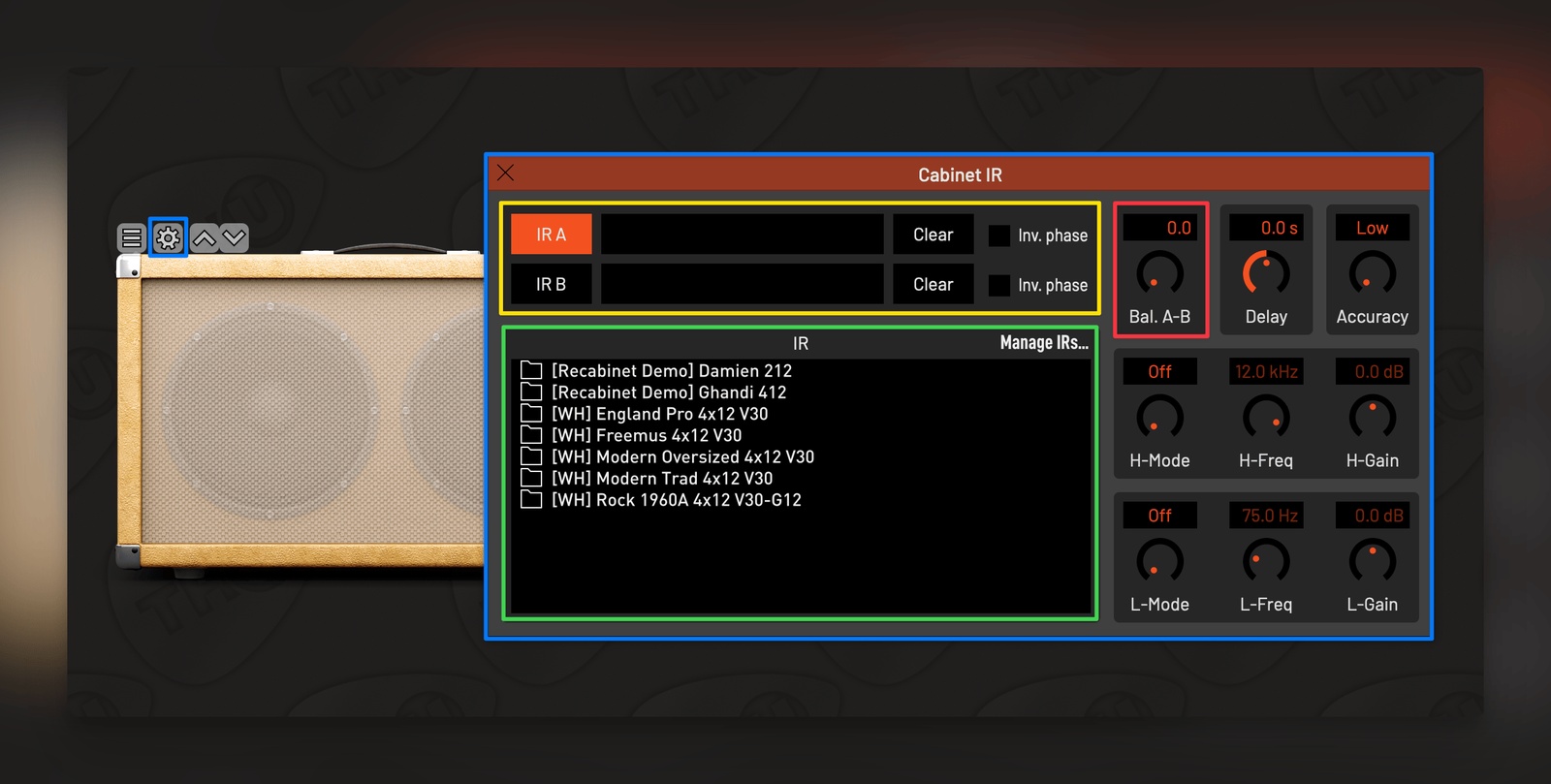
The main benefit of the Cabinet IR module (see image above) is that it allows users to import their own IRs into TH-U. The default location for the User Library can be set in TH-U’s global settings (see Header section), whereupon the IRs can be loaded into the Cabinet IR module via its local settings (blue boxes).
Up to two IRs can be loaded (yellow box) from the IR list (green box). These can be mixed via the Balance control (red box). This lightweight module greatly expands TH-U’s potential, inviting users to import custom files into the convolution engine. This can be hugely inspiring when deploying found sounds in place of traditional IRs. Despite the Cabinet IR outputting to mono, users can use the Splitter (previously discussed) to create stereo processing chains, thus pushing TH-U into the realms of experimental sound-design.
SuperCabinet
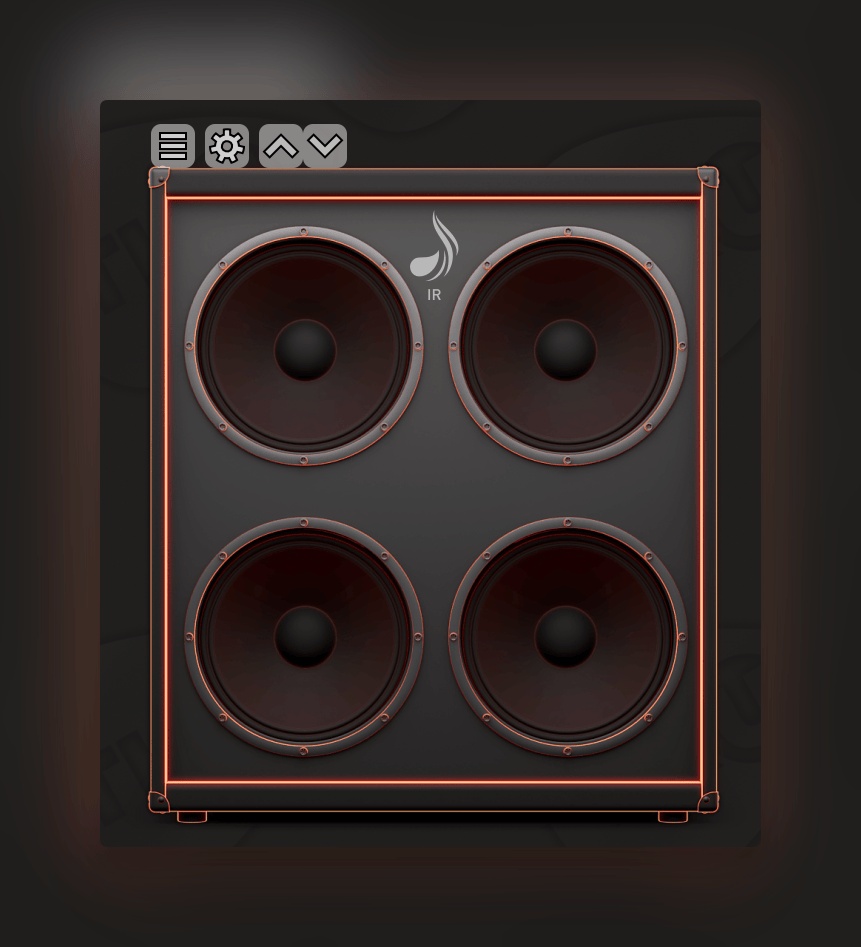
The SuperCabinet (see image above) is best thought of as the big brother to Cabinet IR. It is a comprehensive, power module that offers a streamlined approach to layering multiple IRs, switching between two distinct methods:
- Stacking: Users can layer up to four IRs simultaneously by blending their volumes together.
- Multi-band: The IRs can be split into three layers that target different, user-defined frequency bands.
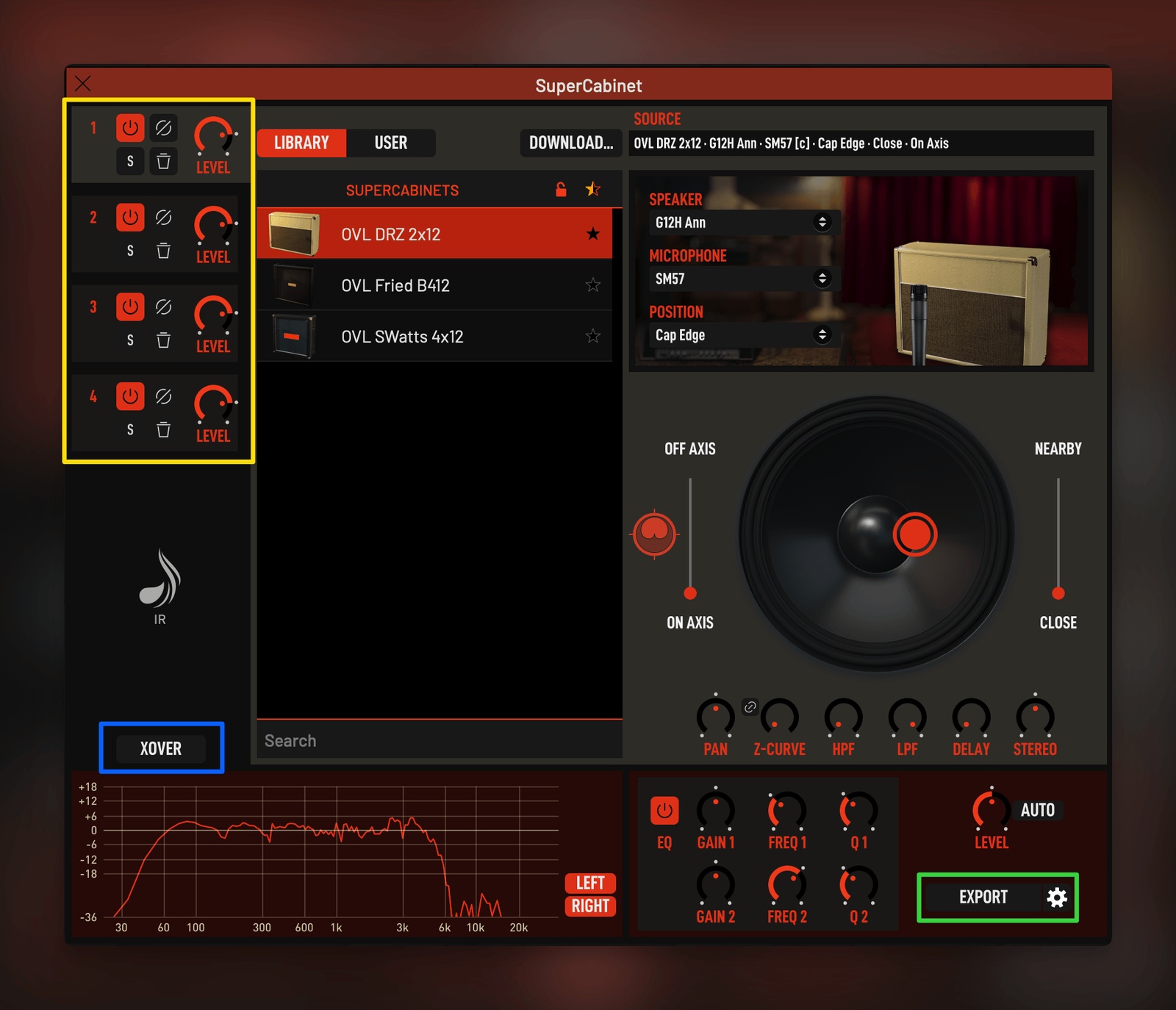
The layering functionality is accessed via the SuperCabinet’s settings (see image above), with the multi-band option engaged by selecting the ‘XOVER’ button (blue box). Once the layers have been mixed to taste (yellow box), users can export (green box) the resulting IR as a WAV file. This can be used in any convolution engine or IR reader, including various hardware solutions for live performance. The exported IR can also be imported back into SuperCabinet, which opens up a lot of potential for creative sound-design.
The module is undeniably excellent, but users will need to purchase additional libraries from Overloud, or import custom files into the module, to maximise its potential. It suffices to say that users with large IR libraries will extract a lot of value from SuperCabinet, which presents a deeply inspiring workflow that can breathe new life into vast collections.
In Use
TH-U is effortless and intuitive to use. Its drag and drop functionality invites exploration and encourages users to experiment with different combinations of amplifiers, cabinets, and effects. The Splitter module makes light work of advanced routing configurations, thus greatly expanding the sonic and creative potential of the plugin. The lack of pages and panels throughout the interface lends to the idea that TH-U is an infinite canvas, a decision that feels distinctly ‘modular’ in its approach. This implementation removes creative barriers when building guitar, bass, and instrument processing chains. Additionally, navigating the interface is made infinitely more bearable by the ‘Overview’ panel, which ensures a frictionless experience when jumping between modules within the Sound Chain.
Most importantly, the modules themselves are top-tier. They sound brilliant, and the combination of modelled gear, captured rigs, and Fluid IRs offers near-unlimited scope for sonic exploration. For example, adding found sounds and foley recordings to the Cabinet IR and SuperCabinet modules can yield wonderfully experimental reverbs. Combining this approach with the Splitter and the various effects turns TH-U into a bonafide, sound-design powerhouse that is capable of transforming any audio source into something new and refreshing.
Whilst the Master Controls ensure that the final output of the plugin is easy to manage, there is still room for improvement regarding the analysis and management of the signal flow within the Sound Chain. Admittedly, this isn’t unique to TH-U. Plugins of this nature tend to overlook certain workflow enhancements that could aid in improved Gain Staging, which is essential when working with modelled software and frequency-dependent IRs. Given that software doesn’t suffer from the same limitations as analog gear, there’s room for developers to explore the addition of various utility modules—such as unlimited Peak/VU Meters, Mix (Dry/Wet) dials, and Volume controls etc. These could theoretically be inserted into any point of the signal chain at the volition of the user for better signal management. Additionally, more routing options for the Splitter (e.g. Mid/Side), and the inclusion of more Automation Slots (currently limited to fifteen) would both represent welcome upgrades to TH-U’s functionality.
Conclusion
The latest iteration of Overloud’s TH-U solidifies its position as a premium, software solution for Guitarists and Bassists. Through its extensive library of included modules and additional content, TH-U offers a richly inspiring environment that will likely augment and adapt to studio and live-performance workflows. The only glaring omission lies in TH-U’s inability to capture custom user rigs. Whilst this is not an essential feature for many users, solutions such as IK Multimedia’s TONEX have shown that there’s a market for user-captured rigs. Most importantly, there’s a social dimension to creating and sharing these captures with one another that users tend to appreciate, which increases the value and utility of the software.
Given the pedigree of Overloud’s professionally captured rigs—and the quality of TH-U as a whole—it would be fascinating to experience the Italian developer’s interpretation of this technology, but it remains to be seen whether this will be implemented in future iterations. Overall, TH-U is an excellent software solution that is extremely comprehensive out of the box—even without the additional content that can be purchased through Overloud. No doubt it’ll be a valuable addition to the toolkit for guitarists, bassists, producers, and sound-designers alike.
Technical Info
- Simple download and installation process. Additional content is authenticated and downloaded directly within the plugin/standalone app. A user account is required.
- Mac & PC are both supported, with options for Standalone, VST, VST3, AU, AAX, and iOS.
- Comprehensive documentation is provided and can be accessed via the settings in TH-U.
- The CPU usage is well optimised. Complex, experimental effect chains can quickly become intensive, but general use is unlikely to be too taxing on most modern computers.
Disclaimer: This review was conducted on a MacBook Pro M4 Pro with 48 GB RAM and 1 TB SSD (macOS Sequoia 15.4.1). User experience with the reviewed software may vary with different technical specifications.
Alternatives
- Bias (Positive Grid)
- AmpliTube (IK Multimedia)
- Amp Room (Softube)
- Genome Suite (Two Notes)
- AmpHub and ToneHub (STL Tones)
- Guitar Rig (Native Instruments)
- Amplifikation 360 Bundle (Kuassa)
- All Amplifier Bundle (Nembrini Audio)
- Archetype Series (Neural DSP)
- Axiom (Blue Cat Audio)
- Helix Native (Line6)
- Revalver (HeadRush)
TH-U V2 is currently available to purchase for 269 EUR (regular 299 EUR), and you can take it for a test drive with a free trial version.
More information can be found at the Overloud website.
ABOUT THE AUTHOR

Josh Turvey is a musician, producer and an avid plugin enthusiast. He provides online, 1-2-1 tuition for guitar and music production for NoiseQuest.

