

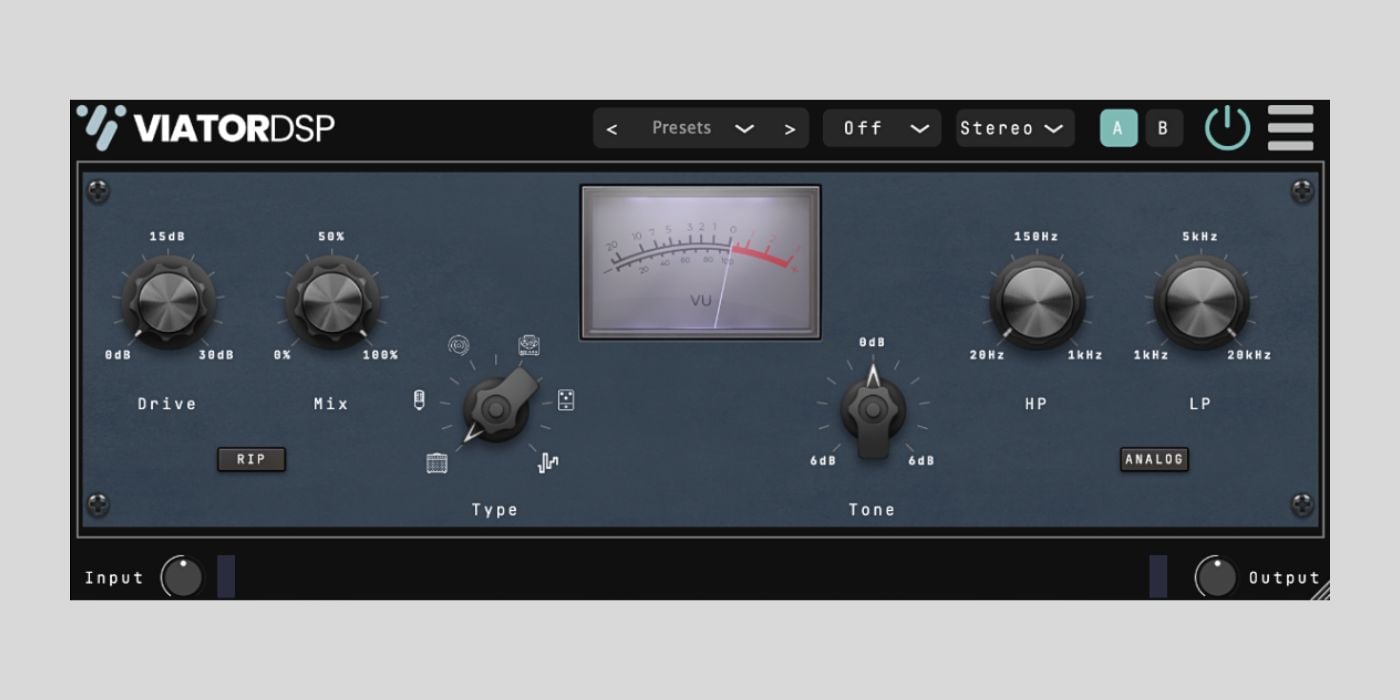

ViatorDSP has released Ripper, a free distortion plugin currently available in beta for Windows, macOS, and Linux.
Ripper is a surprisingly versatile distortion effect for a freebie. You get a very straightforward control layout, but there’s more than enough depth to cover a wide range of tones.
Documentation is non-existent at this stage (the product page literally just describes this “a beta build of a new distortion plugin named Ripper”), so much of what follows is based on my own testing in the DAW.
Ripper has six different distortion types. These appear to include tube, tape, digital, folding, and solid-state modes, although the specifics of each mode aren’t clearly described.
What’s clear from use is that each mode has a distinct character, ranging from softer saturation to more aggressive and sometimes even very harsh distortion. Switching between types noticeably changes the harmonic content and response, which I really like because it makes Ripper flexible enough for subtle coloration or more extreme sound design.
You get a Drive knob to push the signal into distortion and a Mix knob for blending the processed signal with the dry input. The Mix control is useful for parallel distortion, as it lets you push the Drive hard while retaining the clarity of the original input.
This technique works extremely well on drums, bass, and even vocals if you want to add grit without completely wrecking the source.
Ripper also includes a simple set of tone-shaping controls and a pair of filters. The high-pass filter ranges from 20 Hz up to 1 kHz, while the low-pass filter covers 1 kHz to 20 kHz. These filters make it easy to focus the distortion on a specific frequency range or tame excessive harshness after heavy processing.
Two additional buttons add a bit of mystery to me. The RIP button clearly increases the aggression of the distortion, pushing things into a more intense territory.
There’s also an Analog button, which isn’t documented. Based on listening tests, it likely introduces some form of analog-style behavior or non-linear response, possibly affecting the filters or overall signal path, but that’s just an educated guess for now.
The other GUI elements include input and output gain controls for easier gain staging, along with a basic VU-style meter. It’s not meant for precise metering, but it’s helpful for keeping levels in check. You also get a preset manager, A/B comparison, oversampling options, and a global bypass, which is nice to see in a free beta plugin.
The interface is clean and easy on the eyes, using dark blues and black with clearly labeled controls. You can freely resize the GUI by dragging the lower-right corner.
Ripper is available as a free download from ViatorDSP’s official Gumroad page, with optional donations supported. The plugin is available in VST3 and AU formats for Windows, macOS, and Linux (AU is macOS only).
Download: Ripper (FREE)
Deal of the day 🔥: Get 80% OFF iZotope VocalSynth 2 + FREE gift!
More:
Last Updated on January 25, 2026 by Tomislav Zlatic.

