

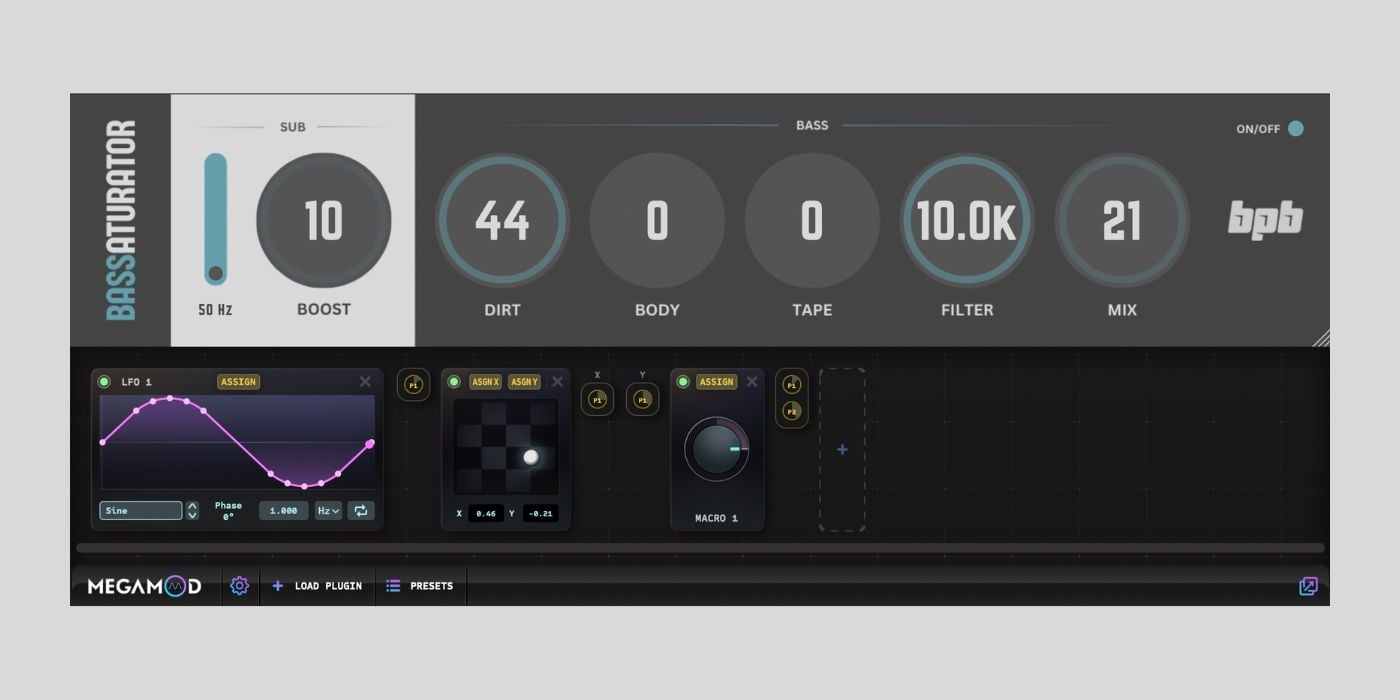

Sync Audio has released MegaMod, a free modulation plugin that lets you attach any of your existing plugins to it and use it as a modulation host.
MegaMod is currently available for free as a limited-time offer during its beta period, so if this sounds interesting, it’s worth grabbing now. I’m guessing that this could become a paid product at some point.
The idea is fun and works really well. I think this is my favorite plugin so far this year.
Here’s how it works.
You load MegaMod as an insert on a channel, click the Load Plugin button, browse to a folder on your drive containing the plugins you want to use, and load one in (you can create a subfolder with a limited number of plugins if you don’t want to include your entire collection).
The hosted plugin appears in the upper half of the interface, and below it is where you add and connect modulation sources to its parameters. This means any plugin you own (even one with no built-in modulation) can suddenly have movement, morphing, and macro control applied to it.
I briefly tested it with BPB Bassaturator and loved how smooth the whole process was.
Once you load a plugin, there are four modulation sources to choose from, and you can use a bunch of them simultaneously.
The Macro control lets you assign multiple parameters to a single knob, with individual amount control per parameter, so you can, say, have a filter cutoff move subtly while the resonance moves dramatically from the same knob turn.
The LFO is super versatile. You can freely draw the curve shape using up to as many points as you need (double-click to add more), choose from preset shapes, and either sync it to your host tempo or run it freely.
The XY Pad connects to multiple parameters at once and lets you control them simultaneously with a joystick-style control.
The Blender is the most unique of the four. It lets you save up to four different plugin states and blend between them. This can create lots of complex movement, especially with a synth or multi-effect.
I also loved the interface. It’s clean and modern but without sacrificing usability, and navigating between sources and parameters feels intuitive.
A few things worth knowing before you download, though.
This is version 0.7 beta, though it was stable during my testing on an M1 MacBook Air. Also, there is no user manual yet and I hope that will be added later on.
The download process is a bit involved — you add it to your cart, enter your name and email, receive a download link, and then need to activate the plugin on first launch. It takes a few minutes, but it’s a one-time process.
MegaMod is available in AAX, AU, and VST3 formats for macOS 10.11 and higher (Intel and Apple Silicon) and Windows 10 and higher. A standalone version is also included.
Download: MegaMod (FREE)
Deal of the day 🔥: LOWEST PRICE EVER – 67% OFF Roland D-50!
More:
Last Updated on February 23, 2026 by Tomislav Zlatic.

