

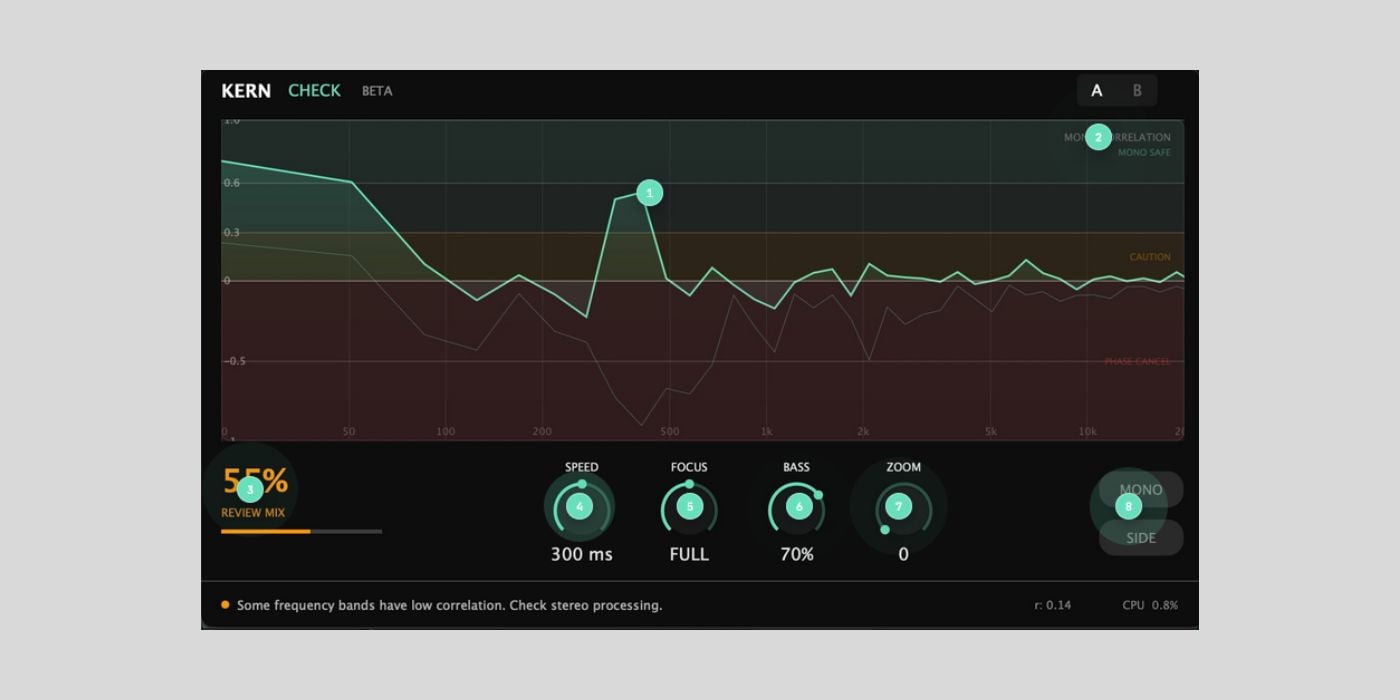

Kern is now offering their plugin Check, a spectral mono-compatibility analyzer for free. It works on Windows and macOS and comes in VST3 and AU formats.
This plugin might be a lifesaver if your mix tends to collapse on mono systems!
While “spectral mono-compatibility analysis” certainly is a mouthful, it’s no less important for a mix that translates well. Check provides you with detailed visual feedback of the stereo information in your track or mix in real-time.
The 40 individual bands follow a correlation curve that immediately tells you what’s in the safezone and what’s de-correlated (and anything in-between).
It’s not always easy to troubleshoot when doing the dreaded mono test. Check can come in handy as an additional pair of “eyes” that guide you to the problem areas that your ears sense, but not necessarily pinpoint. The plugin interface is minimal and clear to understand, with intuitive colors that map out the degree of compatibility. Visually, it looks a bit like the automatic EQ plugin Gullfoss.
To control the analysis, Check offers four buttons named “Speed”, “Focus”, “Bass”, and “Zoom.”
- Speed: Lets you modify how the curve reacts. Low values (fast) prioritize info about quick dynamic elements, and higher values (slow) give you a better idea of how things average out over time.
- Focus: Dips into low or high frequency ranges, while setting the knob to “full” gives you wide-band information. This is perfect if you have specific trouble related to stereo information in the subs or bass register, for instance.
- Bass: Determines how much the plugin emphasizes low frequencies. At 0%, all frequencies count equally.
- Zoom: Sets the vertical display anywhere between +1 and -1 with regard to correlation. Turn it up to see the positively correlated elements.
In the lower-left corner, there’s a scale that reviews your “mono score” from 0 to 100%. It’s especially sensitive in the low-end under 200Hz, where compatibility issues can get more dramatic on speakers and club systems, and prompts you to re-check your balance if the score is too low.
Check also offers an A/B-function if you want to try different settings or just want to analyse the same mix from different perspectives simultaneously.
Additionally, soloing either the mid or side signal is possible with the buttons in the lower-right corner.
Check by Kern seems like a very intuitive and handy tool, for example, if you can’t properly locate the problem you hear in mono, or if your monitoring situation is sub-par in general.
It might even reveal some common blind spots in your plugin, production, or arrangement choices, helping you tighten up your workflow and sharpen your craft.
To get the plugin, simply click “download free” and provide your e-mail address.
Download: Check (FREE – email required)
Deal of the day 🔥: Get BABY Audio Parallel Aggressor for only $5! (92% OFF)
More:
Last Updated on March 16, 2026 by Tomislav Zlatic.

