

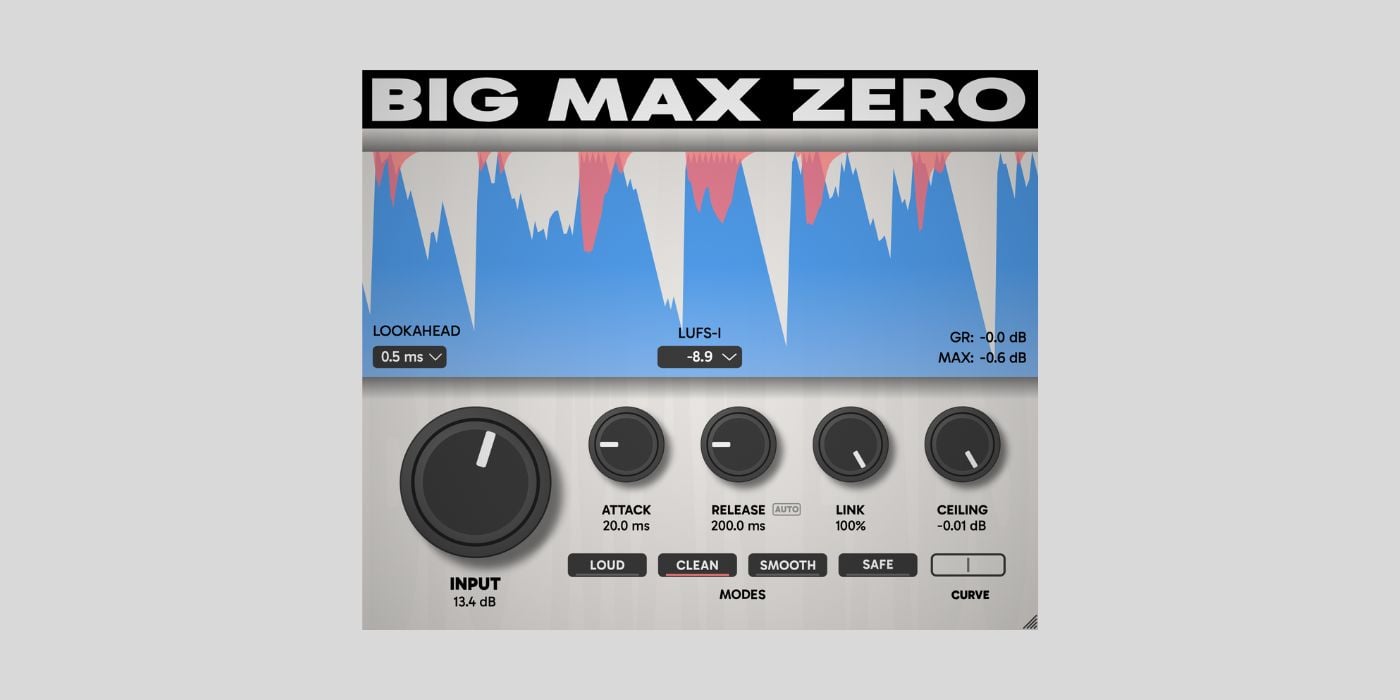

Big Man Labs has released Big Max Zero, a free brickwall limiter plugin for Windows, macOS, and Linux.
Big Max Zero is a low-latency lookahead limiter for when you need to keep the monitoring delay as low as possible. You can choose lookahead settings of 0.5 ms, 1 ms, or 2 ms, so it’s a good fit for tracking, live streaming, and real-time mixing.
The interface is divided into clear sections, with a large real-time waveform display at the top. I really like how this display works. It shows the input signal in blue and overlays gain reduction in pink or red, so you can quickly see how much the limiter is working.
There isn’t too much technical data, but you get enough visual feedback to understand what’s going on.
Under the waveform, you’ll see the lookahead selector, loudness metering options (LUFS-I, LUFS-M, and RMS), a current gain reduction readout, and a maximum peak display.
LUFS-I gives you integrated loudness over time, LUFS-M shows short-term loudness over a 400 ms window, and RMS gives a more traditional average level reading.
The main controls include Input, Attack, Release, Link, and Ceiling knobs, along with four limiter modes: LOUD, CLEAN, SMOOTH, and SAFE. The Input knob (0 to +24 dB) controls how hard you push the limiter, and the Ceiling sets the maximum output level from -12.0 dB to 0.0 dB.
The Attack knob works more like a transient emphasis control, giving you more punch at higher settings and tighter control at lower ones. Release can be set from 10 ms to 1000 ms, or you can use the AUTO mode, which adjusts based on the program.
You can also adjust stereo linking from 0% (dual mono) to 100% (fully linked), which is especially helpful for mastering.
Each of the four modes serves a different purpose. LOUD is for getting the most volume, CLEAN keeps things transparent, SMOOTH is made for bus and mix cohesion, and SAFE is for strict peak control with as few artifacts as possible. In SAFE mode, the Attack knob doesn’t work, so you get more conservative limiting.
Big Max Zero uses 64-bit internal processing and works with sample rates from 44.1 kHz to 96 kHz. It’s available as VST3 and CLAP for Windows and Linux, and as AU, VST3, and CLAP for macOS.
You can get it for free from the developer’s website by entering your email address to receive the installer links. There’s no requirement to register or set up an account, which is pretty cool.
Download: Big Max Zero (FREE)
Deal of the day 🔥: LOWEST PRICE EVER – 67% OFF Roland D-50!
More:
Last Updated on February 20, 2026 by Tomislav Zlatic.

