


Over the past few days, I had a chance to try a iTop Screen Recorder.
As a Mac user, I’m familiar with screencasting software like Screenflow and Camtasia. For the most part, Screenflow has been quite idiot-proof, at least for someone like me. That said, I’m curious to find out if I’d enjoy using iTop screen recorder – so let’s dig in.
First impressions on iTop Screen Recorder
First up, iTop screen recorder only works on PC. They don’t have a version for Mac, yet.
Second, and this is important. The free version has a recording time limit of only 2 minutes, and exports video at 480p only.
If you’re looking for a freemium screencasting software, then iTop screen recorder isn’t for you. The free version is more of a tryout. To really get anything out of the software, you’d really have to buy the full version.
Now that I’ve gotten expectations out of the way – let’s dive into the software.
Installation was quick. The interface was self-explanatory, with the ability to record in 3 different modes – screen, audio & game.
There are four accessible buttons to enable and disable the speaker (computer audio), mic, mouse tracking, and webcam. In settings, you can change advanced stuff like the audio bitrates, video formats, and more.
One neat feature that stood out for me is the ‘Quick Launcher’. Designed to save time, the quick launcher brings you to common apps you would normally record videos or audio from.

Screen Recording Games with Audio
iTop screen recorder can record up to 4K resolution in 120 FPS, without any lag – claiming that the software uses low CPU usage. I tried recording a game running at HD 1080 at 60FPS and the recording turned out smooth, complete with the computer audio as well. Maxing settings out at 4K 90frames started producing a slightly sluggish video, but that could be my computer.
I did notice that the game framerate slightly dropped with the screen recorder recording in the background, but that’s understandable. That said, it does seem that iTop was developed with gamers in mind.
Check out the short video recording below:
https://www.youtube.com/watch?v=Z4G7SbWhzBg
The software included an option to save an extra audio file while recording. I thought this was a useful feature for content creators. In any case, if you have to use or process audio from your screencast, you can!
Interestingly, there’s also a built-in denoising tool that denoises audio files in just one click. But that’s it. There is no way to adjust the denoising effect level. As a music producer, I found this limiting. However, I understand the software is probably made more for the casual user.
Lastly, the screen recorder supports more than 12 video and audio formats, from MP4, AVI, MOV, MP3, and more. Exporting videos was fairly quick as well, though the speed should depend on your onboard CPU and graphics card.
Useful video editor included.
I know, I know. Like you, I’m comfortable editing videos with Premiere Pro. But sometimes, when you just want something quick, a simple video editor is all you need.
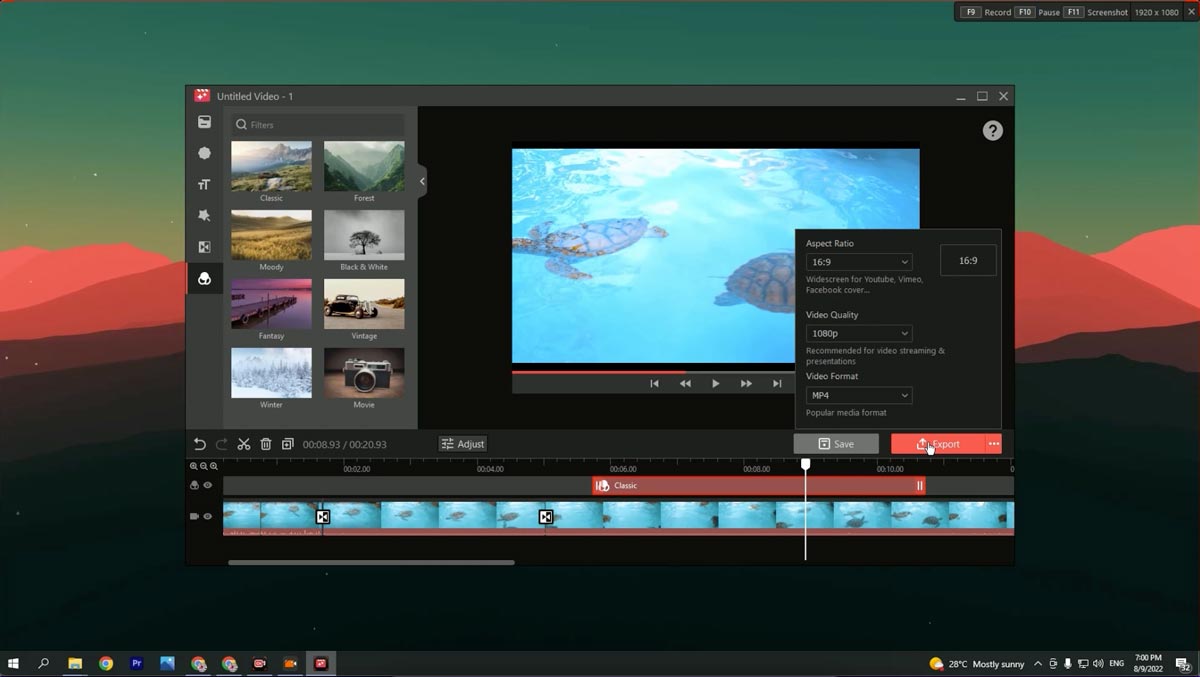
iTop screen recorder includes a video editor which I found useful. The interface reminds me of video editing software like iMovie and Movavi, where it’s simple and straightforward. Along with some fundamental video editing functions like trimming, slicing, changing video speeds to adding more audio tracks, you can add text, watermarks, create effects and transitions all within the video editor

There are even filters you can use to quickly stylize your video.
Using iTop Screen Record with your DAW
So far so good. But what I was interested in was discovering how the software will deal with recording a DAW, like Studio One. From my screencasting experience, most PC-based screen recording software doesn’t play nice with DAWs.

As I suspected, like most screen recorders, iTop doesn’t record the audio from DAWs. But this isn’t the screen recorder’s fault. It’s because of the ASIO driver that most Windows-based DAW uses.
Like most screen recorders, iTop screen recorder records audio from the system audio driver. Most DAWs (I’m using Studio One), use an ASIO driver to route audio from the DAW to the soundcard, skipping the Windows system audio drivers. The reason ASIO drivers work that way is to ensure low latencies for music production work.
A simple remedy to record audio from your DAW is to switch your DAW’s audio output to a system audio driver. Yes, this will introduce some latencies, but that’s the only way to record audio from your DAW into a screen recording software.
Otherwise, everything else worked pretty well – mic, webcam, and screen recording.
A powerful screen recording tool, in a small package.
iTop screen recorder does what it claims to do. If you’re looking for a screen recorder for PC that does it all – from recording online meetings, games, and music from your DAW (with the exception of changing your DAW’s audio output), then iTop screen recorder is a safe choice.
The screen recorder is based on a subscription that costs $35.99 for 2 years. To give you a perspective on price, Screenflow retails for $169! But I’m usually on a Mac, so Screenflow was best for me. I could however see myself using iTop screen recorder if I’m recording on a Windows-based computer.
You can download a free version of iTop screen recorder here to try. Let me know your thoughts in the comments below.

