

Close Menu

    Subscribe to Updates

    Get the latest creative news from FooBar about art, design and business.

    What's Hot

    Why Do My Vocals Sound Thin? 🎤

    abril 21, 2026

    Tuğrul Akyüz releases TugPhonon, a FREE vintage rotating tape delay plugin

    abril 21, 2026

    Groove Music Industries releases Arponaut, a FREE pattern-based arpeggiator for macOS and Windows

    abril 20, 2026
    Facebook X (Twitter) Instagram
    Facebook X (Twitter) Instagram Vimeo
    Producer Gang | Home of Producers
    • Home
    • Articles
    • Downloads
      • VST’s
    • Tutoriais
    • Plugins

      Tuğrul Akyüz releases TugPhonon, a FREE vintage rotating tape delay plugin

      abril 21, 2026

      Groove Music Industries releases Arponaut, a FREE pattern-based arpeggiator for macOS and Windows

      abril 20, 2026

      DAWJunkie releases DT-600 Mini, a FREE Casio MT-600 emulation plugin

      abril 20, 2026

      fedDSP releases fedZEP guitar amp plugin with two original amps, three pedals, and a full FX rack

      abril 17, 2026

      Forma Labs Audio releases Filament, a real-time MIDI orchestration plugin (free public beta)

      abril 16, 2026
    • News
      1. Plugins
      2. VST’s
      3. Hip-Hop
      4. Billboard
      5. View All

      Tuğrul Akyüz releases TugPhonon, a FREE vintage rotating tape delay plugin

      abril 21, 2026

      Groove Music Industries releases Arponaut, a FREE pattern-based arpeggiator for macOS and Windows

      abril 20, 2026

      DAWJunkie releases DT-600 Mini, a FREE Casio MT-600 emulation plugin

      abril 20, 2026

      fedDSP releases fedZEP guitar amp plugin with two original amps, three pedals, and a full FX rack

      abril 17, 2026

      Glitchmachines – Polygon v2.1.0 for Windows

      abril 23, 2025

      Toontrack – EZbass 1.3.0 Update for Windows

      abril 23, 2025

      deltarray – GigLad PC Arranger 4.0.2 for Windows

      abril 23, 2025

      Toontrack – Funk Fusion EBX (SOUNDBANK)

      abril 23, 2025

      Drake Snippet Leaks Before J. Cole’s ‘The Fall-Off’ Drops

      fevereiro 6, 2026

      J. Cole Releases His “Last” Album ‘The Fall Off’

      fevereiro 6, 2026

      GloRilla’s Sister Says She’s “Obligated” To Give Family $2,500 Each

      fevereiro 6, 2026

      Bad Bunny Reveals What To Expect For Super Bowl LX Halftime Show

      fevereiro 6, 2026

      Beyonce Cowboy Carter Tour July 4th in Washington, D.C.: Best Moments

      julho 5, 2025

      Morgan Wallen Notches 18th Country Airplay No. 1

      julho 5, 2025

      Best Moments in Cardiff, Wales

      julho 4, 2025

      Bad Bunny ‘NUEVAYol’ Pro-Immigrant Video Arrives on Fourth of July

      julho 4, 2025

      Best Plug-Ins for Your Volt USB Audio Interface – Universal Audio

      abril 14, 2026

      Getting Started with UAD Explore FREE – Universal Audio

      abril 14, 2026

      Making Music with UAD Explore FREE Plug-Ins – Universal Audio

      abril 14, 2026

      Introducing UAD Labs – Universal Audio

      abril 2, 2026
    • Learn How to Sell Beats
    Producer Gang | Home of Producers
    • Home
    • Plugins
    • Hip-Hop
    • News
    • Learn How to Sell Beats
    Home»Articles»Why Do My Vocals Sound Thin? 🎤
    Articles

    Why Do My Vocals Sound Thin? 🎤

    Producer GangBy Producer Gangabril 21, 2026Nenhum comentário4 Mins Read
    Facebook Twitter Pinterest LinkedIn Tumblr WhatsApp VKontakte Email
    Why Do My Vocals Sound Thin? 🎤
    Share
    Facebook Twitter LinkedIn Pinterest Email


    More Processing, Less Voice?

    “If you have to fix it with ten plugins…
    the problem may be earlier in the chain.”

    You add EQ.

    Then compression.

    Then reverb.

    Then more EQ.

    And somehow…

    The vocal gets smaller.

    Thinner.

    Farther away.

    What happened?

    Thin vocals often come from over-processing, not under-processing.


    Quick Summary

    👉 Vocals sound thin when too much EQ, over-compression, or excessive effects remove body and push the vocal back in the mix. The solution is better source tone, gentler compression, subtractive EQ, and more restraint with effects.

    Magic EQ Guide


    Before plugins…

    Start here.

    A great vocal sound begins with:

    • a good singer
    • a good mic
    • good mic placement
    • a clean recording path

    The Common Mistake

    Trying to “EQ in” a sound that wasn’t captured.


    The Better Approach

    Use a mic that flatters the voice.

    For many home studios, something like
    Shure SM7B
    is popular for exactly this reason.

    It often gives you body before you touch a plugin.


    Capture tone first. Correct less later.


    A common move:

    Boost highs for clarity.

    Boost presence for air.

    Boost top end for shine.

    Keep going…

    And suddenly the vocal loses weight.


    The Problem

    Too much additive EQ can shift attention upward and make the body feel smaller.


    The Fix

    Before boosting:

    Ask what you can remove instead.


    Try cleanup before compression.


    Common Starting Points

    Roll Off Rumble

    Use a high-pass filter around:

    • 80 Hz (roughly, depending on voice)

    Remove what the vocal doesn’t need.


    Reduce Mud

    Check around:

    If it feels cloudy or boxy, a gentle cut may help.


    Remove problems before boosting solutions.


    ⭐️ Download my Free Music Production Guides or take my free Ableton Live Course ⭐️


    Compression can add density.

    But too much?

    It can make vocals feel small and choked.


    Common Problem

    • high ratios
    • too much gain reduction
    • compressor doing all the work

    Try This Instead

    Use gentler ratios:

    Let the vocal breathe.


    Classic Move — Split the Work

    Use two processors doing lighter work.

    Example

    Fast compressor first:
    1176

    Then smooth leveling:

    LA-2A

    That classic compression chain exists for a reason.


    Two gentle moves often sound bigger than one aggressive one.


    Effects can add depth.

    They can also steal focus.


    Common Problems

    Too much:

    And the vocal starts sounding:

    • distant
    • washed out
    • smaller than before

    Why?

    Effects often add layers around the voice.

    Too much of them can mask the body of the voice.


    The Fix

    Use less.

    Or shape the effects.

    • shorter reverb
    • filtered delay returns
    • lighter saturation

    Effects should support the vocal — not replace it.


    Sometimes producers remove so much low-mid energy trying to create clarity…

    They remove the body too.

    That’s not clarity.

    That’s starvation.


    A great vocal has presence and weight.

    You need both.


    If your vocal sounds thin, check:

    • too much additive EQ
    • not enough source tone
    • over-compression
    • too much reduction around 250–300 Hz
    • too much reverb or delay
    • too much distortion or saturation

    Fix these first.


    Q: Should I boost low end to make vocals fuller?
    A: Usually fix the source or remove masking first.

    Q: Is compression causing my vocal to sound thin?
    A: Very possibly — especially if it’s overdone.

    Q: Should EQ come before compression?
    A: Often yes for cleanup.

    Q: Is 1176 into LA-2A still relevant?
    A: Absolutely — it’s a classic for a reason.


    Thin vocals are rarely caused by one thing.

    They usually happen when:

    too much is boosted…
    too much is compressed…
    too much is added.

    A big vocal often comes from doing less — better.

    Capture well.
    Subtract first.
    Compress gently.

    And let the voice keep its body.
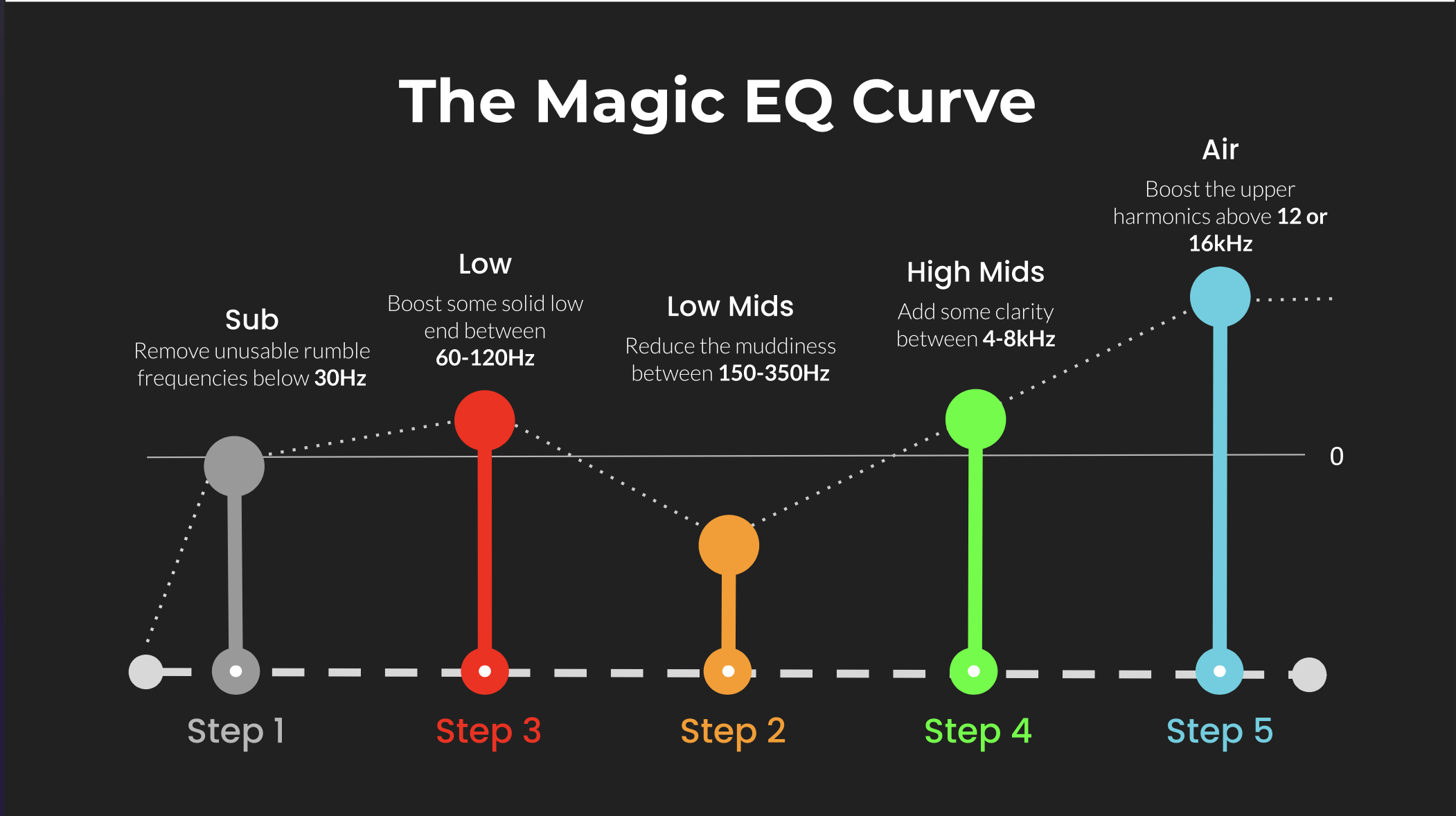
     

    ⭐️ Download my Free Magic EQ settings Guide ⭐️


    ⭐️ Download my Free Magic Reverb settings Guide ⭐️


    #protools #daw #homestudio #recordingschool #recording #musicproduction 

    Also read: 

    How to Start Your Own Online Business Teaching Music

      

    Hey, I’m Futch – Music Production Coach and Ableton Certified Trainer

     

    Learn how to make your first song and beat in Ableton Live with my

    FREE 90-minute Ableton Live course


    I’ve been teaching audio engineering and music production for 35 years.⭐️ 

    Check out my new online music production program: Music Production Ninja…


    Source link

    Share. Facebook Twitter Pinterest LinkedIn Tumblr WhatsApp Email
    Previous ArticleTuğrul Akyüz releases TugPhonon, a FREE vintage rotating tape delay plugin

    Related Posts

    Is Ableton Suite Worth It?

    abril 19, 2026

    Pro Tools Intro vs Artist for Beginners

    abril 16, 2026

    Five Timeless Violin Tunes Worth Learning

    abril 15, 2026

    Audio Plugin Subscriptions: Plugin Alliance vs UAD

    abril 14, 2026
    Demo
    Our Picks
    • Facebook
    • Twitter
    • Pinterest
    • Instagram
    • YouTube
    • Vimeo
    Don't Miss
    Articles

    Why Do My Vocals Sound Thin? 🎤

    By Producer Gangabril 21, 20260

    More Processing, Less Voice? “If you have to fix it with ten plugins… the problem…

    Tuğrul Akyüz releases TugPhonon, a FREE vintage rotating tape delay plugin

    abril 21, 2026

    Groove Music Industries releases Arponaut, a FREE pattern-based arpeggiator for macOS and Windows

    abril 20, 2026

    DAWJunkie releases DT-600 Mini, a FREE Casio MT-600 emulation plugin

    abril 20, 2026

    Subscribe to Updates

    Get the latest creative news from SmartMag about art & design.

    Producer Gang | Home of Producers
    Facebook X (Twitter) Instagram Pinterest
    • Home
    • Plugins
    • Hip-Hop
    • News
    • Learn How to Sell Beats
    © 2026 Producer Gang. Designed by Audio Escola.

    Type above and press Enter to search. Press Esc to cancel.
