

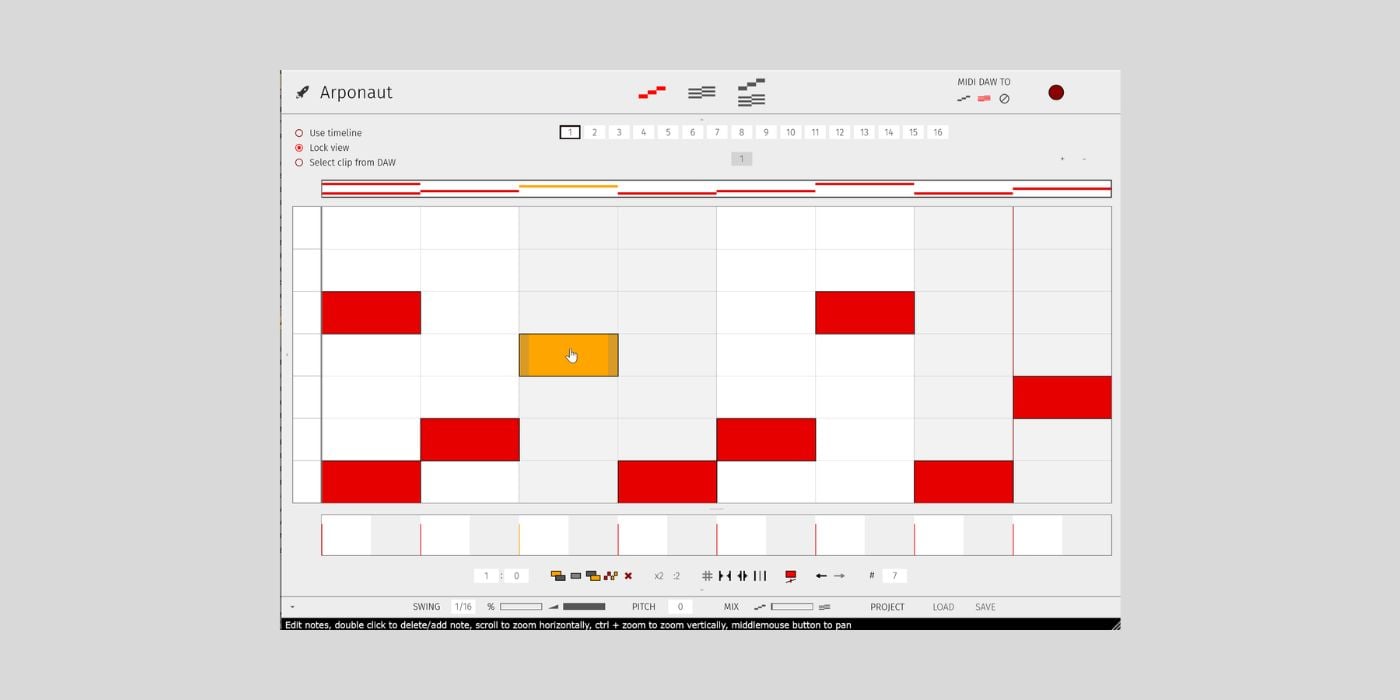

Arponaut is a free pattern-based arpeggiator for macOS and Windows from Groove Music Industries.
The plugin is available in VST3 format for macOS and Windows.
Arponaut takes the typical piano-roll workflow found in a common DAW and provides a quick, easy way to generate simple or complex arpeggiated patterns.
The thing that makes Arponaut more interesting is that you can also create and edit chord sequences directly inside the plugin.
The interface offers three views: Pattern, Chord, and Pattern+Chord.
In the Pattern view, you can draw and edit your arpeggio. The typical piano-roll workflow I mentioned lets you quickly edit various elements of your pattern.
For example, you can grab-and-drag note ends to increase or decrease their length, maintaining a tactile and visual workflow.
You can also highlight multiple notes simultaneously to move or copy the selected group.
Just under the main pattern window, you’ll see adjustable velocity levels for each note. A little further down, you’ll find various function buttons, including:
- Bars/Beats (adjust the number of bars or beats)
- Copy
- Paste
- Duplicate
- Double/Half Length (impacts selected notes)
Once you get past the pattern’s basic structure, you can add some swing, and I like how the interface conveys the swing feel.
If you look at the velocity settings, you’ll see swung notes are now grey, rather than white, which is a cool way to understand the basic concept.
When you adjust the swing percentage, you’ll notice the width of the grey notes changes to display how those notes are being pushed or pulled.
There’s even a dedicated velocity level for swung notes, which creates a more authentic feel.
There are a few ways to customise the pattern window, such as taking a wider or more compact view, to optimise visibility for a specific pattern.
The Chord view is where you can create and edit chord progressions that your pattern will follow. The pattern will apply itself over the harmonic sequence of the chord progression.
You can draw the chord pattern, drag-and-drop a MIDI file into the chord window, or route MIDI from your DAW.
Arponaut offers a quick way to create fun and interesting patterns, and editing chords inside the plugin makes it easier to make more complex changes without slowing your workflow.
The plugin is free with a pay-what-you-want option.
More:
Last Updated on April 20, 2026 by Tomislav Zlatic.

