



EQ Isn’t Adding. It’s Revealing.
Most people think EQ is about boosting.
More highs.
More lows.
More punch.
That’s backwards.
EQ is what happens when you chip away what doesn’t belong — until the sound reveals itself.
You don’t create the statue.
You remove the excess.
Quick Summary
👉 EQ shapes tone by reducing or emphasizing specific frequencies. Like sculpting stone, great EQ removes what’s unnecessary so the core character can emerge.
Every recorded sound starts as a block of stone.
-
rough
-
uneven
-
full of extra material
-
hiding its final shape
The tone you want is already in there.
Your job isn’t to add features —
it’s to uncover form.
Balance in Mixing: Subtractive vs. Additive EQ ⚖️
Think of frequencies as different areas of the stone.
-
Low end → weight and foundation
-
Low-mids → body and mud
-
Mids → identity and presence
-
High-mids → edge and clarity
-
Highs → air and detail
Every sound has a shape.
Every shape has excess.
Cutting EQ is your chisel.
-
small cuts refine
-
deep cuts reshape
-
careless cuts destroy
When you cut:
-
mud disappears
-
clarity emerges
-
space opens up
Most great EQ moves are subtractive.
You’re not weakening the sound.
You’re freeing it.
Equalizer Types: What Kind of EQ Are You Using in Your DAW? 🎛️
Boosting is not carving.
It’s polishing.
A gentle boost can:
-
highlight character
-
enhance clarity
-
bring attention forward
But heavy boosts are like adding clay to stone.
Possible — but risky.
Rule of thumb:
Cut first. Boost second. Lightly.
⭐️ Download my Free Guide: The Magic Compressor Settings that work on EVERYTHING!! ⭐️
The Q controls how wide or narrow your chisel is.
Wide moves change character.
Narrow moves fix problems.
If you’re hunting a problem, go narrow.
If you’re shaping tone, go wide.
Sweeping is running your chisel across the surface to find the crack.
-
boost a narrow band
-
sweep slowly
-
listen for ugliness
-
cut there
Once the flaw is gone, the whole sculpture feels cleaner.
How To Create Space and Clarity in Mixes With EQ and Panning 🎚️
Not every part needs the full block.
High-pass filters remove unnecessary weight.
Low-pass filters remove unnecessary brightness.
You’re not removing music —
you’re removing distractions.
Space appears when excess disappears.
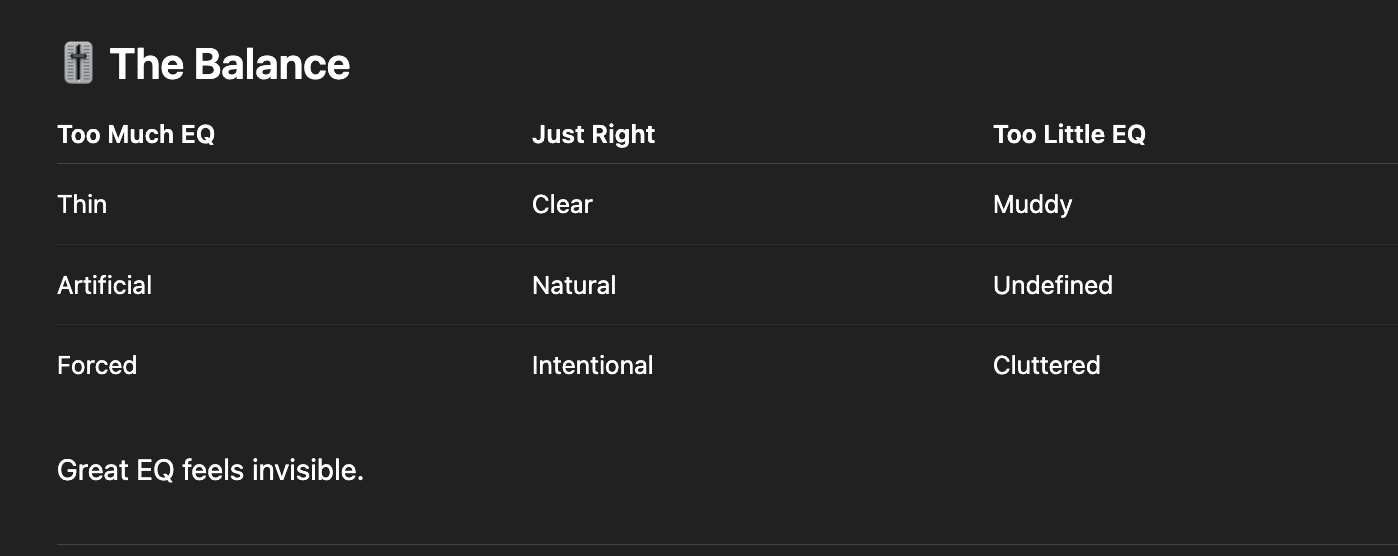
Too much EQ feels like:
-
thin sound
-
hollow tone
-
unnatural edges
-
lifeless results
That’s what happens when you keep carving after the shape is already there.
Know when to stop.
Too little EQ leaves:
-
mud
-
clutter
-
masking
-
confusion
The sculpture exists — but no one can see it clearly.
 ⭐️ Try my FREE Ableton Live Course. Learn Ableton Live in 90 Minutes!
Q: Should I EQ in solo or context?
A: Find problems in solo. Make decisions in the mix.
Q: Do I need to EQ everything?
A: No. Some sounds arrive already shaped.
Q: Why does my EQ make things worse?
A: You’re probably adding instead of removing.
Download my Magic EQ Settings for Free
Once you stop thinking of EQ as a “fix,” everything changes.
EQ doesn’t create beauty.
It reveals it.
When you learn to carve patiently — with intention — your mixes become clearer, deeper, and more powerful without sounding processed.
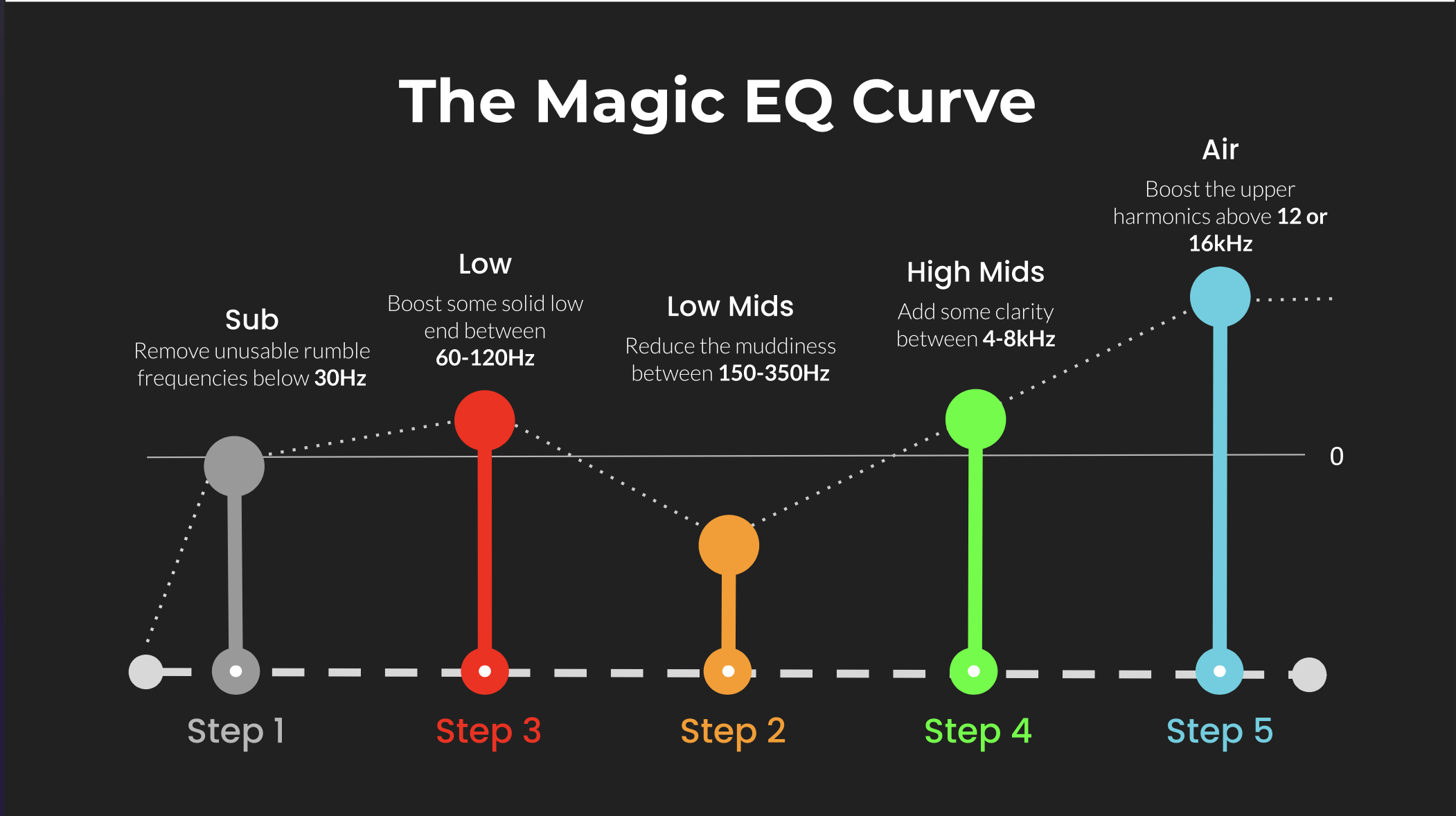 ⭐️ Download my Free Magic EQ settings Guide ⭐️

⭐️ Download my Free Magic Reverb settings Guide ⭐️
#protools #daw #homestudio #recordingschool #recording #musicproduction
Also read:
How to Start Your Own Online Business Teaching Music

Hey, I’m Futch – Music Production Coach and Ableton Certified Trainer

Learn how to make your first song and beat in Ableton Live with my
FREE 90-minute Ableton Live course
I’ve been teaching audio engineering and music production for 35 years.⭐️
Check out my new online music production program: Music Production Ninja…

