

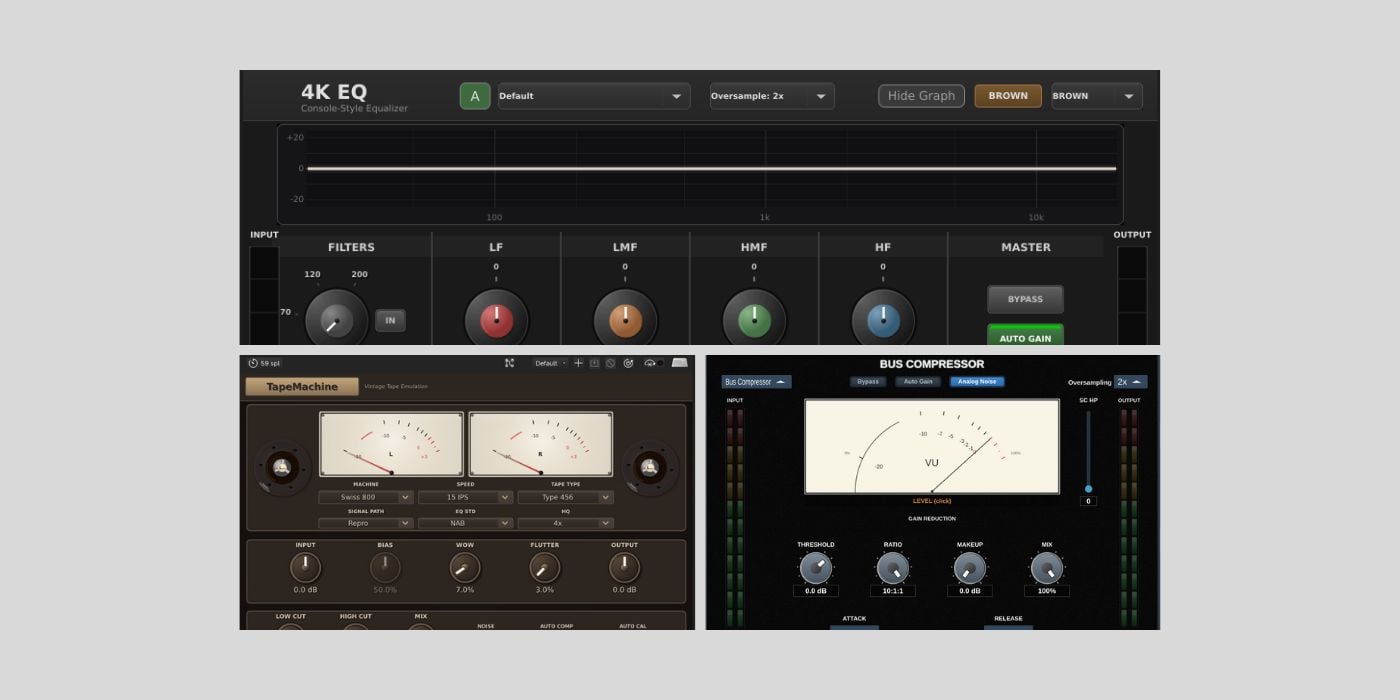

Luna Co. Audio has released 4K EQ, MultiComp, and Tape Machine, three free mixing tools for Windows, macOS, and Linux.
At first glance, I figured these were straightforward mixing utilities we’ve covered dozens, if not hundreds, of times: an equalizer, a multi-band compressor, and a tape-style saturation plugin.
But after going through the feature lists and documentation, I kind of realized that Luna Co. Audio aimed higher than “basic freeware.” All three plugins are very thoughtfully designed, extremely well-documented, and polished in a way that’s on par with commercial software (and thankfully, this is something I’m increasingly seeing from independent developers).
And when I say polished on par with commercial software, I’m referring to the focus on solid DSP and features that go beyond the basics. The only thing that these don’t offer is flashy hardware-like interfaces that you’d find in most paid plugins.
Let’s quickly go through all three plugins.
4K EQ
4K EQ is a console-inspired equalizer modeled after classic British desk designs. It offers two modes that mirror the behavior of different console eras, with broader, more musical curves on one side and tighter, more surgical behavior on the other.
Alongside the usual four EQ bands, you get high-pass and low-pass filters, optional saturation, oversampling, mid/side processing, and a real-time spectrum analyzer.
It’s not the most advanced free EQ out there, but it’s flexible enough for most channel work, and also works nicely on buses when used gently.
MultiComp
MultiComp is the most versatile of the trio in terms of workflow. It combines several classic compression styles into a single plugin, including optical and FET-style compression, VCA and bus compression, a clean digital mode, and a fully featured multiband option.
What I loved, though, is how clearly the factory presets are explained on the product page. Instead of just giving you “Vocal” or “Drum Bus” presets, the descriptions explain why certain attack and release times were chosen.
So if you’re still learning the basics of compression, MultiComp is actually a useful learning tool because you can go through the presets and figure out exactly what the settings are and why.
Tape Machine
Tape Machine is the most ambitious plugin here. Just in terms of flexibility, this is something you’d typically find in a premium tape emulation plugin.
It’s a highly detailed tape emulation with multiple machine models, tape formulations, tape speeds, and signal paths. You can dial in subtle saturation for mix bus duties or push things toward lo-fi territory using wow, flutter, noise, and bias controls.
There are also stereo VU meters, oversampling options, and a good selection of presets that show off both clean and character-heavy settings. Again, it’s surprisingly close to what you’d expect from a paid commercial tape plugin, although ChowTape is another very strong contender in that regard..
I haven’t had time to test these plugins in depth yet, but based on my first impressions, this is a release you should definitely check out. Another big plus is that you can download everything directly from the developer’s website without creating an account or registering.
All three plugins are available for Windows, macOS, and Linux in VST3 format, with AU support on macOS and LV2 support on Linux.
Download: Luna Co. Audio
More:
Last Updated on January 27, 2026 by Tomislav Zlatic.

