


Aqeel Aadam Sound has released Outgrowth, a sample-based instrument for macOS, Windows, and iOS, developed in collaboration with Brooklyn-based electronic and jazz musician BlankFor.ms.
Outgrowth is based on the simple idea of turning your existing samples into an expressive instrument as quickly as possible.
I generally enjoy using plugins that help me flip and transform my samples in new ways, but Ougrowth won me over right away with its elegant workflow.
You drag one or more samples directly into the interface, and the plugin automatically analyzes their pitch content and maps them across the keyboard. This means you can go from a random audio file to a playable patch in seconds, without manually setting root notes or key ranges unless you want to fine-tune things.
Sample Engines
Outgrowth has five playback engines, where each approaches sample playback from a different angle.
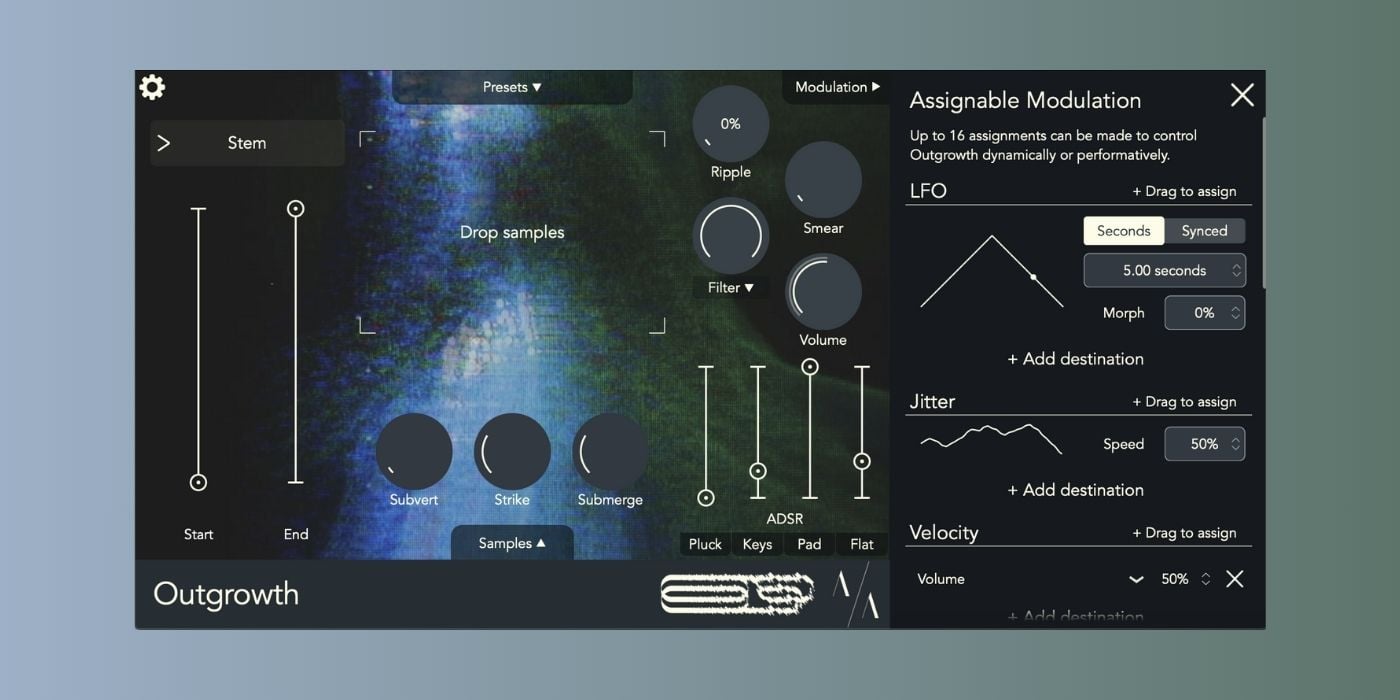
Stem is the most traditional option, acting like a classic sampler with adjustable start and end points, including reverse playback. Retain switches things up a bit by sustaining samples indefinitely using granular synthesis. It lets you preserve transients before moving into a grain-based sustain.
Reflect focuses on looping, but with a twist. Loop lengths stay consistent across the keyboard, even when pitches change, and can be synced to your DAW’s tempo for rhythmically locked results.
The more experimental side shows up in Radiate and Delve.

Radiate resynthesizes a sample into an additive instrument by analyzing its strongest harmonics and rebuilding them as sine-wave partials. You can control how many partials are used, where the analysis window sits, and how much cross-modulation is introduced, moving from clean, harmonically related tones to more complex and noisy textures.
Delve, on the other hand, turns your sample into a wavetable oscillator, scanning through snippets of the original audio at audio rate. A built-in sub-oscillator helps anchor the sound, especially as the wavetable content becomes more abstract.
Sound Shaping
In addition to the sample playback engines, Outgrowth includes several sound-shaping tools that are designed to make repitched samples feel more natural and playable.
Subvert analyzes the internal dynamics of a sample and lets you flatten or even invert its volume contour, which is especially useful if you want the ADSR envelope to fully define the shape of each note.
Strike adds an acoustic-style response across the keyboard. It subtly changes the envelope behavior, filtering, and stereo placement depending on pitch, inspired by how real instruments like pianos behave.
Submerge addresses the “chipmunk effect” by applying spectral shaping and band-limiting, keeping notes closer to the tonal character of the original sample.
Global Effects
You also get a small but useful set of global effects applied after the sound-shaping tools.
Global effects include Smear, a reverb placed before the ADSR that allows reverb tails to blend between notes without washing out attacks, and Ripple, a tape-inspired modulation effect that moves from subtle pitch instability into compression and distortion at higher settings.
A per-voice filter with envelope, key tracking, and feedback options sits at the center of the signal path, alongside a straightforward ADSR with four quick presets for plucks, keys, pads, and flat envelopes.
Modulation and Playback
Outgrowth also features a deep modulation matrix with drag-and-drop routing. You can assign LFOs, random sources, velocity, aftertouch, MPE controls, envelopes, MIDI CCs, and more to almost any parameter.
It’s flexible enough for subtle movement or fully generative patches, depending on how far you want to push it.

Sample management is another strong point. You can stack, round-robin, or scan between overlapping samples, with dynamic or fixed crossfades. Presets can be saved with or without samples attached, making it easy to build reusable sound-design environments or fully self-contained instruments.
Compatibility
Outgrowth is available for macOS and Windows in VST3, AU, and AAX formats, with an additional iOS version. Desktop versions support macOS 10.13 or later and Windows 10 or later, and the plugin is compatible with both Intel and Apple Silicon systems.
More info: Outgrowth ($65)
More:
Last Updated on January 12, 2026 by Tomislav Zlatic.

