
Close Menu

    Subscribe to Updates

    Get the latest creative news from FooBar about art, design and business.

    What's Hot

    Compression Explained Like Wrestling a Wild Animal

    janeiro 31, 2026

    Synsonic Instruments now offers their paid drum plugins for free

    janeiro 31, 2026

    RCJacH releases FREE RCSiner distortion plugin for Windows and macOS

    janeiro 31, 2026
    Facebook X (Twitter) Instagram
    Facebook X (Twitter) Instagram Vimeo
    Producer Gang | Home of Producers
    • Home
    • Articles
    • Downloads
      • VST’s
    • Tutoriais
    • Plugins

      Synsonic Instruments now offers their paid drum plugins for free

      janeiro 31, 2026

      RCJacH releases FREE RCSiner distortion plugin for Windows and macOS

      janeiro 31, 2026

      Igorski releases Phlegetron, a FREE distortion plugin for macOS and Windows

      janeiro 31, 2026

      Kymátika Sounds offers FREE Ptone for Audiomodern Soundbox

      janeiro 30, 2026

      Gooey Audio offers Talkie formant filter plugin for FREE until February 20th

      janeiro 30, 2026
    • News
      1. Plugins
      2. VST’s
      3. Hip-Hop
      4. Billboard
      5. View All

      Synsonic Instruments now offers their paid drum plugins for free

      janeiro 31, 2026

      RCJacH releases FREE RCSiner distortion plugin for Windows and macOS

      janeiro 31, 2026

      Igorski releases Phlegetron, a FREE distortion plugin for macOS and Windows

      janeiro 31, 2026

      Kymátika Sounds offers FREE Ptone for Audiomodern Soundbox

      janeiro 30, 2026

      Glitchmachines – Polygon v2.1.0 for Windows

      abril 23, 2025

      Toontrack – EZbass 1.3.0 Update for Windows

      abril 23, 2025

      deltarray – GigLad PC Arranger 4.0.2 for Windows

      abril 23, 2025

      Toontrack – Funk Fusion EBX (SOUNDBANK)

      abril 23, 2025

      J. Cole Hints Drake-Kendrick Lamar Beef Inspired ‘The Fall-Off’ Expansion

      janeiro 30, 2026

      Tyler, The Creator To Perform At 2026 Grammy Awards

      janeiro 30, 2026

      Pooh Shiesty Talks Comeback, New Music, And GloRilla Collab

      janeiro 29, 2026

      Kevin Gates Says Desmond Scott Was “Suffering” During Kristy Scott Marriage

      janeiro 29, 2026

      Beyonce Cowboy Carter Tour July 4th in Washington, D.C.: Best Moments

      julho 5, 2025

      Morgan Wallen Notches 18th Country Airplay No. 1

      julho 5, 2025

      Best Moments in Cardiff, Wales

      julho 4, 2025

      Bad Bunny ‘NUEVAYol’ Pro-Immigrant Video Arrives on Fourth of July

      julho 4, 2025

      Exclusive Radio & Audio Masterclass with Tracy-Ann Oberman MBE –

      janeiro 30, 2026

      Leah Haworth’s New Single on pointblank Recordings –

      janeiro 29, 2026

      How to Make Your Drops Hit Harder: Tips for EDM Producers 

      janeiro 29, 2026

      The Benefits of Using Reference Tracks While Mixing  –

      janeiro 27, 2026
    • Learn How to Sell Beats
    Producer Gang | Home of Producers
    • Home
    • Plugins
    • Hip-Hop
    • News
    • Learn How to Sell Beats
    Home»Articles»What Is Latency? My Voice Sounds Delayed When I’m Recording
    Articles

    What Is Latency? My Voice Sounds Delayed When I’m Recording

    Producer GangBy Producer Gangmaio 15, 2025Nenhum comentário4 Mins Read
    Facebook Twitter Pinterest LinkedIn Tumblr WhatsApp VKontakte Email
    What Is Latency? My Voice Sounds Delayed When I'm Recording
    Share
    Facebook Twitter LinkedIn Pinterest Email


    🎯 Why does my voice sound delayed when I’m recording?


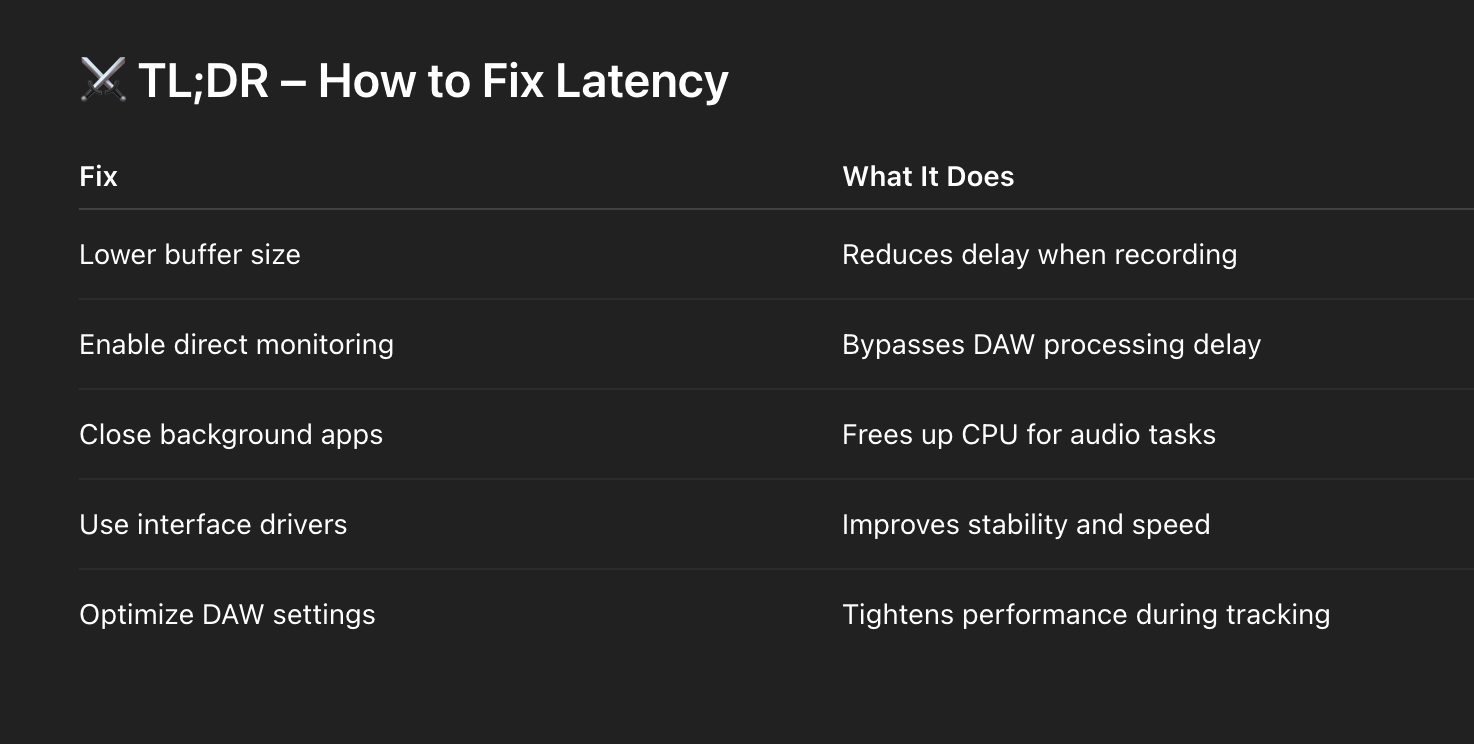
    Your voice sounds delayed due to latency — the time it takes for your audio signal to travel through your mic, audio interface, computer, and back to your headphones. Latency is caused by buffer size, DAW settings, and CPU performance. To fix it, lower your interface’s buffer size or enable direct monitoring.


    You’re singing or speaking into the mic…
    but your voice hits your ears a split-second late.

    It’s jarring. It ruins timing. And it makes you want to throw your headphones out the window.

    That delay is called latency, and it’s fixable — if you know how it works.


    🧠 1. What Is Latency?

    Latency is the time delay between the moment sound enters your system (via microphone or instrument) and the moment you hear it back (via headphones or speakers).

    Even though it feels like it should be instant, your sound is actually traveling through:

    🎯 Think of it like sending a letter through five post offices — each stop adds a delay.

    How to Record Studio-Quality Vocals at Home: A Beginner’s Checklist


    ⭐️ Start by downloading all of my FREE Music Production Guides ⭐️ It took me years to learn this stuff!


    🎛 2. The Biggest Latency Culprit: Buffer Size

    Your audio interface uses a buffer to process sound.
    The larger the buffer, the more time your computer has to think — but the more lag you’ll hear.

    • High buffer (512–1024 samples) = smooth playback, high latency

    • Low buffer (32–128 samples) = tight monitoring, low latency

    🎤 For recording vocals or instruments:

    • 👉 Use a low buffer setting (32, 64 or 128)  👈

    • This minimizes delay while tracking

    🎧 For mixing:

    ⚠️ If your buffer is too low, you might get clicks, pops, or glitches during recording — especially if your CPU is underpowered.


    🔀 3. Use Direct Monitoring

    Many interfaces include a feature called Direct Monitoring or Hardware Monitoring.

    This lets you hear your input before it passes through your computer.
    It sends the sound directly from the mic to your headphones — with zero latency.

    Look for a switch or knob labeled:

    • Direct Monitor

    • Input/Playback Blend

    • Mix Control

    Set it toward “Direct” while recording. Then switch back to “Playback” for mixing.

    🥷 Ninja tip: Use direct monitoring and avoid all latency altogether.


    ⭐️ Download my FREE Home Studio Setup Guide ⭐️ 


    🧠 4. Your Computer Matters Too

    Latency isn’t just about hardware — it’s about horsepower.

    Your CPU and RAM affect how quickly your DAW can process audio.

    Here’s how to lighten the load:

    • Close all other apps (web browsers, video, etc.)

    • Freeze or bounce tracks with heavy plugins

    • Disable Wi-Fi or Bluetooth during recording

    • Use low-latency monitoring mode (many DAWs have this)

    If you’re using an older or underpowered computer, you’ll experience more latency — no matter how fancy your interface is.


    🎚 5. Your DAW Settings Also Matter

    Every DAW has audio preferences where you can adjust:

    • Buffer size

    • Sample rate (higher = slightly lower latency, but more CPU load)

    • Driver type (use ASIO on Windows or CoreAudio on Mac)

    Set your DAW to use your interface’s dedicated driver, not your built-in audio.

    In Ableton Live, Logic Pro, FL Studio, or Pro Tools — dig into preferences > audio settings and make sure you’re optimized for low-latency tracking.


    🥷 Final Thought:

    Latency is one of those invisible enemies that can throw off your performance, timing, and focus.

    But once you understand where it comes from — and how to dial it in — it disappears.
    Just you, the mic, and the moment.

    🎤 Record with confidence.
    ⚡ Respond in real time.
    🥷 Eliminate the gap between idea and execution.


    ⭐️ Download my Free Magic Compressor Settings Guide ⭐️ 

    ⭐️ Download my Free 10 Characteristic of a Sound Wave Guide ⭐️


    #protools #daw #homestudio #recordingschool #recording #musicproduction 

    Also read: 

    How to Start Your Own Online Business Teaching Music


    Hey, I’m Futch – Music Production Coach and Ableton Certified Trainer


    Learn how to make your first song and beat in Ableton Live with my

    FREE 90-minute Ableton Live course


    I’ve been teaching audio engineering and music production for 35 years.⭐️ 

    Check out my new online music production program: Music Production Ninja…


    Source link

    Share. Facebook Twitter Pinterest LinkedIn Tumblr WhatsApp Email
    Previous ArticleGo Behind-The-Scenes of Tems’ First-Ever Billboard Cover Shoot with Exclusive Pinterest Board
    Next Article Save 60% on UVI’s Quadra series of virtual instruments

    Related Posts

    Compression Explained Like Wrestling a Wild Animal

    janeiro 31, 2026

    Synth Legends: The PPG Wave 2

    janeiro 30, 2026

    3 Popular Chord Progressions That Never Fail

    janeiro 26, 2026

    Classic Drum Machines: The TR-909

    janeiro 24, 2026
    Demo
    Our Picks
    • Facebook
    • Twitter
    • Pinterest
    • Instagram
    • YouTube
    • Vimeo
    Don't Miss
    Articles

    Compression Explained Like Wrestling a Wild Animal

    By Producer Gangjaneiro 31, 20260

    Compression Isn’t Math. It’s Control. Most explanations of compression sound like a physics lecture. Threshold.…

    Synsonic Instruments now offers their paid drum plugins for free

    janeiro 31, 2026

    RCJacH releases FREE RCSiner distortion plugin for Windows and macOS

    janeiro 31, 2026

    Igorski releases Phlegetron, a FREE distortion plugin for macOS and Windows

    janeiro 31, 2026

    Subscribe to Updates

    Get the latest creative news from SmartMag about art & design.

    Producer Gang | Home of Producers
    Facebook X (Twitter) Instagram Pinterest
    • Home
    • Plugins
    • Hip-Hop
    • News
    • Learn How to Sell Beats
    © 2026 Producer Gang. Designed by Audio Escola.

    Type above and press Enter to search. Press Esc to cancel.


